# KPU Application Development Guide
## Overview
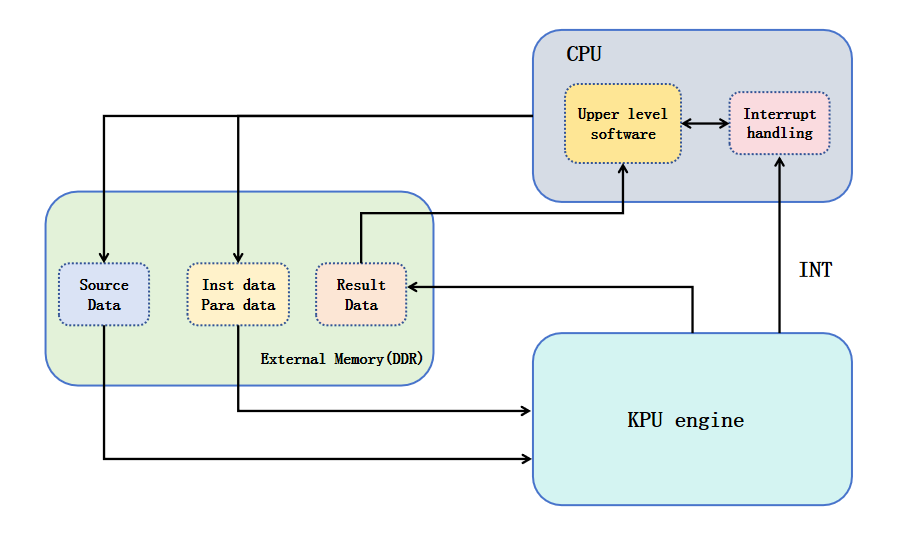
**KPU (Knowledge Processing Unit)** is the hardware accelerator on K230 designed for edge AI. It is a highly optimized deep-learning accelerator that can efficiently run dense computation in neural-network models. KPU supports a wide range of mainstream visual model structures and is suitable for many edge-vision AI scenarios.
The following diagram shows the position of KPU in the K230 system:
## KPU Inference Flow
When you use the **KPU runtime API** to run inference, the end-to-end flow is:
```{mermaid}
graph TD;
LoadModel("Initialize Interpreter
Load model") -->
SetInput("Query input shape
Initialize input tensor") -->
SetOutput("Query output shape
Initialize output tensor") -->
GetFrame("Get inference data
Read image or camera frame") -->
SetPreprocessParam("Set preprocessing parameters
Configure AI2D and tensors") -->
PreProcess("Run preprocessing
Convert data to the required model format") -->
KPURun("Run KPU inference") -->
GetOutput("Get model output pointer") -->
PostProcess("Postprocess model outputs") -->
DrawResult("Draw results to the image or screen");
```
The main components involved in the inference process are `AI2D` and `Interpreter`.
### `AI2D`
- Handles image preprocessing before model inference.
- The preprocessing path is hardware-accelerated and significantly improves runtime efficiency.
### `Interpreter`
- Executes model inference on KPU.
- Handles model loading, tensor setup, model execution, and output retrieval.
The input and output data type used by both modules is `host_runtime_tensor`.
Model input tensors may be:
- single-input
- multi-input
In most applications, the AI2D output tensor is used directly as the model input tensor. During program initialization, applications usually initialize these items together:
- `ai2d_builder`
- `Interpreter`
- input tensors
- output tensors
Their relationship is shown below:
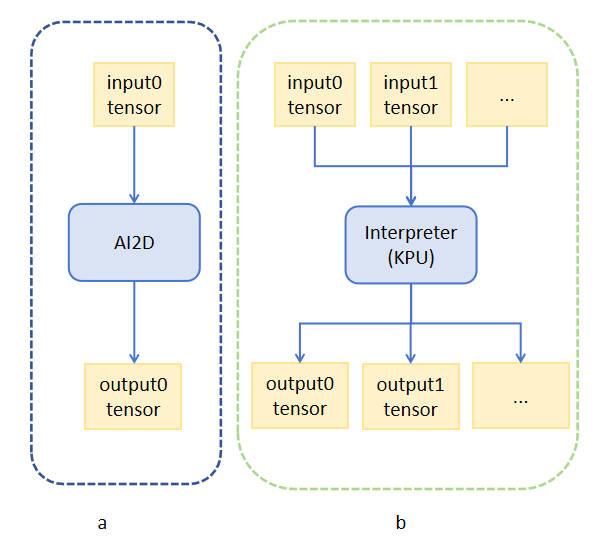
For a **single-input model**, you can bind:
- the **AI2D output tensor**
- the **Interpreter input tensor**
to the same `host_runtime_tensor`. This:
- avoids an extra copy
- saves one tensor buffer
- improves overall execution efficiency
If you do not use AI2D for preprocessing, you can also:
- preprocess with **OpenCV** on the CPU
- manually create the corresponding `host_runtime_tensor` as the model input
The complete processing path is shown below:

## Model Inference Example
This section uses a **YOLOv8 object-detection model** to explain the overall deployment flow based on KPU.
The sample source code is located at:
```bash
src/rtsmart/examples/ai/usage_kpu
```
In that directory, run:
```bash
./build_app.sh
```
After the build completes, the generated executables are placed under:
```bash
k230_bin/
```
The output directory contains:
- an **image inference** sample
- a **camera real-time inference** sample
Copy the required executable to the board before running it.
## Code Analysis Notes
This section uses the **image inference** example and explains the `main()` function step by step to show the complete flow of model loading, preprocessing, inference, and postprocessing.
### Image Inference Example
The image sample accepts:
```text
```
`debug_mode` is typically:
- `0`: no debug output
- `1`: timing-oriented output
- `2`: detailed debug output
The main implementation phases are:
1. Initialize `interpreter` and load the `kmodel`.
1. Initialize input tensors and record input shapes.
1. Initialize output tensors and record output shapes.
1. Read the image and convert it to `CHW + RGB`.
1. Compute `Pad + Resize` parameters with letterbox-style scaling.
1. Create the AI2D input tensor and copy the image data into it.
1. Reuse the model input tensor as the AI2D output tensor.
1. Configure AI2D parameters and enable `pad + resize`.
1. Build and invoke AI2D.
1. Run KPU inference.
1. Read output pointers.
1. Run postprocessing and NMS.
1. Draw detection results and save the output image.
Full `main()` implementation:
```c++
int main(int argc, char *argv[])
{
std::cout << "case " << argv[0] << " build " << __DATE__ << " " << __TIME__ << std::endl;
if (argc < 4)
{
std::cerr << "Usage: " << argv[0] << " " << std::endl;
return -1;
}
int debug_mode = atoi(argv[3]);
// ==============================
// 1. Initialize Interpreter and load kmodel
// ==============================
interpreter interp;
std::ifstream ifs(argv[1], std::ios::binary);
interp.load_model(ifs).expect("Invalid kmodel");
vector> input_shapes;
vector> output_shapes;
vector p_outputs;
// ==============================
// 2. Initialize input tensors and record input shapes
// ==============================
for (int i = 0; i < interp.inputs_size(); i++)
{
auto desc = interp.input_desc(i);
auto shape = interp.input_shape(i);
auto tensor = host_runtime_tensor::create(desc.datatype, shape, hrt::pool_shared).expect("cannot create input tensor");
interp.input_tensor(i, tensor).expect("cannot set input tensor");
vector in_shape;
if (debug_mode > 1)
std::cout << "input " << i << " datatype: " << desc.datatype << " , shape: ";
for (int j = 0; j < shape.size(); ++j)
{
in_shape.push_back(shape[j]);
if (debug_mode > 1)
std::cout << shape[j] << " ";
}
if (debug_mode > 1)
std::cout << std::endl;
input_shapes.push_back(in_shape);
}
// ==============================
// 3. Initialize output tensors and record output shapes
// ==============================
for (size_t i = 0; i < interp.outputs_size(); i++)
{
auto desc = interp.output_desc(i);
auto shape = interp.output_shape(i);
auto tensor = host_runtime_tensor::create(desc.datatype, shape, hrt::pool_shared).expect("cannot create output tensor");
interp.output_tensor(i, tensor).expect("cannot set output tensor");
vector out_shape;
if (debug_mode > 1)
std::cout << "output " << i << " datatype: " << desc.datatype << " , shape: ";
for (int j = 0; j < shape.size(); ++j)
{
out_shape.push_back(shape[j]);
if (debug_mode > 1)
std::cout << shape[j] << " ";
}
if (debug_mode > 1)
std::cout << std::endl;
output_shapes.push_back(out_shape);
}
// ==============================
// 4. Read image and convert to CHW + RGB
// ==============================
cv::Mat ori_img = cv::imread(argv[2]);
int ori_w = ori_img.cols;
int ori_h = ori_img.rows;
std::vector chw_vec;
std::vector bgrChannels(3);
cv::split(ori_img, bgrChannels);
for (auto i = 2; i > -1; i--)
{
std::vector data = std::vector(bgrChannels[i].reshape(1, 1));
chw_vec.insert(chw_vec.end(), data.begin(), data.end());
}
// ==============================
// 5. Compute Pad + Resize parameters (letterbox: scale by shorter side)
// ==============================
int width = input_shapes[0][3];
int height = input_shapes[0][2];
float ratiow = (float)width / ori_w;
float ratioh = (float)height / ori_h;
float ratio = ratiow < ratioh ? ratiow : ratioh;
int new_w = (int)(ratio * ori_w);
int new_h = (int)(ratio * ori_h);
float dw = (float)(width - new_w) / 2;
float dh = (float)(height - new_h) / 2;
int top = (int)(roundf(0));
int bottom = (int)(roundf(dh * 2 + 0.1));
int left = (int)(roundf(0));
int right = (int)(roundf(dw * 2 - 0.1));
// ==============================
// 6. Create AI2D input tensor and copy image data into it
// ==============================
dims_t ai2d_in_shape{1, 3, ori_h, ori_w};
runtime_tensor ai2d_in_tensor = host_runtime_tensor::create(typecode_t::dt_uint8, ai2d_in_shape, hrt::pool_shared).expect("cannot create input tensor");
auto input_buf = ai2d_in_tensor.impl()->to_host().unwrap()->buffer().as_host().unwrap().map(map_access_::map_write).unwrap().buffer();
memcpy(reinterpret_cast(input_buf.data()), chw_vec.data(), chw_vec.size());
hrt::sync(ai2d_in_tensor, sync_op_t::sync_write_back, true).expect("write back input failed");
// ==============================
// 7. Reuse model input tensor as the AI2D output tensor
// ==============================
runtime_tensor ai2d_out_tensor = interp.input_tensor(0).expect("cannot get input tensor");
dims_t out_shape = ai2d_out_tensor.shape();
// ==============================
// 8. Configure AI2D parameters (pad + resize)
// ==============================
ai2d_datatype_t ai2d_dtype{ai2d_format::NCHW_FMT, ai2d_format::NCHW_FMT, ai2d_in_tensor.datatype(), ai2d_out_tensor.datatype()};
ai2d_crop_param_t crop_param{false, 0, 0, 0, 0};
ai2d_shift_param_t shift_param{false, 0};
ai2d_pad_param_t pad_param{true, {{0, 0}, {0, 0}, {top, bottom}, {left, right}}, ai2d_pad_mode::constant, {114, 114, 114}};
ai2d_resize_param_t resize_param{true, ai2d_interp_method::tf_bilinear, ai2d_interp_mode::half_pixel};
ai2d_affine_param_t affine_param{false, ai2d_interp_method::cv2_bilinear, 0, 0, 127, 1, {0.5, 0.1, 0.0, 0.1, 0.5, 0.0}};
// ==============================
// 9. Build and invoke AI2D
// ==============================
ai2d_builder builder(ai2d_in_shape, out_shape, ai2d_dtype, crop_param, shift_param, pad_param, resize_param, affine_param);
builder.build_schedule();
builder.invoke(ai2d_in_tensor, ai2d_out_tensor).expect("error occurred in ai2d running");
// ==============================
// 10. Run KPU inference
// ==============================
interp.run().expect("error occurred in running model");
// ==============================
// 11. Read model outputs
// ==============================
p_outputs.clear();
for (int i = 0; i < interp.outputs_size(); i++)
{
auto out = interp.output_tensor(i).expect("cannot get output tensor");
auto buf = out.impl()->to_host().unwrap()->buffer().as_host().unwrap().map(map_access_::map_read).unwrap().buffer();
float *p_out = reinterpret_cast(buf.data());
p_outputs.push_back(p_out);
}
// ==============================
// 12. Postprocessing (decode + NMS)
// ==============================
std::vector classes{"apple", "banana", "orange"};
float conf_thresh = 0.25;
float nms_thresh = 0.45;
int class_num = classes.size();
std::vector class_colors = getColorsForClasses(class_num);
// Transpose output layout from C x N to N x C so each box's features are contiguous
float *output0 = p_outputs[0];
int f_len = class_num + 4;
int num_box =
((input_shapes[0][2] / 8) * (input_shapes[0][3] / 8) +
(input_shapes[0][2] / 16) * (input_shapes[0][3] / 16) +
(input_shapes[0][2] / 32) * (input_shapes[0][3] / 32));
float *output_det = new float[num_box * f_len];
for (int r = 0; r < num_box; r++)
for (int c = 0; c < f_len; c++)
output_det[r * f_len + c] = output0[c * num_box + r];
// Decode boxes and map back to original image coordinates
std::vector bboxes;
for (int i = 0; i < num_box; i++)
{
float *vec = output_det + i * f_len;
float box[4] = {vec[0], vec[1], vec[2], vec[3]};
float *class_scores = vec + 4;
auto max_class_score_ptr = std::max_element(class_scores, class_scores + class_num);
float score = *max_class_score_ptr;
int max_class_index = max_class_score_ptr - class_scores;
if (score > conf_thresh)
{
Bbox bbox;
float x_ = box[0] / ratio;
float y_ = box[1] / ratio;
float w_ = box[2] / ratio;
float h_ = box[3] / ratio;
int x = int(MAX(x_ - 0.5 * w_, 0));
int y = int(MAX(y_ - 0.5 * h_, 0));
int w = int(w_);
int h = int(h_);
if (w <= 0 || h <= 0) { continue; }
bbox.box = cv::Rect(x, y, w, h);
bbox.confidence = score;
bbox.index = max_class_index;
bboxes.push_back(bbox);
}
}
// Run Non-Maximum Suppression
std::vector nms_result;
nms(bboxes, conf_thresh, nms_thresh, nms_result);
// ==============================
// 13. Draw detection results and save output image
// ==============================
for (int i = 0; i < nms_result.size(); i++)
{
int res = nms_result[i];
cv::Rect box = bboxes[res].box;
int idx = bboxes[res].index;
cv::rectangle(ori_img, box, class_colors[idx], 2, 8);
cv::putText(ori_img, classes[idx], cv::Point(box.x + 5, box.y - 10),
cv::FONT_HERSHEY_DUPLEX, 1, class_colors[idx], 2, 0);
}
cv::imwrite("result.jpg", ori_img);
delete[] output_det;
return 0;
}
```
### Typical Image-Side Preprocessing
The sample uses:
- `crop_param`: disabled
- `shift_param`: disabled
- `pad_param`: enabled
- `resize_param`: enabled
- `affine_param`: disabled
This is the standard detection-model letterbox path.
### Postprocessing Logic
The example decodes detection boxes from the first output tensor, performs confidence filtering and NMS, then draws results onto the original image.
Key operations include:
- transpose the output layout from `C x N` to `N x C`
- decode bounding boxes
- map coordinates back to the original image
- perform NMS
- draw boxes and labels
- save `result.jpg`
### Camera Real-Time Inference Example
The camera inference example uses the same model-inference logic, but the input frame comes from the camera pipeline rather than `opencv::imread`.
The main file tree is:
```text
yolov8_run_camera
├── main.cc # core inference logic
├── scoped_timing.h # timing helper
├── setting.h # screen and resolution settings
├── video_pipeline.cc # display and frame pipeline implementation
├── video_pipeline.h # pipeline interface
└── CMakeLists.txt # build file
```
The `camera_inference()` function can be divided into these phases:
1. Parse command-line parameters and initialize basic variables.
1. Initialize the video pipeline and OSD frame.
1. Load the `kmodel` and initialize `Interpreter`.
1. Initialize model input and output tensors.
1. Compute `Resize + Padding` parameters for YOLO letterbox preprocessing.
1. Configure AI2D input/output tensors and build the AI2D scheduler.
1. Enter the main loop:
- get one ISP frame
- create the AI2D input tensor with zero-copy binding to the ISP buffer
- run AI2D
- run KPU inference
- read outputs
- decode detections and run NMS
- draw results onto the OSD layer
- insert the OSD frame and release the current frame
1. Release resources and destroy the pipeline when exiting.
Full `camera_inference()` implementation:
```c++
int camera_inference(char *argv[])
{
/************************************************************
* Phase 0: Parse arguments and initialize basic variables
************************************************************/
int debug_mode = atoi(argv[4]);
// AI input image size (CHW)
FrameCHWSize image_size = {AI_FRAME_CHANNEL, AI_FRAME_HEIGHT, AI_FRAME_WIDTH};
// OSD layer (RGBA) for drawing bounding boxes and labels
cv::Mat draw_frame(OSD_HEIGHT, OSD_WIDTH, CV_8UC4, cv::Scalar(0, 0, 0, 0));
/************************************************************
* Phase 1: Initialize video pipeline (ISP -> DRM -> OSD)
************************************************************/
PipeLine pl(debug_mode);
pl.Create();
// Buffer for one ISP frame (virtual address + physical address)
DumpRes dump_res;
/************************************************************
* Phase 2: Load kmodel and initialize Interpreter
************************************************************/
interpreter interp;
std::ifstream ifs(argv[1], std::ios::binary);
interp.load_model(ifs).expect("Invalid kmodel");
/************************************************************
* Phase 3: Initialize input/output tensors and record shapes
************************************************************/
vector> input_shapes;
vector> output_shapes;
vector p_outputs;
for (int i = 0; i < interp.inputs_size(); i++)
{
auto desc = interp.input_desc(i);
auto shape = interp.input_shape(i);
auto tensor = host_runtime_tensor::create(desc.datatype, shape, hrt::pool_shared).expect("cannot create input tensor");
interp.input_tensor(i, tensor).expect("cannot set input tensor");
vector in_shape;
if (debug_mode > 1)
std::cout << "input " << i << " datatype: " << desc.datatype << " , shape: ";
for (int j = 0; j < shape.size(); ++j)
{
in_shape.push_back(shape[j]);
if (debug_mode > 1)
std::cout << shape[j] << " ";
}
if (debug_mode > 1)
std::cout << std::endl;
input_shapes.push_back(in_shape);
}
for (size_t i = 0; i < interp.outputs_size(); i++)
{
auto desc = interp.output_desc(i);
auto shape = interp.output_shape(i);
auto tensor = host_runtime_tensor::create(desc.datatype, shape, hrt::pool_shared).expect("cannot create output tensor");
interp.output_tensor(i, tensor).expect("cannot set output tensor");
vector out_shape;
if (debug_mode > 1)
std::cout << "output " << i << " datatype: " << desc.datatype << " , shape: ";
for (int j = 0; j < shape.size(); ++j)
{
out_shape.push_back(shape[j]);
if (debug_mode > 1)
std::cout << shape[j] << " ";
}
if (debug_mode > 1)
std::cout << std::endl;
output_shapes.push_back(out_shape);
}
/************************************************************
* Phase 4: Compute Resize + Padding parameters (YOLO LetterBox)
************************************************************/
int width = input_shapes[0][3];
int height = input_shapes[0][2];
float ratiow = (float)width / AI_FRAME_WIDTH;
float ratioh = (float)height / AI_FRAME_HEIGHT;
float ratio = ratiow < ratioh ? ratiow : ratioh;
int new_w = (int)(ratio * AI_FRAME_WIDTH);
int new_h = (int)(ratio * AI_FRAME_HEIGHT);
float dw = (float)(width - new_w) / 2;
float dh = (float)(height - new_h) / 2;
int top = (int)(roundf(0));
int bottom = (int)(roundf(dh * 2 + 0.1));
int left = (int)(roundf(0));
int right = (int)(roundf(dw * 2 - 0.1));
/************************************************************
* Phase 5: Configure AI2D tensors and builder
************************************************************/
dims_t ai2d_in_shape{1, AI_FRAME_CHANNEL, AI_FRAME_HEIGHT, AI_FRAME_WIDTH};
runtime_tensor ai2d_in_tensor;
// Reuse model input tensor as AI2D output to avoid extra copies
runtime_tensor ai2d_out_tensor = interp.input_tensor(0).expect("cannot get input tensor");
dims_t out_shape = ai2d_out_tensor.shape();
ai2d_datatype_t ai2d_dtype{
ai2d_format::NCHW_FMT, ai2d_format::NCHW_FMT,
typecode_t::dt_uint8, typecode_t::dt_uint8};
ai2d_crop_param_t crop_param{false, 0, 0, 0, 0};
ai2d_shift_param_t shift_param{false, 0};
ai2d_pad_param_t pad_param{true,
{{0, 0}, {0, 0}, {top, bottom}, {left, right}},
ai2d_pad_mode::constant, {114, 114, 114}};
ai2d_resize_param_t resize_param{true, ai2d_interp_method::tf_bilinear, ai2d_interp_mode::half_pixel};
ai2d_affine_param_t affine_param{false, ai2d_interp_method::cv2_bilinear, 0, 0, 127, 1,
{0.5, 0.1, 0.0, 0.1, 0.5, 0.0}};
ai2d_builder builder(ai2d_in_shape, out_shape, ai2d_dtype,
crop_param, shift_param, pad_param, resize_param, affine_param);
builder.build_schedule();
/************************************************************
* Phase 6: Initialize postprocessing parameters
************************************************************/
std::vector classes{"apple", "banana", "orange"};
float conf_thresh = atof(argv[2]);
float nms_thresh = atof(argv[3]);
int class_num = classes.size();
std::vector class_colors = getColorsForClasses(class_num);
float *output0;
int f_len = class_num + 4;
int num_box =
((input_shapes[0][2] / 8) * (input_shapes[0][3] / 8) +
(input_shapes[0][2] / 16) * (input_shapes[0][3] / 16) +
(input_shapes[0][2] / 32) * (input_shapes[0][3] / 32));
float *output_det = new float[num_box * f_len];
std::vector bboxes;
/************************************************************
* Phase 7: Main loop (capture -> preprocess -> infer -> postprocess -> display)
************************************************************/
while (!isp_stop)
{
// Get one ISP frame
pl.GetFrame(dump_res);
// Create AI2D input tensor with zero-copy binding to ISP buffer
ai2d_in_tensor = host_runtime_tensor::create(
typecode_t::dt_uint8, ai2d_in_shape,
{(gsl::byte *)dump_res.virt_addr, compute_size(ai2d_in_shape)},
false, hrt::pool_shared, dump_res.phy_addr)
.expect("cannot create input tensor");
hrt::sync(ai2d_in_tensor, sync_op_t::sync_write_back, true).expect("sync write_back failed");
// Run AI2D preprocessing
builder.invoke(ai2d_in_tensor, ai2d_out_tensor).expect("error occurred in ai2d running");
// Run KPU inference
interp.run().expect("error occurred in running model");
// Read model outputs
p_outputs.clear();
for (int i = 0; i < interp.outputs_size(); i++)
{
auto out = interp.output_tensor(i).expect("cannot get output tensor");
auto buf = out.impl()->to_host().unwrap()->buffer().as_host().unwrap().map(map_access_::map_read).unwrap().buffer();
p_outputs.push_back(reinterpret_cast(buf.data()));
}
// Transpose output layout (C x N -> N x C)
output0 = p_outputs[0];
for (int r = 0; r < num_box; r++)
for (int c = 0; c < f_len; c++)
output_det[r * f_len + c] = output0[c * num_box + r];
// Decode boxes, filter by confidence, run NMS
bboxes.clear();
for (int i = 0; i < num_box; i++)
{
float *vec = output_det + i * f_len;
float box[4] = {vec[0], vec[1], vec[2], vec[3]};
float *class_scores = vec + 4;
auto max_ptr = std::max_element(class_scores, class_scores + class_num);
float score = *max_ptr;
int max_class_index = max_ptr - class_scores;
if (score > conf_thresh)
{
Bbox bbox;
float x_ = box[0] / ratio;
float y_ = box[1] / ratio;
float w_ = box[2] / ratio;
float h_ = box[3] / ratio;
int x = int(MAX(x_ - 0.5 * w_, 0));
int y = int(MAX(y_ - 0.5 * h_, 0));
int w = int(w_);
int h = int(h_);
if (w <= 0 || h <= 0) continue;
bbox.box = cv::Rect(x, y, w, h);
bbox.confidence = score;
bbox.index = max_class_index;
bboxes.push_back(bbox);
}
}
std::vector nms_result;
nms(bboxes, conf_thresh, nms_thresh, nms_result);
// Draw detections onto OSD layer
draw_frame.setTo(cv::Scalar(0, 0, 0, 0));
for (int i = 0; i < nms_result.size(); i++)
{
int res = nms_result[i];
cv::Rect box = bboxes[res].box;
int idx = bboxes[res].index;
float score = bboxes[res].confidence;
int x = int(box.x * float(OSD_WIDTH) / AI_FRAME_WIDTH);
int y = int(box.y * float(OSD_HEIGHT) / AI_FRAME_HEIGHT);
int w = int(box.width * float(OSD_WIDTH) / AI_FRAME_WIDTH);
int h = int(box.height * float(OSD_HEIGHT) / AI_FRAME_HEIGHT);
cv::Rect new_box(x, y, w, h);
cv::rectangle(draw_frame, new_box, class_colors[idx], 2, 8);
cv::putText(draw_frame,
classes[idx] + " " + std::to_string(score),
cv::Point(MIN(new_box.x + 5, OSD_HEIGHT), MAX(new_box.y - 10, 0)),
cv::FONT_HERSHEY_DUPLEX, 1, class_colors[idx], 2, 0);
}
// Composite OSD and release frame
pl.InsertFrame(draw_frame.data);
pl.ReleaseFrame(dump_res);
}
/************************************************************
* Phase 8: Release resources
************************************************************/
delete[] output_det;
pl.Destroy();
return 0;
}
```
### Camera-Side Postprocessing and Drawing
In the video path, the sample:
- decodes YOLO output
- filters by confidence threshold
- performs NMS
- maps box coordinates from AI-frame space to OSD space
- draws class names and confidence values
- inserts the OSD frame into the video pipeline
## Build and Run
After writing or modifying the code, build it with `CMakeLists.txt` or `Makefile`. For the sample above, you can run:
```bash
cd src/rtsmart/examples/ai/usage_kpu
./build_app.sh
```
The generated files are placed in `k230_bin`. Copy them to the TF card on the board, then run the corresponding command.
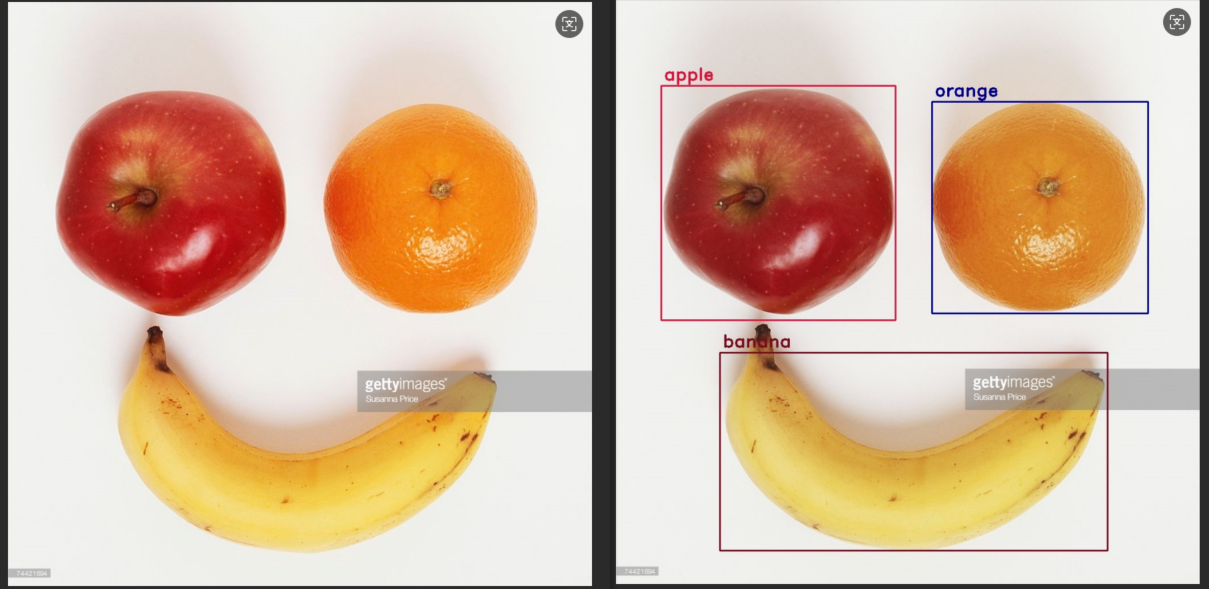
### Run YOLOv8 on a Static Image
```bash
./yolov8_image.elf best.kmodel test.jpg 2
```
The image inference result is saved as an output image. The reference result is shown below:
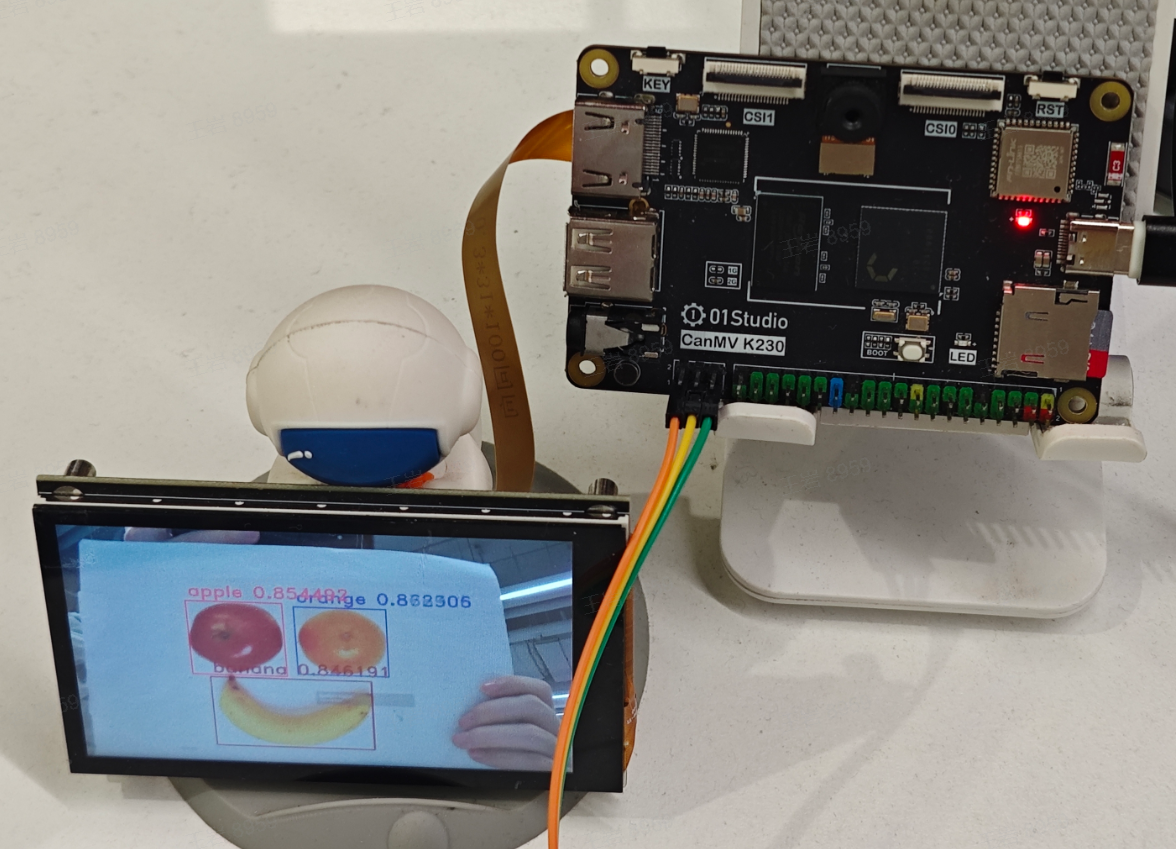
### Run YOLOv8 on Camera Data
```bash
./yolov8_camera.elf best.kmodel 0.5 0.45 2
```
The camera inference result is displayed on the screen in real time. The reference effect is shown below:
## Notes
The purpose of this guide is to explain the model-conversion and KPU-inference path. It is not intended to be a drop-in solution for every application scenario, but it can be used as a reference when developing KPU-based applications for other tasks.