问题描述
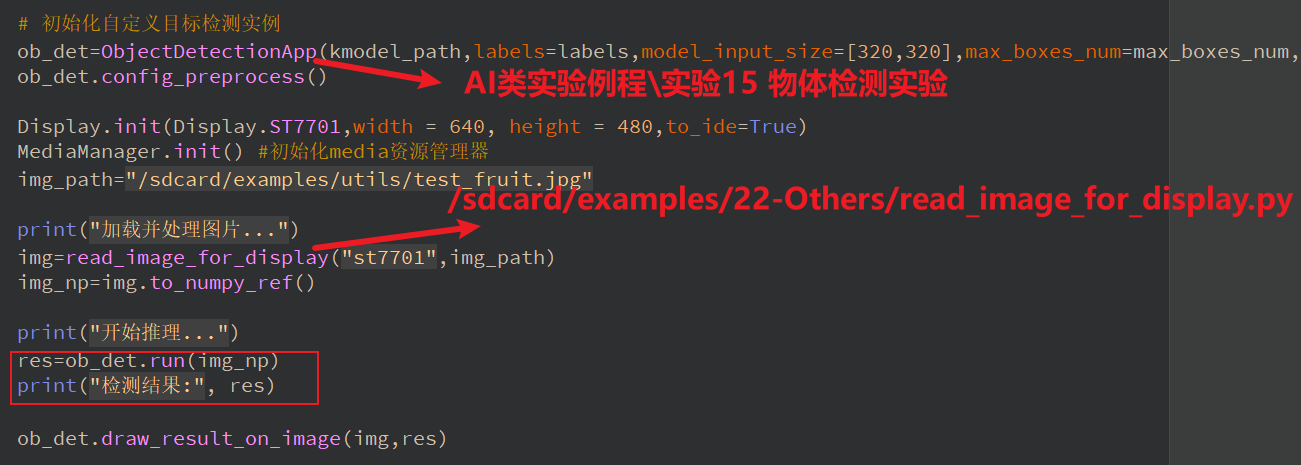
我想把AI类实验例程\实验15 物体检测实验和/sdcard/examples/22-Others/read_image_for_display.py两个例程结合起来,识别本地的图片,并输出识别结果,但是加载本地图片后,打印的res(print(res))一直是空,更换了不同的图片也不行
复现步骤
硬件板卡
正点原子K230D
软件版本
CanMV_K230D_ATK_DNK230D_micropython_v1.3-0-g8dd764f_nncase_v2.9.0.img.gz
我想把AI类实验例程\实验15 物体检测实验和/sdcard/examples/22-Others/read_image_for_display.py两个例程结合起来,识别本地的图片,并输出识别结果,但是加载本地图片后,打印的res(print(res))一直是空,更换了不同的图片也不行
正点原子K230D
CanMV_K230D_ATK_DNK230D_micropython_v1.3-0-g8dd764f_nncase_v2.9.0.img.gz
read_image_for_display是什么?可以把具体的方法给出来
from media.display import *
from media.media import *
import nncase_runtime as nn
import ulab.numpy as np
import gc


def read_image_for_display(display_mode,image_path):
    # 屏幕显示分辨率
    output_w=800
    output_h=480
    if display_mode=="st7701":
        output_w=800
        output_h=480
    elif display_mode=="lt9611":
        output_w=1920
        output_h=1080
    else:
        output_w=800
        output_h=480
    # 读入图片
    img_ori=image.Image(image_path).to_rgb888()
    print(img_ori)
    # ST7701只能显示800*480分辨率的图像,需要使用ai2d做resize,实现适配屏幕

    # 读入的图片是HWC的,需要使用transpose将数据转成CHW,用于创建ai2d输入tensor,[H,W,C]->[H*W,C]->[C,H*W]->[C,H,W]
    img_ori_hwc=img_ori.to_numpy_ref()
    shape_input=img_ori_hwc.shape
    img_tmp = img_ori_hwc.reshape((shape_input[0] * shape_input[1], shape_input[2]))
    img_tmp_trans = img_tmp.transpose().copy()
    img_ori_chw=img_tmp_trans.reshape((shape_input[2],shape_input[0],shape_input[1]))
    # 构建ai2d的输入和输出tensor,并构造ai2d实例,进行resize配置,并执行resize
    ai2d_input_tensor = nn.from_numpy(img_ori_chw)
    ai2d_output_np = np.ones((1,3,output_h,output_w),dtype=np.uint8)
    ai2d_output_tensor = nn.from_numpy(ai2d_output_np)
    ai2d=nn.ai2d()
    ai2d.set_dtype(nn.ai2d_format.NCHW_FMT, nn.ai2d_format.NCHW_FMT, np.uint8, np.uint8)
    ai2d.set_resize_param(True,nn.interp_method.tf_bilinear, nn.interp_mode.half_pixel)
    ai2d_builder = ai2d.build([1,3,img_ori_chw.shape[1],img_ori_chw.shape[2]], [1,3,output_h,output_w])
    ai2d_builder.run(ai2d_input_tensor, ai2d_output_tensor)
    # 输出tensor转numpy.ndarray
    ai2d_output_np=ai2d_output_tensor.to_numpy()[0]
    # 输出为CHW,创建Image实例需要使用HWC排布的数据,使用transpose,[C,H,W]->[C,H*W]->[H*W,C]->[H,W,C]
    shape_output=ai2d_output_np.shape
    img_tmp_ = ai2d_output_np.reshape((shape_output[0],shape_output[1]*shape_output[2]))
    img_tmp_trans_ = img_tmp_.transpose().copy()
    img_out_hwc=img_tmp_trans_.reshape((shape_output[1],shape_output[2],shape_output[0]))
    img_out = image.Image(output_w, output_h, image.RGB888, alloc=image.ALLOC_REF,data =img_out_hwc)
    return img_out


Display.init(Display.ST7701,width = 800, height = 480,to_ide=True)
MediaManager.init() #初始化media资源管理器
img_path="/sdcard/examples/utils/test.jpg"
img=read_image_for_display("st7701",img_path)
while True:
    Display.show_image(img)
gc.collect()
使用下面的代码显示,把图片替换成你的路径:
from media.display import *
from media.media import *
import nncase_runtime as nn
import ulab.numpy as np
import gc


def read_image_for_display(display_w,display_h,image_path):
    # 读入图片
    img_ori=image.Image(image_path).to_rgb888()
    print(img_ori)
    # ST7701只能显示支持的几种屏幕分辨率的图像,需要使用ai2d做resize,实现适配屏幕
    img_ori_hwc=img_ori.to_numpy_ref()
    ai2d_input_tensor = nn.from_numpy(img_ori_hwc)
    ai2d_output_np = np.ones((1,display_h,display_w,3),dtype=np.uint8)
    ai2d_output_tensor = nn.from_numpy(ai2d_output_np)
    ai2d=nn.ai2d()
    ai2d.set_dtype(nn.ai2d_format.RGB_packed, nn.ai2d_format.RGB_packed, np.uint8, np.uint8)
    ai2d.set_resize_param(True,nn.interp_method.tf_bilinear, nn.interp_mode.half_pixel)
    ai2d_builder = ai2d.build([1,img_ori_hwc.shape[0],img_ori_hwc.shape[1],img_ori_hwc.shape[2]], [1,display_h,display_w,3])
    ai2d_builder.run(ai2d_input_tensor, ai2d_output_tensor)
    img_out_hwc=ai2d_output_tensor.to_numpy()[0]
    img_out = image.Image(display_w, display_h, image.RGB888, alloc=image.ALLOC_REF,data =img_out_hwc)
    return img_out

display_w=640
display_h=480
Display.init(Display.ST7701,width = display_w, height = display_h,to_ide=True)
MediaManager.init() #初始化media资源管理器
img_path="/data/banana.jpg"
img=read_image_for_display(display_w,display_h,img_path)
try:
    while True:
        Display.show_image(img)
except BaseException as e:
        import sys
        sys.print_exception(e)
finally:
    gc.collect()
    os.exitpoint(os.EXITPOINT_ENABLE_SLEEP)
    Display.deinit()
    time.sleep_ms(50)
    MediaManager.deinit()
哈喽,下面是工程完整的代码,麻烦看一下
替换了,模型推理的结果还是空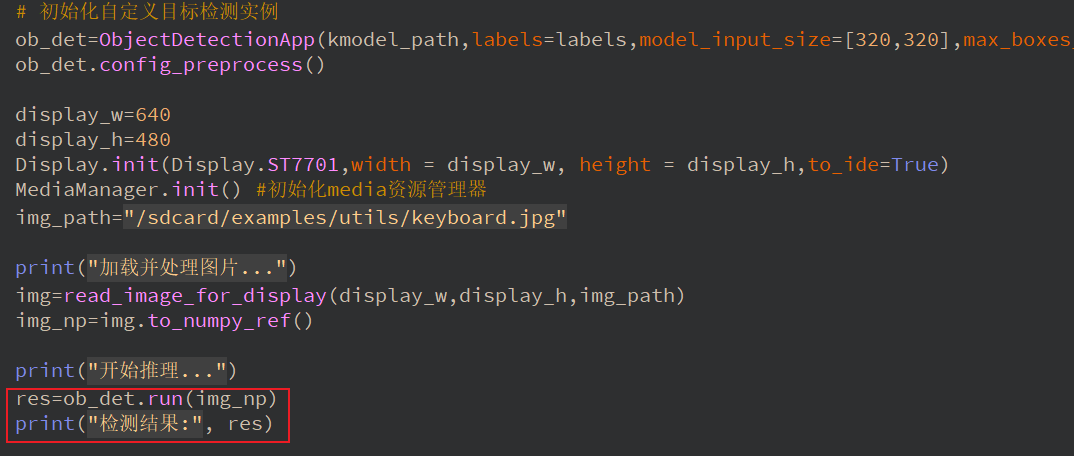
下面是工程完整的代码,麻烦看一下
from libs.PipeLine import PipeLine, ScopedTiming
from libs.AIBase import AIBase
from libs.AI2D import Ai2d
import os
import ujson
from media.display import *
from media.media import *
from media.sensor import *
from time import *
import nncase_runtime as nn
import ulab.numpy as np
import time
import utime
import image
import random
import gc
import sys
import aidemo
import time, os, urandom, sys

# 自定义YOLOv8检测类
class ObjectDetectionApp(AIBase):
    def __init__(self,kmodel_path,labels,model_input_size,max_boxes_num,confidence_threshold=0.5,nms_threshold=0.2,rgb888p_size=[224,224],display_size=[1920,1080],debug_mode=0):
        super().__init__(kmodel_path,model_input_size,rgb888p_size,debug_mode)
        self.kmodel_path=kmodel_path
        self.labels=labels
        # 模型输入分辨率
        self.model_input_size=model_input_size
        # 阈值设置
        self.confidence_threshold=confidence_threshold
        self.nms_threshold=nms_threshold
        self.max_boxes_num=max_boxes_num
        # sensor给到AI的图像分辨率
        self.rgb888p_size=[ALIGN_UP(rgb888p_size[0],16),rgb888p_size[1]]
        # 显示分辨率
        self.display_size=[ALIGN_UP(display_size[0],16),display_size[1]]
        self.debug_mode=debug_mode
        # 检测框预置颜色值
        self.color_four=[(255, 220, 20, 60), (255, 119, 11, 32), (255, 0, 0, 142), (255, 0, 0, 230),
                         (255, 106, 0, 228), (255, 0, 60, 100), (255, 0, 80, 100), (255, 0, 0, 70),
                         (255, 0, 0, 192), (255, 250, 170, 30), (255, 100, 170, 30), (255, 220, 220, 0),
                         (255, 175, 116, 175), (255, 250, 0, 30), (255, 165, 42, 42), (255, 255, 77, 255),
                         (255, 0, 226, 252), (255, 182, 182, 255), (255, 0, 82, 0), (255, 120, 166, 157)]
        # 宽高缩放比例
        self.x_factor = float(self.rgb888p_size[0])/self.model_input_size[0]
        self.y_factor = float(self.rgb888p_size[1])/self.model_input_size[1]
        # Ai2d实例,用于实现模型预处理
        self.ai2d=Ai2d(debug_mode)
        # 设置Ai2d的输入输出格式和类型
        self.ai2d.set_ai2d_dtype(nn.ai2d_format.NCHW_FMT,nn.ai2d_format.NCHW_FMT,np.uint8, np.uint8)

    # 配置预处理操作,这里使用了resize,Ai2d支持crop/shift/pad/resize/affine,具体代码请打开/sdcard/app/libs/AI2D.py查看
    def config_preprocess(self,input_image_size=None):
        with ScopedTiming("set preprocess config",self.debug_mode > 0):
            # 初始化ai2d预处理配置,默认为sensor给到AI的尺寸,您可以通过设置input_image_size自行修改输入尺寸
            ai2d_input_size=input_image_size if input_image_size else self.rgb888p_size
            self.ai2d.resize(nn.interp_method.tf_bilinear, nn.interp_mode.half_pixel)
            self.ai2d.build([1,3,ai2d_input_size[1],ai2d_input_size[0]],[1,3,self.model_input_size[1],self.model_input_size[0]])

    # 自定义当前任务的后处理
    def postprocess(self,results):
        with ScopedTiming("postprocess",self.debug_mode > 0):
            result=results[0]
            result = result.reshape((result.shape[0] * result.shape[1], result.shape[2]))
            output_data = result.transpose()
            boxes_ori = output_data[:,0:4]
            scores_ori = output_data[:,4:]
            confs_ori = np.max(scores_ori,axis=-1)
            inds_ori = np.argmax(scores_ori,axis=-1)
            boxes,scores,inds = [],[],[]
            for i in range(len(boxes_ori)):
                if confs_ori[i] > confidence_threshold:
                    scores.append(confs_ori[i])
                    inds.append(inds_ori[i])
                    x = boxes_ori[i,0]
                    y = boxes_ori[i,1]
                    w = boxes_ori[i,2]
                    h = boxes_ori[i,3]
                    left = int((x - 0.5 * w) * self.x_factor)
                    top = int((y - 0.5 * h) * self.y_factor)
                    right = int((x + 0.5 * w) * self.x_factor)
                    bottom = int((y + 0.5 * h) * self.y_factor)
                    boxes.append([left,top,right,bottom])
            if len(boxes)==0:
                return []
            boxes = np.array(boxes)
            scores = np.array(scores)
            inds = np.array(inds)
            # NMS过程
            keep = self.nms(boxes,scores, nms_threshold)
            dets = np.concatenate((boxes, scores.reshape((len(boxes),1)), inds.reshape((len(boxes),1))), axis=1)
            dets_out = []
            for keep_i in keep:
                dets_out.append(dets[keep_i])
            dets_out = np.array(dets_out)
            dets_out = dets_out[:self.max_boxes_num, :]
            return dets_out

    # 绘制结果
    def draw_result(self,pl,dets):
        with ScopedTiming("display_draw",self.debug_mode >0):
            if dets:
                pl.osd_img.clear()
                for det in dets:
                    x1, y1, x2, y2 = map(lambda x: int(round(x, 0)), det[:4])
                    x= x1*self.display_size[0] // self.rgb888p_size[0]
                    y= y1*self.display_size[1] // self.rgb888p_size[1]
                    w = (x2 - x1) * self.display_size[0] // self.rgb888p_size[0]
                    h = (y2 - y1) * self.display_size[1] // self.rgb888p_size[1]
                    pl.osd_img.draw_rectangle(x,y, w, h, color=self.get_color(int(det[5])),thickness=4)
                    pl.osd_img.draw_string_advanced( x , y-50,32," " + self.labels[int(det[5])] + " " + str(round(det[4],2)) , color=self.get_color(int(det[5])))
            else:
                pl.osd_img.clear()

    # 绘制结果到图像(新增方法)
    def draw_result_on_image(self,img,dets):
        with ScopedTiming("display_draw",self.debug_mode >0):
            if dets:
                for det in dets:
                    x1, y1, x2, y2 = map(lambda x: int(round(x, 0)), det[:4])
                    x= x1*self.display_size[0] // self.rgb888p_size[0]
                    y= y1*self.display_size[1] // self.rgb888p_size[1]
                    w = (x2 - x1) * self.display_size[0] // self.rgb888p_size[0]
                    h = (y2 - y1) * self.display_size[1] // self.rgb888p_size[1]
                    img.draw_rectangle(x,y, w, h, color=self.get_color(int(det[5])),thickness=4)
                    img.draw_string_advanced( x , y-50,32," " + self.labels[int(det[5])] + " " + str(round(det[4],2)) , color=self.get_color(int(det[5])))


    # 多目标检测 非最大值抑制方法实现
    def nms(self,boxes,scores,thresh):
        """Pure Python NMS baseline."""
        x1,y1,x2,y2 = boxes[:, 0],boxes[:, 1],boxes[:, 2],boxes[:, 3]
        areas = (x2 - x1 + 1) * (y2 - y1 + 1)
        order = np.argsort(scores,axis = 0)[::-1]
        keep = []
        while order.size > 0:
            i = order[0]
            keep.append(i)
            new_x1,new_y1,new_x2,new_y2,new_areas = [],[],[],[],[]
            for order_i in order:
                new_x1.append(x1[order_i])
                new_x2.append(x2[order_i])
                new_y1.append(y1[order_i])
                new_y2.append(y2[order_i])
                new_areas.append(areas[order_i])
            new_x1 = np.array(new_x1)
            new_x2 = np.array(new_x2)
            new_y1 = np.array(new_y1)
            new_y2 = np.array(new_y2)
            xx1 = np.maximum(x1[i], new_x1)
            yy1 = np.maximum(y1[i], new_y1)
            xx2 = np.minimum(x2[i], new_x2)
            yy2 = np.minimum(y2[i], new_y2)
            w = np.maximum(0.0, xx2 - xx1 + 1)
            h = np.maximum(0.0, yy2 - yy1 + 1)
            inter = w * h
            new_areas = np.array(new_areas)
            ovr = inter / (areas[i] + new_areas - inter)
            new_order = []
            for ovr_i,ind in enumerate(ovr):
                if ind < thresh:
                    new_order.append(order[ovr_i])
            order = np.array(new_order,dtype=np.uint8)
        return keep

    # 根据当前类别索引获取框的颜色
    def get_color(self, x):
        idx=x%len(self.color_four)
        return self.color_four[idx]


def read_image_for_display(display_w,display_h,image_path):
    # 读入图片
    img_ori=image.Image(image_path).to_rgb888()
    print(img_ori)
    # ST7701只能显示800*480分辨率的图像,需要使用ai2d做resize,实现适配屏幕

    # 读入的图片是HWC的,需要使用transpose将数据转成CHW,用于创建ai2d输入tensor,[H,W,C]->[H*W,C]->[C,H*W]->[C,H,W]
    img_ori_hwc=img_ori.to_numpy_ref()
    ai2d_input_tensor = nn.from_numpy(img_ori_hwc)
    ai2d_output_np = np.ones((1,display_h,display_w,3),dtype=np.uint8)
    ai2d_output_tensor = nn.from_numpy(ai2d_output_np)
    ai2d=nn.ai2d()
    ai2d.set_dtype(nn.ai2d_format.RGB_packed, nn.ai2d_format.RGB_packed, np.uint8, np.uint8)
    ai2d.set_resize_param(True,nn.interp_method.tf_bilinear, nn.interp_mode.half_pixel)
    ai2d_builder = ai2d.build([1,img_ori_hwc.shape[0],img_ori_hwc.shape[1],img_ori_hwc.shape[2]], [1,display_h,display_w,3])
    ai2d_builder.run(ai2d_input_tensor, ai2d_output_tensor)
    img_out_hwc=ai2d_output_tensor.to_numpy()[0]
    img_out = image.Image(display_w, display_h, image.RGB888, alloc=image.ALLOC_REF,data =img_out_hwc)
    return img_out


if __name__=="__main__":
    # 显示模式,默认"lcd"
    display_mode="lcd"
    display_size=[640,480]
    # 模型路径
    kmodel_path="/sdcard/examples/kmodel/yolov8n_320.kmodel"
    labels = ["person", "bicycle", "car", "motorcycle", "airplane", "bus", "train", "truck", "boat", "traffic light", "fire hydrant", "stop sign", "parking meter", "bench", "bird", "cat", "dog", "horse", "sheep", "cow", "elephant", "bear", "zebra", "giraffe", "backpack", "umbrella", "handbag", "tie", "suitcase", "frisbee", "skis", "snowboard", "sports ball", "kite", "baseball bat", "baseball glove", "skateboard", "surfboard", "tennis racket", "bottle", "wine glass", "cup", "fork", "knife", "spoon", "bowl", "banana", "apple", "sandwich", "orange", "broccoli", "carrot", "hot dog", "pizza", "donut", "cake", "chair", "couch", "potted plant", "bed", "dining table", "toilet", "tv", "laptop", "mouse", "remote", "keyboard", "cell phone", "microwave", "oven", "toaster", "sink", "refrigerator", "book", "clock", "vase", "scissors", "teddy bear", "hair drier", "toothbrush"]
    # 其它参数设置
    confidence_threshold = 0.2
    nms_threshold = 0.2
    max_boxes_num = 50
    rgb888p_size=[320,320]

    # 初始化自定义目标检测实例
    ob_det=ObjectDetectionApp(kmodel_path,labels=labels,model_input_size=[320,320],max_boxes_num=max_boxes_num,confidence_threshold=confidence_threshold,nms_threshold=nms_threshold,rgb888p_size=rgb888p_size,display_size=display_size,debug_mode=0)
    ob_det.config_preprocess()

    display_w=640
    display_h=480
    Display.init(Display.ST7701,width = display_w, height = display_h,to_ide=True)
    MediaManager.init() #初始化media资源管理器
    img_path="/sdcard/examples/utils/test_apple.jpg"

    print("加载并处理图片...")
    img=read_image_for_display(display_w,display_h,img_path)
    img_np=img.to_numpy_ref()

    print("开始推理...")
    res=ob_det.run(img_np)
    print("检测结果:", res)

    ob_det.draw_result_on_image(img,res)

    try:
        while True:
            os.exitpoint()
            with ScopedTiming("total",1):
#                # 显示当前的绘制结果
                Display.show_image(img)
    except Exception as e:
        sys.print_exception(e)
    finally:
        ob_det.deinit()
        gc.collect()
        os.exitpoint(os.EXITPOINT_ENABLE_SLEEP)
        Display.deinit()
        time.sleep_ms(50)
        MediaManager.deinit()
