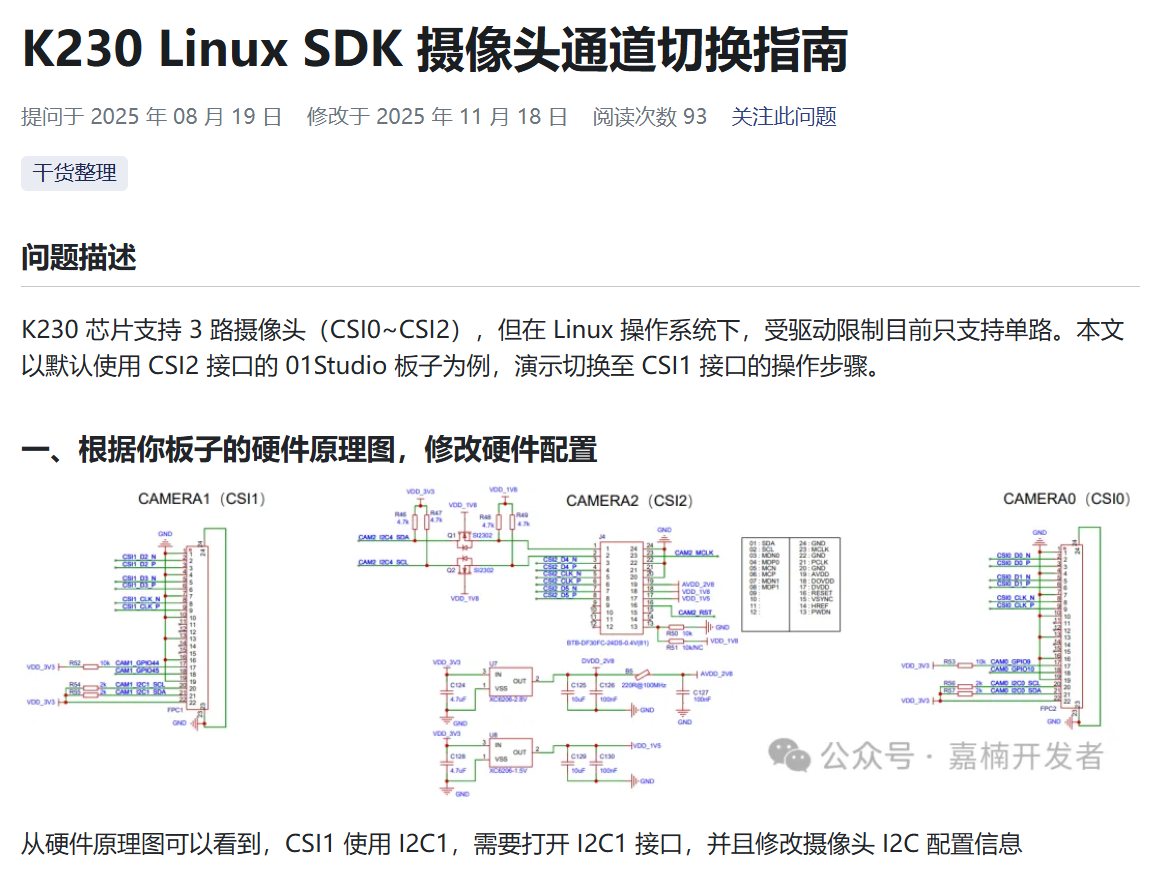
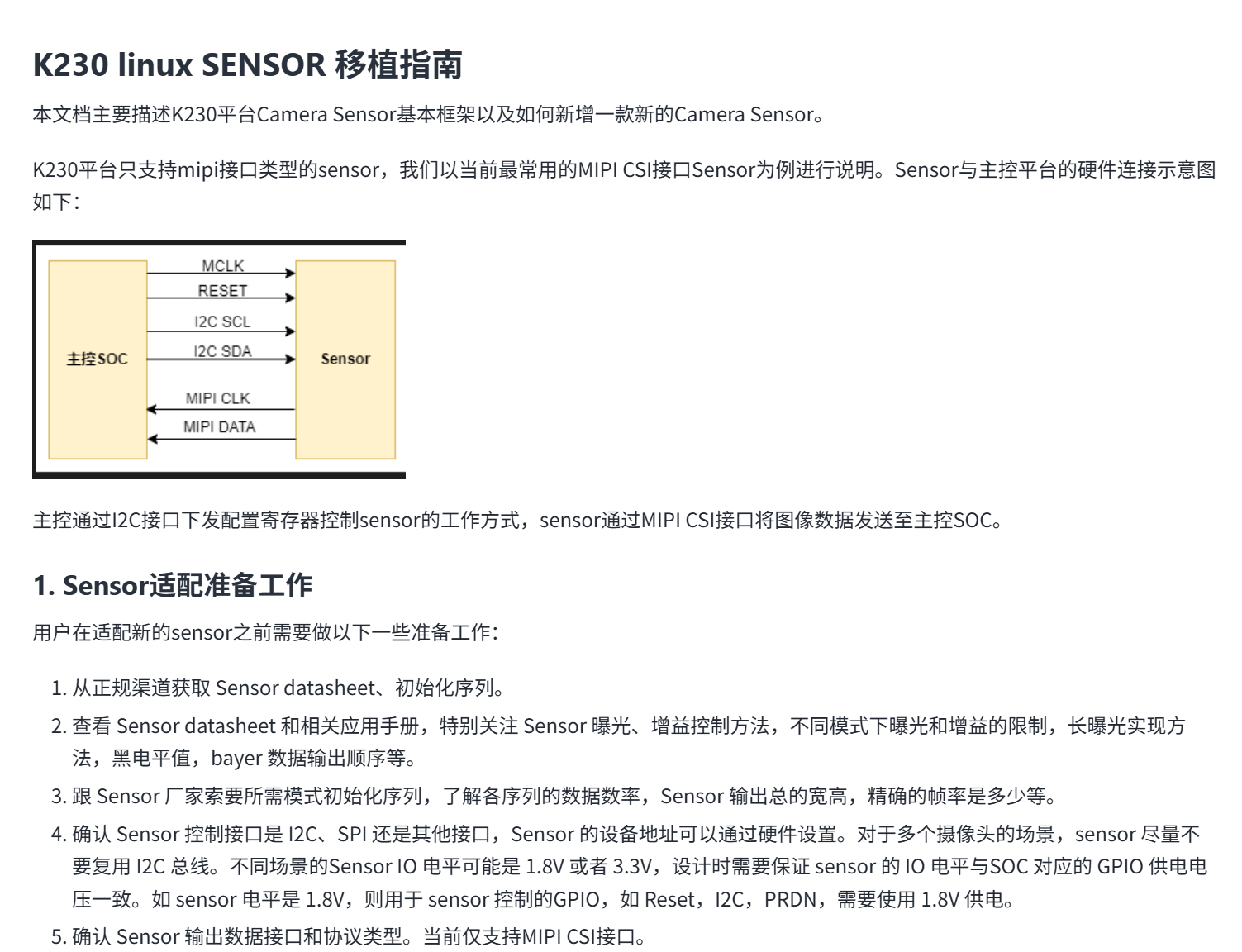
在linuxsdk下切换摄像头通道失败

Viewed 112

问题描述


板载ov5647的摄像头,在CSI2上,想用gc2093的摄像头模块接入CSI0通道

image.png
这是运行demo示例后的报错信息

复现步骤


image.png
根据这篇文章修改了设备树,驱动程序中的I2C_SLAVE_ADDRESS多次选择,考虑到这可能是i2c的设备地址image.png还根据芯片手册的引脚选择地址修改过0x6e和0xfc。

image.png
也参照过这篇文章,修改过/proc/vsi/isp_subdev0文件,修改成gc2093。都失败了,有没有人指点一下

硬件板卡


创乐博v3

软件版本


linuxsdk自行编译

3 Answers

建议你直接使用 最新代码,我刚才测试下,按你的修改,最新版本是可以的。
只修改了设备树和proc下面的那几个echo:

echo 0 sensor=gc2093 > /proc/vsi/isp_subdev0
echo 0 mode=0 > /proc/vsi/isp_subdev0
echo 0 xml=/etc/vvcam/gc2093-1920x1080.xml > /proc/vsi/isp_subdev0
echo 0 manu_json=/etc/vvcam/gc2093-1920x1080_manual.json > /proc/vsi/isp_subdev0
echo 0 auto_json=/etc/vvcam/gc2093-1920x1080_auto.json > /proc/vsi/isp_subdev0

v4l2-drm -d 1 -n 5 -w 320 -h 320

我用的设备树如下:
#output/k230_canmv_v3_defconfig/build/linux-7d4e1f444f461dbe3833bd99a4640e7b6c2cd529/arch/riscv/boot/dts/canaan/k230-canmv-v3-lcd.dts

// SPDX-License-Identifier: GPL-2.0 OR MIT
/*
 * Copyright (C) 2024 Yangyu Chen <cyy@cyyself.name>
 */

#include "k230.dtsi"
#include "display-st7701-480x800.dtsi"

/ {
	model = "Canaan CanMV-K230";
	compatible = "canaan,canmv-k230", "canaan,kendryte-k230";

	aliases {
		serial3 = &uart3;
		mmc0 = &mmc_sd0;
		mmc1 = &mmc_sd1;
		i2c0 = &i2c0;
		i2c1 = &i2c3;
	};

	chosen {
		stdout-path = "serial0:115200n8";
	};

	ddr: memory@0 {
		device_type = "memory";
		reg = <0x0 0x0 0x0 0x40000000>;
	};

	sound {
		status                      = "okay";
		compatible                  = "canaan,k230-audio-inno";
		canaan,model                = "K230_I2S_INNO";
		canaan,k230-i2s-controller  = <&i2s>;
		canaan,k230-audio-codec     = <&inno_codec>;
	};
};

&uart0 {
	status = "okay";
};
&uart3 {
	status = "okay";
};
&mmc_sd1{
	status = "okay";
	no-1-8-v;
	cap-sd-highspeed;
	mshc_ctrl_r = <0x00>;
};

&usb0 {
	status = "okay";
};
&usb1 {
	status = "okay";
};

&i2c3 {
	status = "okay";
	touchscreen@38 {
		compatible = "edt,edt-ft5306";
		reg = <0x38>;
		reset-gpios = <&gpio0_ports 24 GPIO_ACTIVE_LOW>;
		interrupt-parent = <&gpio0_ports>;
		interrupts = <23 IRQ_TYPE_EDGE_FALLING>;
		touchscreen-size-x = <480>;
		touchscreen-size-y = <800>;
	};
};

&i2c0 {
	status = "okay";
};

&mipi0
{
	// set to csi2
	status = "okay";

	id = <0>;
	reg = <0x0 0x90009800 0x0 0x800>;
	interrupts = <115 IRQ_TYPE_LEVEL_HIGH>;
	resets = <&sysctl_reset
				K230_RESET_CSI0_REG_OFFSET
				K230_RESET_CSI0_TYPE
				K230_RESET_CSI0_DONE_BIT
				K230_RESET_CSI0_ASSERT_BIT>,
				<&sysctl_reset
				K230_RESET_M0_REG_OFFSET
				K230_RESET_M0_TYPE
				K230_RESET_M0_DONE_BIT
				K230_RESET_M0_ASSERT_BIT>;

};


&lcd {
	dsi_reset-gpios = <&gpio0_ports 22 GPIO_ACTIVE_HIGH>;
	backlight_gpio-gpios = <&gpio0_ports 25 GPIO_ACTIVE_HIGH>;
};
&mmc_sd0 {
	status = "okay";
	no-1-8-v;
	rx_delay_line = <0x0d>;
	tx_delay_line = <0xc0>;
};

大佬,问题找到了,文章里的mipi寄存器地址映射是reg = <0x0 0x90000800 0x0 0x800>;你给我的是reg = <0x0 0x90009800 0x0 0x800>;用了你的就可以了

可以i2cdetect命令扫一下,看一下能不能扫到摄像头,gc2093有两个地址,可以换一下试试

[root@canaan /boot ]#i2cdetect -y -r 1
0 1 2 3 4 5 6 7 8 9 a b c d e f
00: -- -- -- -- -- -- -- -- -- -- -- -- --
10: -- -- -- -- -- -- -- -- -- -- -- -- -- -- -- --
20: -- -- -- -- -- -- -- -- -- -- -- -- -- -- -- --
30: -- -- -- -- -- -- -- -- -- -- -- 3b -- -- -- --
40: -- -- -- -- -- -- -- -- -- -- -- -- -- -- -- --
50: -- -- -- -- -- -- -- -- -- -- -- -- -- -- -- --
60: -- -- -- -- -- -- -- -- -- -- -- -- -- -- -- --
70: -- -- -- -- -- -- -- --
这个3b应该是hdmi屏幕的

[root@canaan /boot ]#i2cdetect -y -r 0
0 1 2 3 4 5 6 7 8 9 a b c d e f
00: -- -- -- -- -- -- -- -- -- -- -- -- --
10: -- -- -- -- -- -- -- -- -- -- -- -- -- -- -- --
20: -- -- -- -- -- -- -- -- -- -- -- -- -- -- -- --
30: -- -- -- -- -- -- -- 37 -- -- -- -- -- -- -- --
40: -- -- -- -- -- -- -- -- -- -- -- -- -- -- -- --
50: -- -- -- -- -- -- -- -- -- -- -- -- -- -- -- --
60: -- -- -- -- -- -- -- -- -- -- -- -- -- -- -- --
70: -- -- -- -- -- -- -- --
这个37是啥呀

我换7e那个地址再试一下

用的那个板子,补充下你修改后的设备树 ?

aliases {
	serial3 = &uart3;
	mmc0 = &mmc_sd0;
	mmc1 = &mmc_sd1;
	i2c0 = &i2c0;
	i2c1 = &i2c3;
};

&i2c0 {
status = "okay";
};

&mipi0 {
// set to csi0
id = <0>;
reg = <0x0 0x90000800 0x0 0x800>;
interrupts = <115 IRQ_TYPE_LEVEL_HIGH>;
resets = <&sysctl_reset K230_RESET_CSI0_REG_OFFSET K230_RESET_CSI0_TYPE K230_RESET_CSI0_DONE_BIT K230_RESET_CSI0_ASSERT_BIT>,
<&sysctl_reset K230_RESET_M0_REG_OFFSET K230_RESET_M0_TYPE K230_RESET_M0_DONE_BIT K230_RESET_M0_ASSERT_BIT>;
};然后改默认配置文件那一步也是改成了gc2093的auto和手动的json文件,还是会报错,创乐博v3的板子,想换到csi0上

设备树没问题,目前k230 linux只支持带晶振的sensor,估计你那个sensor不带晶振。你的sensor是从哪里买的?能找他们确认下 带晶振吗?

其实我之前已经切换通道做好了一版镜像了,后来又因为环境的原因重新编译了sdk,然后现在又搞不出来了,只有那一版镜像能解我的gc2093摄像头,特难受