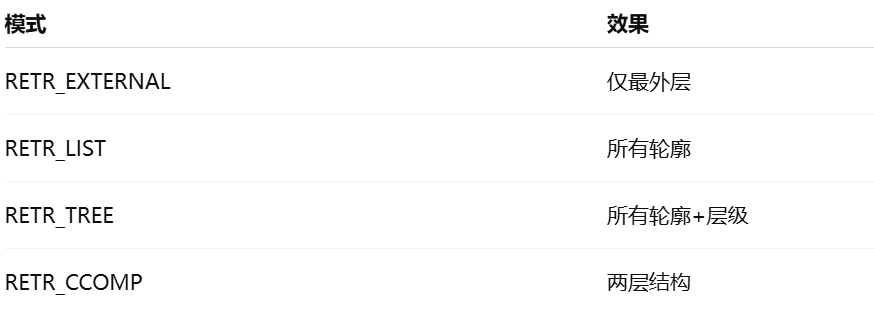
问题描述
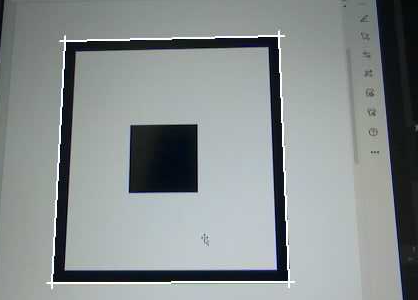
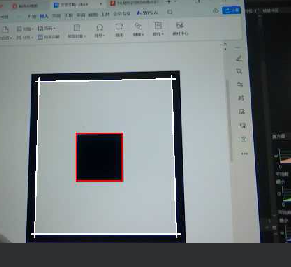
使用rgb888_find_rectangle_with_corners识别矩形时只能识别到矩形框的外框,增加识别矩形的rgb888_find_rectangle函数,限制识别矩形框里的矩形,识别到外框时无法识别出矩形,只有识别到内框时才能识别出,要如何改才能识别出框内的矩形
import time, os, sys, gc
from machine import Pin
from media.sensor import *     # 摄像头接口 / Camera interface
from media.display import *    # 显示接口 / Display interface
from media.media import *      # 媒体资源管理器 / Media manager
import _thread
import cv_lite                 # cv_lite扩展模块 / cv_lite extension (C bindings)
import ulab.numpy as np        # MicroPython NumPy类库

image_shape = [480, 640]  # 高 x 宽 / Height x Width
sensor = Sensor(id=2,width=1280,height=960,fps = 90)
sensor.reset()
sensor.set_framesize(width=image_shape[1], height=image_shape[0])
sensor.set_pixformat(Sensor.RGB888)  # RGB888格式 / rgb888 format

Display.init(Display.ST7701, width=image_shape[1], height=image_shape[0],
             to_ide=True, quality=50)

MediaManager.init()
sensor.run()
gain = k_sensor_gain()
gain.gain[0] =20
sensor.again(gain)
threshold = [26, 74, -29, 81, -67, 63]# 格式:[Rmin, Rmax, Gmin, Gmax, Bmin, Bmax]
min_area = 100 # 最小色块面积 / Minimum blob area
kernel_size = 1 # 腐蚀膨胀核大小(用于预处理)/ Kernel size for morphological ops

clock = time.clock()

canny_thresh1      = 80  #50        # Canny 边缘检测低阈值 / Canny low threshold
canny_thresh2      = 200   #150       # Canny 边缘检测高阈值 / Canny high threshold
approx_epsilon     = 0.02  # 0.01       # 多边形拟合精度比例(越小拟合越精确)/ Polygon approximation accuracy
area_min_ratio     = 0.001  #0.0001     # 最小面积比例(相对于图像总面积)/ Min area ratio
max_angle_cos      = 0.15   #0.3       # 最大角度余弦(越小越接近矩形)/ Max cosine of angle between edges
gaussian_blur_size = 5         # 高斯模糊核尺寸(奇数)/ Gaussian blur kernel siz

while True:
    clock.tick()

    # 拍摄一帧图像 / Capture a frame
    img = sensor.snapshot()
    img_np = img.to_numpy_ref()

    rects = cv_lite.rgb888_find_rectangles_with_corners(
        image_shape, img_np,
        canny_thresh1, canny_thresh2,
        approx_epsilon,
        area_min_ratio,
        max_angle_cos,
        gaussian_blur_size
    )
    # 遍历检测到的矩形并绘制矩形框和角点
    for i in range(len(rects)):
        r = rects[i]
        # 四个角点坐标(从检测结果直接取出)
        p1 = (r[4], r[5])   # 角点1
        p2 = (r[6], r[7])   # 角点2
        p3 = (r[8], r[9])   # 角点3
        p4 = (r[10], r[11]) # 角点4

        img.draw_line(p1[0], p1[1], p2[0], p2[1], color=(255,255,255), thickness=2)
        img.draw_line(p2[0], p2[1], p3[0], p3[1], color=(255,255,255), thickness=2)
        img.draw_line(p3[0], p3[1], p4[0], p4[1], color=(255,255,255), thickness=2)
        img.draw_line(p4[0], p4[1], p1[0], p1[1], color=(255,255,255), thickness=2)

        # 画角点
        img.draw_cross(p1[0],p1[1],color=(255,255,255),size=5,thickness=2)
        img.draw_cross(p2[0],p2[1],color=(255,255,255),size=5,thickness=2)
        img.draw_cross(p3[0],p3[1],color=(255,255,255),size=5,thickness=2)
        img.draw_cross(p4[0],p4[1],color=(255,255,255),size=5,thickness=2)

    if rects:
        rects_all = cv_lite.rgb888_find_rectangles(
                   image_shape, img_np,
                   canny_thresh1, canny_thresh2,
                   approx_epsilon,
                   area_min_ratio,
                   max_angle_cos,
                   gaussian_blur_size
               )

        for big_rect in rects:
            bx, by, bw, bh = big_rect[0:4]
            for i in range(0, len(rects_all), 4):
                x, y, w, h = rects_all[i:i+4]
                if (bx < x < bx+bw) and (by < y < by+bh)and (w*h < bw*bh*0.9):
                    img.draw_rectangle(x, y, w, h, color=(255,0,0), thickness=2)

    # 显示图像 / Show image
    Display.show_image(img)

    # 垃圾回收 & 输出帧率/ Garbage collect and print FPS
    gc.collect()
    print("fps:", clock.fps())
sensor.stop()
Display.deinit()
os.exitpoint(os.EXITPOINT_ENABLE_SLEEP)
time.sleep_ms(100)
MediaManager.deinit()
硬件板卡
亚博智能