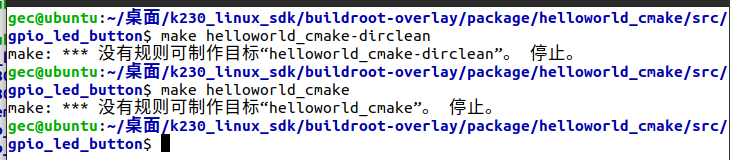
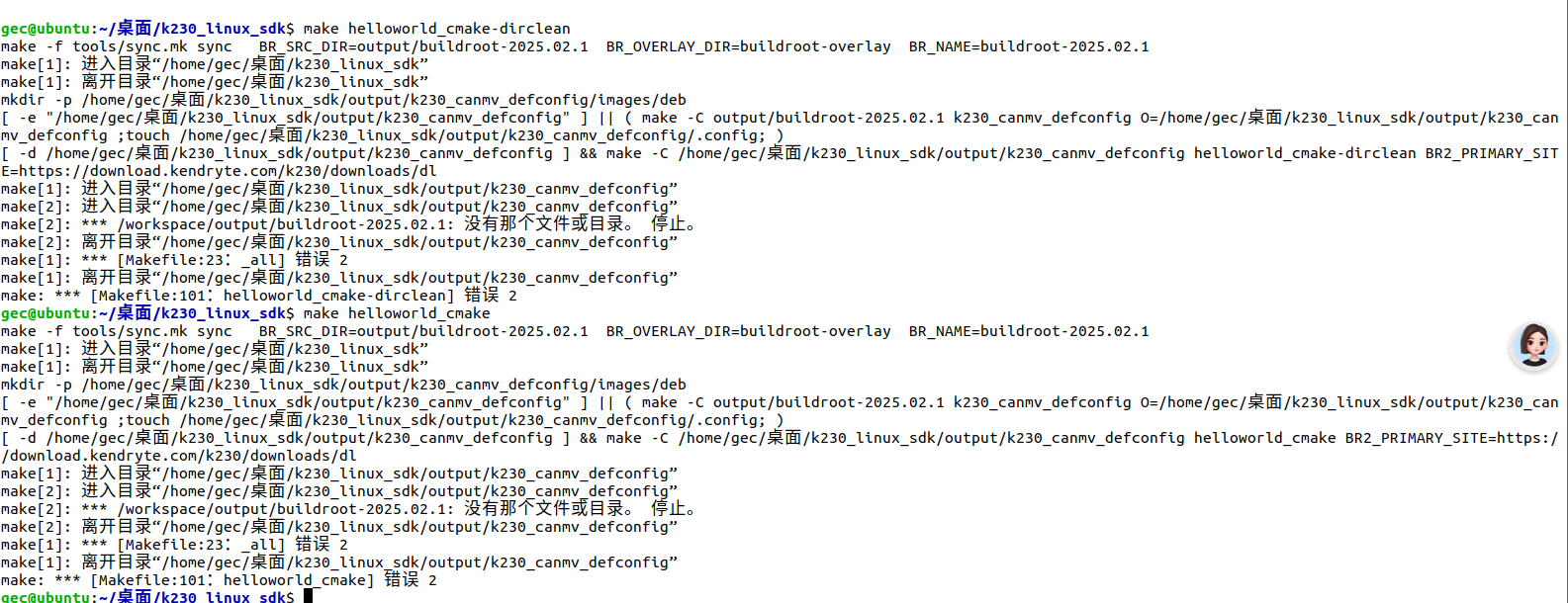
问题描述
#include <stdio.h>
#include <stdlib.h>
#include <unistd.h>
#include <gpiod.h>
#define LED_GPIO_CHIP_PATH "/dev/gpiochip1"
#define LED_LINE_NUM 20
// 闪烁间隔(毫秒),可通过命令行参数指定
#define DEFAULT_INTERVAL_MS 500
int main(int argc, char *argv[]) {
struct gpiod_chip *led_chip = NULL;
struct gpiod_line_settings *settings = NULL;
struct gpiod_line_config *line_cfg = NULL;
struct gpiod_request_config *req_cfg = NULL;
struct gpiod_line_request *led_request = NULL;
unsigned int offsets[1];
int interval_ms = DEFAULT_INTERVAL_MS;
int ret = EXIT_FAILURE;
// 解析命令行参数:led_blink [间隔毫秒]
if (argc > 1) {
    interval_ms = atoi(argv[1]);
    if (interval_ms <= 0) {
        fprintf(stderr, "无效的间隔时间: %s\n", argv[1]);
        fprintf(stderr, "用法: %s [间隔毫秒]\n", argv[0]);
        return EXIT_FAILURE;
    }
}

printf("LED 闪烁测试 - 间隔: %d ms\n", interval_ms);

// 1. 打开 LED GPIO 芯片控制器
led_chip = gpiod_chip_open(LED_GPIO_CHIP_PATH);
if (!led_chip) {
    perror("打开 LED gpiochip 失败");
    goto cleanup;
}

// 2. 创建并配置引脚设置
settings = gpiod_line_settings_new();
if (!settings) {
    perror("创建 line settings 失败");
    goto cleanup;
}

// 3. 创建引脚配置
line_cfg = gpiod_line_config_new();
if (!line_cfg) {
    perror("创建 line config 失败");
    goto cleanup;
}

// 配置 LED 引脚:设置为输出,初始值为 0(熄灭)
gpiod_line_settings_set_direction(settings, GPIOD_LINE_DIRECTION_OUTPUT);
gpiod_line_settings_set_output_value(settings, 0);
offsets[0] = LED_LINE_NUM;
if (gpiod_line_config_add_line_settings(line_cfg, &offsets[0], 1, settings) < 0) {
    perror("配置 LED 引脚失败");
    goto cleanup;
}

// 4. 创建请求配置
req_cfg = gpiod_request_config_new();
if (!req_cfg) {
    perror("创建 request config 失败");
    goto cleanup;
}
gpiod_request_config_set_consumer(req_cfg, "k230_led");

// 5. 请求 LED GPIO 引脚
led_request = gpiod_chip_request_lines(led_chip, req_cfg, line_cfg);
if (!led_request) {
    perror("请求 LED GPIO 引脚失败");
    goto cleanup;
}

printf("LED 初始化成功!开始闪烁...\n");
printf("LED: %s:%u\n", LED_GPIO_CHIP_PATH, LED_LINE_NUM);

// 6. 主循环:LED 闪烁
while (1) {
    // LED 点亮
    ret = gpiod_line_request_set_value(led_request, LED_LINE_NUM, 1);
    if (ret < 0) {
        perror("写入 LED 失败");
        break;
    }
    printf("LED ON\n");
    usleep(interval_ms * 1000);

    // LED 熄灭
    ret = gpiod_line_request_set_value(led_request, LED_LINE_NUM, 0);
    if (ret < 0) {
        perror("写入 LED 失败");
        break;
    }
    printf("LED OFF\n");
    usleep(interval_ms * 1000);
}

ret = EXIT_SUCCESS;
cleanup:
// 释放资源
if (led_request) gpiod_line_request_release(led_request);
if (req_cfg) gpiod_request_config_free(req_cfg);
if (line_cfg) gpiod_line_config_free(line_cfg);
if (settings) gpiod_line_settings_free(settings);
if (led_chip) gpiod_chip_close(led_chip);
return ret;
}
这个是官方的例程,但是编译的时候找不到gpiod.h这个头文件,是要放在指定的路径下吗,还是怎么解决
硬件板卡
01科技K230
软件版本
CanMV-K230_01studio_linux_v1.2_nncase_v2.11.0_bd411da2.img
其他信息