
LVGL Python API#
LVGL (Light and Versatile Graphics Library) Python bindings for the K230 platform
Automatically generated from LVGL C headers and built through a libclang → IR → pybind11 pipeline. 902 binding methods/functions (
.def()), 651 enum values, 65 module constants, 96 enum classes, 26 widgets, and 8 classes.
Quick Start#
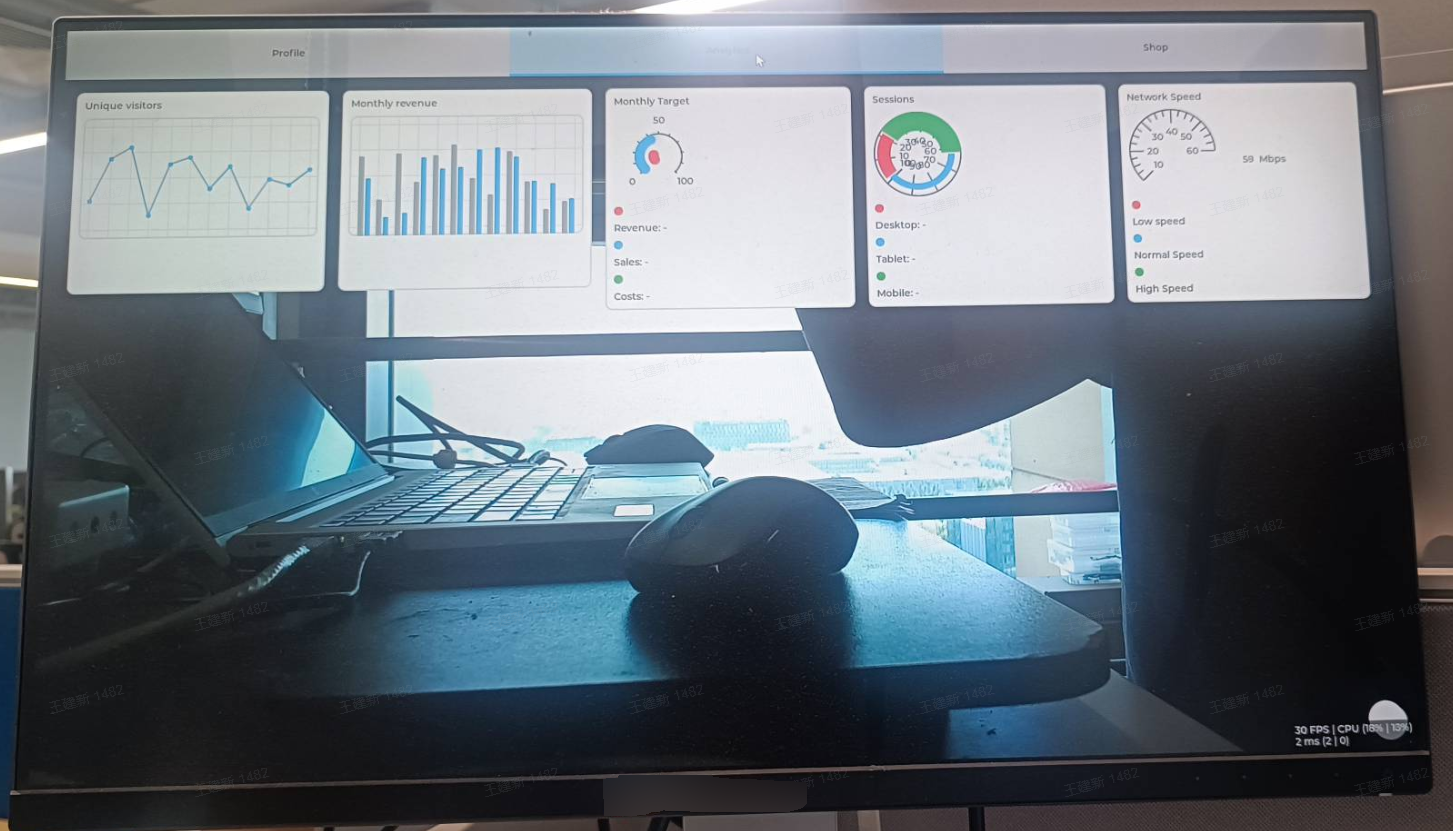
Example |
Description |
Source |
|---|---|---|
Dashboard Demo |
Avatar/chart/animated arc/list |
|
Hello |
Minimal LVGL example (button) |
|
Camera + OSD |
Camera feed with LVGL overlay |
|
Camera + Rotation |
Portrait orientation support |
|
Chinese Font |
Load a TTF font with FreeType |
|
Basic Widgets |
Button/slider/progress bar/arc/switch/LED |
Initialization and Drivers#
lv.init(v4l2_drm=None, v4l2_drm_run_flag=0)#
One-click initialization for the K230 platform, completing the following internally:
lv_init()— initialize the LVGL libraryRegister the driver backend
Initialize the display backend (DRM or DRM_V4L2_K230)
Initialize the EVDEV input backend
Parameter |
Type |
Description |
|---|---|---|
|
|
Pass a V4l2Drm object to use the K230 v4l2-drm backend (OSD and camera video share DRM); |
|
|
Reserved parameter, currently unused, defaults to 0 |
lv.settings#
A module-level object that directly maps to the simulator global variable settings on the C side (defined in driver_backends.c); reads and writes directly affect the same global state.
Attribute |
Type |
Description |
|---|---|---|
|
|
Display rotation angle; valid values are |
Behavior differs between the two backend paths:
Standard Linux DRM backend (
lv.init()with no arguments):rotationis consumed during initialization (DRM backendinit_drm→ sets the DRM plane rotation property while swapping the resolution), and must be set beforelv.init(); changes made after initialization do not take effect.K230 v4l2-drm backend (
lv.init(v4l2drm)): rotation is controlled byv4l2drm.set_rotation(). Afterk230_driver_initcompletes initialization, the v4l2-drm rotation value is overwritten intosettings.rotation(for evdev touch coordinate transformation). On this path, readlv.settings.rotationafter initialization to obtain the effective angle instead of writing to it.
# 标准 DRM 后端:初始化前设置旋转
lv.settings.rotation = lv.DISPLAY_ROTATION._90
lv.init()                    # DRM plane 以 90° 初始化

# v4l2-drm 后端:初始化后读取生效旋转
v4l2drm.set_rotation(0, ROTATION_90)
lv.init(v4l2drm, v4l2_drm_run_flag=1)
print(lv.settings.rotation)  #DISPLAY_ROTATION._90 (由 v4l2-drm 发布)
Accompanying examples: lvgl_linux_drm_demo.py, lvgl_ai_change.py, and all examples under the basic/ and quick/ directories (all containing an lv.settings.rotation setting line).
lv.run()#
Enters the LVGL driver run loop (blocking). Supports interruption with Ctrl+C, calling os._exit(0) to exit after interruption.
Module-level Functions#
Core#
Function |
Description |
|---|---|
|
Initialize the LVGL library |
|
Deinitialize the LVGL library |
|
Whether LVGL has been initialized |
|
Call the LVGL timer handler (main loop core), returning idle time (ms) |
|
Get the currently active screen object |
|
Load the specified screen |
|
Run the LVGL performance benchmark |
|
Return a percentage width/height value (for |
Version Information#
Function |
Description |
|---|---|
|
LVGL major version number |
|
LVGL minor version number |
|
LVGL patch version number |
|
LVGL version information string |
Display#
Function |
Description |
|---|---|
|
Create a display object |
|
Get the default display object |
|
Create an EVDEV input device |
Timers#
Function |
Description |
|---|---|
|
Create a timer and return a timer_t object |
Animation#
Constant |
Description |
|---|---|
|
Infinite animation repeat value |
Groups#
Function |
Description |
|---|---|
|
Create an input group |
|
Delete a group |
|
Set the default group |
|
Get the default group |
|
Add an object to a group |
|
Remove an object from a group |
|
Focus a specified object |
|
Focus the next object |
|
Focus the previous object |
|
Set whether focus wraps around |
Theme#
Function |
Description |
|---|---|
|
Initialize the default theme |
|
Get the theme primary color |
Palette#
Function |
Description |
|---|---|
|
Get the palette main color |
|
Get the palette light color |
|
Get the palette dark color |
Input Devices#
Function |
Description |
|---|---|
|
Create an input device |
|
Get the next input device |
|
Get the input device type |
|
Set the input device group |
|
Set the input device type |
Driver Backends#
Function |
Description |
|---|---|
|
Initialize the K230 driver (called internally by |
|
Register driver backends |
|
Initialize driver backends |
|
Query whether a backend is supported |
|
Print supported backends |
|
Run the driver loop |
FreeType Fonts#
Function |
Description |
|---|---|
|
Create a FreeType font |
|
Delete a FreeType font |
Color (color)#
Create a color#
c1 = lv.color_make(255, 0, 0)          # RGB (0-255)
c2 = lv.color.from_rgb(255, 0, 0)      # RGB (0-255), color static method
c3 = lv.color_hex(0xFF0000)            # Hexadecimal integer
c4 = lv.color.from_hex(0xFF0000)       # Hexadecimal integer, color static method
c5 = lv.color(r, g, b)                 # _wrapper alias, equivalent to color_make
c6 = lv.color_from_hex_str("#FF0000")  # Hexadecimal string, _wrapper alias
c7 = lv.color_black()                  # Pure black
c8 = lv.color_white()                  # Pure white
color properties#
c = lv.color_make(255, 128, 0)
print(c.red, c.green, c.blue)       # Read RGB components (read-only, 0-255)
Opacity constants#
Constant |
Value |
Description |
|---|---|---|
|
0 |
Fully transparent |
|
0 |
0% opaque |
|
25 |
10% opaque |
|
51 |
20% |
|
76 |
30% |
|
102 |
40% |
|
127 |
50% |
|
153 |
60% |
|
178 |
70% |
|
204 |
80% |
|
229 |
90% |
|
255 |
100% opaque |
|
255 |
Fully opaque |
Classes#
Class |
Python Name |
Description |
|---|---|---|
|
|
Base class of all widgets |
|
|
Event object |
|
|
Color object |
|
|
Display object |
|
|
Input device object |
|
|
Timer object |
|
|
Animation object |
|
|
Font object (FreeType) |
Basic Object obj#
obj is the base class of all widgets. All widgets inherit the methods of obj.
Creation (obj)#
obj = lv.obj()                      # No-argument constructor
child = parent.obj()                # Create a child object (create a new obj under parent)
Note: The no-argument
lv.obj()constructor creates a basic object, whileparent.obj()creates a child object under the parent object.
Position and Size#
Method |
Description |
|---|---|
|
Set position |
|
Set X coordinate |
|
Set Y coordinate |
|
Set width and height |
|
Set width |
|
Set height |
|
Set content width |
|
Set content height |
|
Get coordinates |
|
Get width and height |
|
Get content width and height |
Alignment#
Method |
Description |
|---|---|
|
Set alignment |
|
Align relative to the parent object |
|
Align relative to another object |
|
Center |
Alignment values use the lv.ALIGN enumeration:
lv.ALIGN.CENTER           # Center
lv.ALIGN.TOP_LEFT         # Top left
lv.ALIGN.TOP_MID          # Top center
lv.ALIGN.TOP_RIGHT        # Top right
lv.ALIGN.BOTTOM_LEFT      # Bottom left
lv.ALIGN.BOTTOM_MID       # Bottom center
lv.ALIGN.BOTTOM_RIGHT     # Bottom right
lv.ALIGN.LEFT_MID         # Left center
lv.ALIGN.RIGHT_MID        # Right center
lv.ALIGN.OUT_TOP_LEFT     # Align to the upper left outside the parent object
lv.ALIGN.OUT_BOTTOM_MID   # Align to the bottom center outside the parent object
# ... More OUT_ variants
Hierarchy and Parent-Child Relationships#
Method |
Description |
|---|---|
|
Set parent object |
|
Get parent object |
|
Get child object |
|
Get number of child objects |
|
Get index among siblings |
|
Move to a specific index position |
|
Move to the front |
|
Move to the back |
|
Swap the positions of two objects |
Deletion#
Method |
Description |
|---|---|
|
Delete object |
|
Delete object asynchronously |
|
Delete all child objects |
Event Binding (Shorthand)#
btn.add_event_cb(lv.EVENT.CLICKED, callback)        # Add an event callback
btn.on(lv.EVENT.CLICKED, callback)                  # Shorthand, equivalent to add_event_cb
btn.off(lv.EVENT.CLICKED, callback)                 # Remove an event callback (LED only)
btn.remove_event(idx)                               # Remove an event by index
btn.remove_event_cb_with_user_data(cb, data)        # Remove an event by callback
Fade In and Fade Out#
obj.fade_in(time_ms, delay_ms)   # Fade in
obj.fade_out(time_ms, delay_ms)  # Fade out
Transformation#
obj.set_transform(matrix)     # Set the transformation matrix
obj.reset_transform()         # Reset the transformation
obj.transform_point(point)    # Transform a coordinate point
Coordinates and Visibility#
Method |
Description |
|---|---|
|
Get absolute coordinate area |
|
Get content area coordinates |
|
Mark an area as invalid (redraw) |
|
Mark a specified area as invalid |
|
Whether the object is visible |
|
Whether the area is visible within the object |
|
Move to an absolute position |
|
Move all child objects |
Widgets#
All widgets are created through module-level factory functions, passing the parent parameter (optional, defaults to the current screen):
btn = lv.button(parent) # Create button
Unified naming: All widgets share the
objbase class, but the methods of each widget use unified short names (such asset_text,set_value,close), with no widget prefix required. Methods with the same name automatically call the corresponding implementation on different widgets (for example,arc.set_value()andslider.set_value()each update the value of the corresponding widget). The “Common Methods” table in each widget section lists all the methods supported by that widget.
label#
Text display widget supporting multiline, scrolling, recoloring, and other modes.
Creation
label = lv.label(scr)
label.set_text("Hello World")
Common Methods
Method |
Description |
|---|---|
|
Set text |
|
Set static text (not copied) |
|
Set long text mode |
|
Enable recoloring |
|
Maximum number of lines |
|
Get text |
|
Insert text at position |
|
Cut text from position |
Enumerations
Long text mode (lv.LABEL_LONG):
Enumeration Value |
Description |
|---|---|
|
Automatic wrapping (default) |
|
Show ellipsis for excess text |
|
Scroll display |
|
Circular scrolling |
|
Clip |
Events
Event |
Description |
|---|---|
|
Text changed |
Complete Example
image#
Image display widget supporting transformations such as scaling, rotation, and offset.
Creation
img = lv.image(scr)
img.set_src("A:/path/to/image.png")   # LVGL 文件系统需要 'A:' 前缀
File path: LVGL uses the FS_STDIO backend, with the drive letter
A:. All file paths must begin withA:(for example,"A:/root/image.png"). PNG (recommended), BMP, and JPEG (baseline only) formats are supported.
Common Methods
Method |
Description |
|---|---|
|
Set image source |
|
X offset |
|
Y offset |
|
Rotate (0.1-degree units, 450=45.0°) |
|
Set rotation center |
|
Scale (256=1x, 512=2x) |
|
Scale in the X direction |
|
Scale in the Y direction |
|
Blend mode |
|
Antialiasing |
|
Inner alignment |
|
Get scale value |
|
Get rotation angle |
|
Get source image width |
|
Get source image height |
|
Get rotation center |
Enumerations
Image alignment (lv.IMAGE_ALIGN): DEFAULT, TOP_LEFT, TOP_MID, TOP_RIGHT, BOTTOM_LEFT, BOTTOM_MID, BOTTOM_RIGHT, LEFT_MID, RIGHT_MID, CENTER, STRETCH, TILE, CONTAIN, COVER
Events
Event |
Description |
|---|---|
|
Image changed |
Complete Example
arc#
Arc widget used to display an angular range or as a knob for adjusting a value.
Creation
arc = lv.arc(scr)
arc.set_range(0, 100)
arc.set_value(70)
Common Methods
Method |
Description |
|---|---|
|
Set value range |
|
Set current value |
|
Set minimum value |
|
Set maximum value |
|
Set foreground arc angles |
|
Set background arc angles |
|
Rotation offset |
|
Mode |
|
Value change rate |
|
Knob offset |
|
Get current value |
|
Get minimum value |
|
Get maximum value |
|
Get rotation offset |
|
Get foreground start angle |
|
Get foreground end angle |
|
Get mode |
Enumerations
Arc mode (lv.ARC_MODE): NORMAL, SYMMETRICAL, REVERSE
Events
Event |
Description |
|---|---|
|
Value changed |
Complete Example
bar#
Progress bar widget used to display a ratio or progress.
Creation
bar = lv.bar(scr)
bar.set_range(0, 100)
bar.set_value(60, True)
Common Methods
Method |
Description |
|---|---|
|
Set range |
|
Set value (whether animated) |
|
Set start value (range mode) |
|
Set minimum value |
|
Set maximum value |
|
Mode |
|
Orientation |
|
Get current value |
|
Get start value |
|
Get minimum value |
|
Get maximum value |
|
Get mode |
|
Get orientation |
|
Whether in symmetrical mode |
Enumerations
Bar mode (lv.BAR_MODE): NORMAL, SYMMETRICAL, RANGE
Orientation (lv.BAR_ORIENTATION): AUTO, HORIZONTAL, VERTICAL
Events
Event |
Description |
|---|---|
|
Value changed |
Complete Example
slider#
Slider widget used to drag and adjust a value.
Creation
slider = lv.slider(scr)
slider.set_range(0, 100)
slider.set_value(50, True)
Common Methods
Method |
Description |
|---|---|
|
Set range |
|
Set value (whether animated) |
|
Set start value (range mode, whether animated) |
|
Set minimum value |
|
Set maximum value |
|
Mode |
|
Orientation |
|
Get current value |
|
Get left value (range mode) |
|
Get minimum value |
|
Get maximum value |
|
Get mode |
|
Get orientation |
|
Whether in symmetrical mode |
|
Whether currently being dragged |
Enumerations
Slider mode (lv.SLIDER_MODE): NORMAL, SYMMETRICAL, RANGE
Events
Event |
Description |
|---|---|
|
Value changed |
Complete Example
switch#
Switch widget used to toggle on/off states.
Creation
sw = lv.switch(scr)
Common Methods
Method |
Description |
|---|---|
|
Orientation |
|
Get orientation |
Enumerations
Orientation (lv.SWITCH_ORIENTATION): AUTO, HORIZONTAL, VERTICAL
Events
Event |
Description |
|---|---|
|
Value changed |
Complete Example
checkbox#
Checkbox widget used to select or deselect an option.
Creation
cb = lv.checkbox(scr)
cb.set_text("Option A")
Common Methods
Method |
Description |
|---|---|
|
Set text |
|
Set static text |
|
Get text |
Events
Event |
Description |
|---|---|
|
Value changed |
Complete Example
dropdown#
Dropdown list widget used to select one item from a list of options.
Creation
dd = lv.dropdown(scr)
dd.set_options("Red\nGreen\nBlue")
Common Methods
Method |
Description |
|---|---|
|
Set options (\n-separated) |
|
Add option at position |
|
Set selected item |
|
Set current selected item text |
|
Set static text |
|
Set expansion direction |
|
Set indicator symbol |
|
Clear all options |
|
Get selected index |
|
Get current selected item text |
|
Get option string |
|
Get option count |
|
Find index by name |
|
Open dropdown list |
|
Close dropdown list |
|
Whether open |
Events
Event |
Description |
|---|---|
|
Selected item changed |
Complete Example
roller#
Roller widget for selecting options by scrolling.
Creation
roller = lv.roller(scr)
roller.set_options("A\nB\nC", lv.ROLLER_MODE.NORMAL)
Common Methods
Method |
Description |
|---|---|
|
Set options |
|
Set selected item (whether animated) |
|
Select by string |
|
Set visible row count |
|
Get selected index |
|
Get options |
|
Get option count |
Enumerations
Roller mode (lv.ROLLER_MODE): NORMAL, INFINITE
Events
Event |
Description |
|---|---|
|
Selected item changed |
Complete Example
textarea#
Text input field widget supporting single-line/multiline, password mode, character filtering, and other features.
Creation
ta = lv.textarea(scr)
ta.set_text("Hello")
Common Methods
Method |
Description |
|---|---|
|
Set text |
|
Set placeholder text |
|
Single-line mode |
|
Password mode |
|
Maximum length |
|
Restrict accepted chars |
|
Set cursor position |
|
Enable text selection |
|
Append text |
|
Append character (ASCII) |
|
Delete character before cursor |
|
Delete character after cursor |
|
Clear selection |
|
Get cursor position |
|
Whether single-line |
|
Whether password mode |
|
Get maximum length |
Events
Event |
Description |
|---|---|
|
Text content changed |
|
Input completed |
Complete Example
keyboard#
Virtual keyboard widget used with Textarea to enter text.
Creation
kb = lv.keyboard(scr)
kb.set_textarea(textarea_obj)
Common Methods
Method |
Description |
|---|---|
|
Associate a text input field |
|
Set keyboard mode |
|
Enable key popovers |
|
Get associated text field |
|
Get current mode |
|
Get key text |
Enumerations
Keyboard mode (lv.KEYBOARD_MODE): TEXT_LOWER, TEXT_UPPER, SPECIAL, NUMBER, USER_1~USER_4
Events
Event |
Description |
|---|---|
|
Key value changed |
|
Input completed (confirm key) |
Complete Example
chart#
Chart widget supporting data visualization such as line, curve, and bar charts.
Creation
chart = lv.chart(scr)
chart.set_type(lv.CHART_TYPE.LINE)
Common Methods
Method |
Description |
|---|---|
|
Chart type |
|
Set axis range |
|
Update mode |
|
Horizontal/vertical division line count |
|
Horizontal division line count |
|
Vertical division line count |
|
Set axis minimum value |
|
Set axis maximum value |
|
Set number of data points |
|
Add data series |
|
Append a data point |
|
Set all to the same value |
|
Set series color |
|
Refresh display |
|
Get type |
|
Get number of points |
|
Get update mode |
|
Get horizontal division line count |
|
Get vertical division line count |
|
Get pressed data point |
Enumerations
Chart type (lv.CHART_TYPE): NONE, LINE, CURVE, BAR, STACKED, SCATTER
Update mode (lv.CHART_UPDATE_MODE): SHIFT, CIRCULAR
Axis (lv.CHART_AXIS): PRIMARY_Y, SECONDARY_Y, PRIMARY_X, SECONDARY_X, LAST
Events
Event |
Description |
|---|---|
|
Data point changed |
|
Data point pressed |
Complete Example
table#
Table widget used to display row and column data.
Creation
table = lv.table(scr)
table.set_row_count(5)
table.set_column_count(3)
Common Methods
Method |
Description |
|---|---|
|
Set row count |
|
Set column count |
|
Set column width |
|
Set cell text |
|
Set cell control flags |
|
Get cell text |
|
Get row count |
|
Get column count |
|
Set selected cell |
Enumerations
Cell control (lv.TABLE_CELL_CTRL): NONE, MERGE_RIGHT, TEXT_CROP, CUSTOM_1~CUSTOM_4
Events
Event |
Description |
|---|---|
|
Selected cell changed |
Complete Example
tabview#
Tab view widget used to switch between multiple pages.
Creation
tv = lv.tabview(scr)
tab1 = tv.add_tab("Tab 1")
tab2 = tv.add_tab("Tab 2")
Common Methods
Method |
Description |
|---|---|
|
Add tab |
|
Switch tab (whether animated) |
|
Set tab bar size |
|
Set tab bar position |
|
Get number of tabs |
|
Get current active tab |
|
Get content area |
|
Get tab bar |
Events
Event |
Description |
|---|---|
|
Tab switched |
Complete Example
list#
List widget used to display a list of items with icons.
Creation
list = lv.list(scr)
list.add_text("Section Title")
btn = list.add_button(icon, "Item Text")
Common Methods
Method |
Description |
|---|---|
|
Add text heading |
|
Add button item |
|
Get button text |
|
Set button text |
Events
Event |
Description |
|---|---|
|
Item clicked |
|
Item selected |
Complete Example
msgbox#
Message box widget used to display prompts. When constructed without arguments, it is modal (with a backdrop).
Creation
msgbox = lv.msgbox()               # Modal (recommended)
msgbox = lv.msgbox(parent)         # Non-modal (specify parent object)
Common Methods
Method |
Description |
|---|---|
|
Add title |
|
Add text content |
|
Add footer button |
|
Add close button (✕) |
|
Get header area |
|
Get footer area |
|
Get content area |
|
Close message box |
|
Close message box asynchronously |
Events
Event |
Description |
|---|---|
|
Button clicked |
|
Message box closed |
|
Button value changed |
Complete Example
Notes
When lv.msgbox() is called without a parent, it internally passes NULL to lv_msgbox_create. LVGL automatically creates a semi-transparent backdrop on lv_layer_top(), producing a modal effect. If a parent object is passed, no backdrop is created.
led#
LED indicator widget used to display status.
Creation
led = lv.led(scr)
led.set_size(30, 30)
Common Methods
Method |
Description |
|---|---|
|
Set LED color |
|
Set brightness (0-255) |
|
Turn on (maximum brightness) |
|
Turn off (minimum brightness) |
|
Toggle |
|
Get brightness |
|
Get color |
Complete Example
line#
Polyline widget used to draw a polyline with multiple segments.
Creation
line = lv.line(scr)
line.center()
line.set_points([(0, 0), (40, 30), (80, 0), (120, 30), (160, 0), (200, 30)])
Common Methods
Method |
Description |
|---|---|
|
Set coordinate points (list of tuples) |
|
Invert the Y axis |
|
Get Y inversion state |
|
Get number of coordinate points |
Complete Example
Notes
set_points() accepts a Python list of (x, y) tuples. The Line widget must be given coordinate points with set_points() before it can be displayed; otherwise, it will remain blank.
canvas#
Canvas widget used to draw graphics pixel by pixel.
Creation
import numpy as np

canvas = lv.canvas(scr)
buf = np.zeros((H, W, 4), dtype=np.uint8)
canvas.set_buffer(buf.ctypes.data, W, H, lv.COLOR_FORMAT.ARGB8888)
Common Methods
Method |
Description |
|---|---|
|
Set drawing buffer |
|
Set pixel |
|
Get pixel |
|
Fill background |
|
Set palette |
|
Get drawing buffer |
Complete Example
Notes
The buf parameter of set_buffer(buf, w, h, cf) is a memory address integer (uintptr_t). When using a numpy array, pass buf.ctypes.data; do not pass a ctypes pointer object.
scale#
Scale widget used to display tick marks.
Creation
scale = lv.scale(scr)
scale.set_range(0, 100)
Common Methods
Method |
Description |
|---|---|
|
Mode |
|
Total tick count |
|
Major tick interval |
|
Set range |
|
Set minimum value |
|
Set maximum value |
|
Circular scale angle range |
|
Rotation offset |
|
Show labels |
|
Draw ticks at the top |
|
Get mode |
|
Get total tick count |
|
Get minimum value |
|
Get maximum value |
|
Get angle range |
|
Get rotation offset |
Enumerations
Scale mode (lv.SCALE_MODE): HORIZONTAL_TOP, HORIZONTAL_BOTTOM, VERTICAL_LEFT, VERTICAL_RIGHT, ROUND_INNER, ROUND_OUTER, LAST
Events
Event |
Description |
|---|---|
|
Value changed |
Complete Example
spinbox#
Numeric input field widget used for precise value adjustment.
Creation
sb = lv.spinbox(scr)
sb.set_value(50)
Common Methods
Method |
Description |
|---|---|
|
Set value |
|
Digits, decimal point position |
|
Step value |
|
Set range |
|
Set minimum value |
|
Set maximum value |
|
Wrap around |
|
Cursor position |
|
Digit step direction |
|
Get value |
|
Get minimum value |
|
Get maximum value |
|
Increment by one step |
|
Decrement by one step |
|
Move cursor to next digit |
|
Move cursor to previous digit |
Events
Event |
Description |
|---|---|
|
Value changed |
Complete Example
spinner#
Loading animation widget used to display a waiting state.
Creation
sp = lv.spinner(scr)
sp.set_size(50, 50)
Common Methods
Method |
Description |
|---|---|
|
Period (ms), sweep angle |
|
Set animation period |
|
Set arc sweep angle |
|
Get animation period |
|
Get arc sweep angle |
Complete Example
tileview#
Tile view widget used to switch pages by swiping left/right or up/down.
Creation
tv = lv.tileview(scr)
tile1 = tv.add_tile(0, 0, lv.DIR.RIGHT)
tile2 = tv.add_tile(1, 0, lv.DIR.LEFT)
Common Methods
Method |
Description |
|---|---|
|
Add tile (column, row, swipe direction) |
|
Swipe to specified tile (whether animated) |
|
Swipe by index |
|
Get current active tile |
Complete Example
win#
Window widget with a title bar and content area.
Creation
win = lv.win(scr)
title = win.add_title("Window")
Common Methods
Method |
Description |
|---|---|
|
Add title |
|
Add button |
|
Get header |
|
Get content area |
Complete Example
animimg#
Animated image widget used to play frame animations.
Creation
anim = lv.animimg(scr)
anim.set_src(["A:/path/to/frame1.png", "A:/path/to/frame2.png"])
Common Methods
Method |
Description |
|---|---|
|
Set image path list |
|
Duration of one complete loop (ms) |
|
Repeat count (255 = infinite loop) |
|
Start playback |
|
Get loop duration |
|
Get repeat count |
Complete Example
Animation (anim_t)#
An animation object used to drive widget property changes over time.
Creation (anim_t)#
a = lv.anim_t()
a.set_var(obj)                                   # Set the animation target object
a.set_exec_cb(obj, lambda var, v: var.set_value(v))  # Set the execution callback fn(var, value)
a.set_values(0, 100)                             # Start value, end value
a.set_duration(1000)                             # Duration (ms)
a.set_repeat_count(lv.ANIM_REPEAT_INFINITE)      # Infinite loop
a.start()                                        # Start the animation
Common Methods (anim_t) |#
| set_exec_cb(obj, callback) | Set the execution callback fn(var, value) |
| set_values(start, end) | Set the start/end values |
| set_duration(ms) | Forward duration |
| set_reverse_duration(ms) | Reverse duration |
| set_delay(ms) | Delayed start |
| set_repeat_count(n) | Number of repeats (ANIM_REPEAT_INFINITE = infinite) |
| set_repeat_delay(ms) | Repeat interval |
| set_early_apply(True) | Apply the start value immediately |
| set_completed_cb(obj, callback) | Set the completion callback |
| set_start_cb(obj, callback) | Set the start callback |
| start() | Start the animation |
| delete() | Delete the animation |
Motion Path#
Method |
Description |
|---|---|
|
Linear |
|
Ease in |
|
Ease out |
|
Ease in and ease out |
|
Overshoot |
|
Bounce |
|
Step |
Constants#
Constant |
Description |
|---|---|
|
Infinite loop flag |
Timers (timer_t)#
Timer objects are used to periodically execute callbacks.
Creation (timer_t)#
def on_timer(timer):
    # Code executed periodically
    pass

timer = lv.timer_create(on_timer, 100)  # Called once every 100ms
Common Methods (timer_t) |#
| ready() | Mark the timer as ready |
| pause() | Pause the timer |
| resume() | Resume the timer |
| is_valid() | Whether the timer is valid |
| delete() | Delete the timer |
Display (display)#
Displays objects, used to manage screen resolution and rotation.
Create (display)#
disp = lv.display_create(800, 480)       # Create an 800x480 display
disp = lv.display_get_default()          # Get the default display object
Common Methods (display) |#
| set_rotation(rotation) | Set rotation |
| get_horizontal_resolution() | Get horizontal resolution |
| get_vertical_resolution() | Get vertical resolution |
| flush_ready() | Notify that flushing is complete |
Enumeration (display)#
Display rotation (lv.DISPLAY_ROTATION):_0, _90, _180, _270
Input Devices (indev)#
An input device object used to manage input devices such as touchscreens and keyboards.
Creating (indev)#
indev = lv.indev_create()
indev.set_type(lv.INDEV_TYPE.POINTER)
Common Methods (indev)#
Method |
Description |
|---|---|
|
Gets the next device |
|
Gets the device type |
|
Sets the device type |
|
Sets the input group |
Groups (group)#
Groups are used for keyboard/encoder navigation. They organize multiple controls together, allowing focus to be switched between controls using the arrow keys.
Usage#
# Create a group
g = lv.group_create()
lv.group_set_default(g)

# Bind an input device to the group
indev = lv.indev_create()
indev.set_type(lv.INDEV_TYPE.KEYPAD)
lv.indev_set_group(indev, g)

# Add controls to the group
lv.group_add_obj(g, btn1)
lv.group_add_obj(g, btn2)
Group Functions#
Function |
Description |
|---|---|
|
Create a group |
|
Delete a group |
|
Set the default group |
|
Get the default group |
|
Add an object to a group |
|
Remove an object from a group |
|
Focus the specified object |
|
Focus the next object |
|
Focus the previous object |
|
Set whether focus wraps |
Events and Callbacks#
Registering Event Callbacks#
def on_clicked(event):
    if event.code == lv.EVENT.CLICKED:
        print("Button clicked!")
        print("Target:", event.target)  # The object that triggered the event

btn.add_event_cb(lv.EVENT.CLICKED, on_clicked)
btn.on(lv.EVENT.CLICKED, on_clicked)    # Shorthand, equivalent to add_event_cb
event Object#
The callback function receives an event object, which provides the following properties and methods:
Property/Method |
Description |
|---|---|
|
Event code (int, can be compared with |
|
The object that triggered the event (Obj) |
|
The object currently handling the event (object on the event bubbling path) |
|
Stops event bubbling |
|
Stops event processing for the current object |
|
Stops propagating the event to child objects |
Backward compatibility: The
Eventobject supports== intcomparisons (event == lv.EVENT.CLICKEDis equivalent toevent.code == lv.EVENT.CLICKED), so existing code will continue to run without modification.
Complete Event Codes (lv.EVENT, 76 total)#
Event |
Description |
|---|---|
|
All events |
|
Pressed |
|
Pressing |
|
Press lost |
|
Short click |
|
Single click |
|
Double click |
|
Triple click |
|
Long press |
|
Long press repeat |
|
Clicked |
|
Released |
|
Scrolling begins |
|
Momentum scrolling begins |
|
Scrolling ends |
|
Scroll |
|
Gesture |
|
Key |
|
Rotary |
|
Focused |
|
Defocused |
|
Leave |
|
Hit test |
|
Input device reset |
|
Hover over |
|
Hover still |
|
Hover leave |
|
Value changed |
|
Insert |
|
Refresh |
|
Ready |
|
Cancel |
|
Screen loading complete |
|
Screen loading starts |
|
Screen unloading complete |
|
Screen unloading starts |
|
Size changed |
|
Draw task added |
|
Child changed |
|
Child created |
|
Child deleted |
|
Selected |
|
Checked |
Style System#
Styles are set through the set_style_*(value, selector) method. The selector parameter specifies the target to which the style is applied. It is recommended to use lv.SELECTOR.DEFAULT (the default state LV_PART_MAIN | LV_STATE_DEFAULT) and avoid using the bare number 0.
Common selector values#
Value |
Description |
|---|---|
|
|
|
Main part |
|
Indicator part (Slider/Bar fill) |
|
Knob part |
|
Item part |
|
Cursor part |
|
Selected part |
|
Scrollbar part |
|
Starting position for custom parts |
|
Any part |
Tip: Combine Part + State using bitwise OR:
lv.PART.KNOB | lv.STATE.FOCUSED
Background styles#
obj.set_style_bg_color(lv.color_make(255, 0, 0), lv.SELECTOR.DEFAULT)       # Background color
obj.set_style_bg_opa(lv.OPA_50, lv.SELECTOR.DEFAULT)                 # Background opacity
obj.set_style_bg_grad_color(lv.color_make(0, 0, 255), lv.SELECTOR.DEFAULT)   # Gradient end color
obj.set_style_bg_grad_dir(lv.GRAD_DIR.VER, lv.SELECTOR.DEFAULT)  # Gradient direction
obj.set_style_bg_main_stop(0, lv.SELECTOR.DEFAULT)                       # Gradient start position (0-255)
obj.set_style_bg_grad_stop(255, lv.SELECTOR.DEFAULT)                     # Gradient end position
obj.set_style_bg_main_opa(lv.OPA_100, lv.SELECTOR.DEFAULT)               # Gradient start opacity
obj.set_style_bg_grad_opa(lv.OPA_100, lv.SELECTOR.DEFAULT)               # Gradient end opacity
obj.set_style_bg_image_src(src, lv.SELECTOR.DEFAULT)                     # Background image
obj.set_style_bg_image_opa(lv.OPA_100, lv.SELECTOR.DEFAULT)              # Background image opacity
obj.set_style_bg_image_recolor(color, lv.SELECTOR.DEFAULT)               # Recolor background image
obj.set_style_bg_image_tiled(True, lv.SELECTOR.DEFAULT)                  # Tile background image
Border styles#
obj.set_style_border_width(2, lv.SELECTOR.DEFAULT)                       # Border width
obj.set_style_border_color(lv.color_make(0, 0, 0), lv.SELECTOR.DEFAULT)       # Border color
obj.set_style_border_opa(lv.OPA_100, lv.SELECTOR.DEFAULT)             # Border opacity
obj.set_style_border_side(lv.BORDER_SIDE.FULL, lv.SELECTOR.DEFAULT)  # Border side
obj.set_style_border_post(True, lv.SELECTOR.DEFAULT)                     # Draw border last
Rounded corners and shadows#
obj.set_style_radius(10, lv.SELECTOR.DEFAULT)                            # Corner radius
obj.set_style_shadow_width(10, lv.SELECTOR.DEFAULT)                      # Shadow width
obj.set_style_shadow_color(lv.color_make(0, 0, 0), lv.SELECTOR.DEFAULT)       # Shadow color
obj.set_style_shadow_offset_x(3, lv.SELECTOR.DEFAULT)                    # Shadow X offset
obj.set_style_shadow_offset_y(3, lv.SELECTOR.DEFAULT)                    # Shadow Y offset
obj.set_style_shadow_spread(2, lv.SELECTOR.DEFAULT)                      # Shadow spread
obj.set_style_shadow_opa(lv.OPA_50, lv.SELECTOR.DEFAULT)              # Shadow opacity
Blur styles#
obj.set_style_blur_radius(r, lv.SELECTOR.DEFAULT)                        # Blur radius
obj.set_style_blur_quality(lv.BLUR_QUALITY.AUTO, lv.SELECTOR.DEFAULT)    # Blur quality
obj.set_style_blur_backdrop(True, lv.SELECTOR.DEFAULT)                   # Blur backdrop
Outline styles#
obj.set_style_outline_width(2, lv.SELECTOR.DEFAULT)                      # Outline width
obj.set_style_outline_color(lv.color_make(0, 128, 255), lv.SELECTOR.DEFAULT)  # Outline color
obj.set_style_outline_opa(lv.OPA_100, lv.SELECTOR.DEFAULT)            # Outline opacity
obj.set_style_outline_pad(3, lv.SELECTOR.DEFAULT)                        # Outline padding
Text styles#
obj.set_style_text_color(lv.color_make(255, 255, 255), lv.SELECTOR.DEFAULT)   # Text color
obj.set_style_text_opa(lv.OPA_100, lv.SELECTOR.DEFAULT)               # Text opacity
obj.set_style_text_font(font_ptr, lv.SELECTOR.DEFAULT)                    # Text font
obj.set_style_text_letter_space(2, lv.SELECTOR.DEFAULT)                   # Letter spacing
obj.set_style_text_line_space(4, lv.SELECTOR.DEFAULT)                     # Line spacing
obj.set_style_text_align(lv.TEXT_ALIGN.CENTER, lv.SELECTOR.DEFAULT)  # Text alignment
obj.set_style_text_decor(lv.TEXT_DECOR.UNDERLINE, lv.SELECTOR.DEFAULT)  # Text decoration
obj.set_style_text_outline_stroke_width(1, lv.SELECTOR.DEFAULT)           # Text outline stroke width
obj.set_style_text_outline_stroke_color(lv.color_make(0, 0, 0), lv.SELECTOR.DEFAULT) # Stroke color
Padding and margin#
obj.set_style_pad_top(10, lv.SELECTOR.DEFAULT)
obj.set_style_pad_bottom(10, lv.SELECTOR.DEFAULT)
obj.set_style_pad_left(10, lv.SELECTOR.DEFAULT)
obj.set_style_pad_right(10, lv.SELECTOR.DEFAULT)
obj.set_style_pad_row(5, lv.SELECTOR.DEFAULT)       # Row spacing (Flex/Grid)
obj.set_style_pad_column(5, lv.SELECTOR.DEFAULT)    # Column spacing

# Shorthand (padding)
obj.set_style_pad_all(10, lv.SELECTOR.DEFAULT)      # Same on all sides
obj.set_style_pad_hor(10, lv.SELECTOR.DEFAULT)      # Same on left and right
obj.set_style_pad_ver(10, lv.SELECTOR.DEFAULT)      # Same on top and bottom
obj.set_style_pad_gap(5, lv.SELECTOR.DEFAULT)       # Same row and column spacing

obj.set_style_margin_top(5, lv.SELECTOR.DEFAULT)
obj.set_style_margin_bottom(5, lv.SELECTOR.DEFAULT)
obj.set_style_margin_left(5, lv.SELECTOR.DEFAULT)
obj.set_style_margin_right(5, lv.SELECTOR.DEFAULT)

# Shorthand (margin)
obj.set_style_margin_all(5, lv.SELECTOR.DEFAULT)
obj.set_style_margin_hor(5, lv.SELECTOR.DEFAULT)
obj.set_style_margin_ver(5, lv.SELECTOR.DEFAULT)
Transform styles#
obj.set_style_transform_scale_x(256, lv.SELECTOR.DEFAULT)        # X 缩放 (256=1x)
obj.set_style_transform_scale_y(256, lv.SELECTOR.DEFAULT)        # Y 缩放
obj.set_style_transform_scale(256, lv.SELECTOR.DEFAULT)          # XY 同时缩放
obj.set_style_transform_rotation(0, lv.SELECTOR.DEFAULT)          # 旋转 (0.1° 单位)
obj.set_style_transform_pivot_x(0, lv.SELECTOR.DEFAULT)           # 旋转中心 X
obj.set_style_transform_pivot_y(0, lv.SELECTOR.DEFAULT)           # 旋转中心 Y
obj.set_style_transform_skew_x(0, lv.SELECTOR.DEFAULT)            # X 倾斜
obj.set_style_transform_skew_y(0, lv.SELECTOR.DEFAULT)            # Y 倾斜
obj.set_style_translate_x(10, lv.SELECTOR.DEFAULT)                # X 平移
obj.set_style_translate_y(10, lv.SELECTOR.DEFAULT)                # Y 平移
Other styles#
obj.set_style_opa(lv.OPA_80, lv.SELECTOR.DEFAULT)              # Overall opacity
obj.set_style_opa_layered(lv.OPA_80, lv.SELECTOR.DEFAULT)      # Layered opacity
obj.set_style_clip_corner(True, lv.SELECTOR.DEFAULT)               # Clip rounded corners
obj.set_style_blend_mode(lv.BLEND_MODE.NORMAL, lv.SELECTOR.DEFAULT)  # Blend mode
obj.set_style_anim_duration(300, lv.SELECTOR.DEFAULT)              # Animation duration
obj.set_style_base_dir(lv.BASE_DIR.LTR, lv.SELECTOR.DEFAULT)  # Text direction
obj.set_style_bitmap_mask_src(src, lv.SELECTOR.DEFAULT)            # Bitmap mask
obj.set_style_color_filter_opa(lv.OPA_100, lv.SELECTOR.DEFAULT)   # Color filter opacity
obj.set_style_layout(lv.LAYOUT.FLEX, lv.SELECTOR.DEFAULT)         # Layout type
obj.set_style_radial_offset(0, lv.SELECTOR.DEFAULT)               # Radial offset
obj.set_style_recolor(color, lv.SELECTOR.DEFAULT)                 # Recolor
obj.set_style_rotary_sensitivity(256, lv.SELECTOR.DEFAULT)        # Rotary sensitivity
Line and arc styles#
obj.set_style_line_width(2, lv.SELECTOR.DEFAULT)                   # Line width
obj.set_style_line_color(lv.color_make(0, 0, 255), lv.SELECTOR.DEFAULT) # Line color
obj.set_style_line_rounded(True, lv.SELECTOR.DEFAULT)              # Rounded line caps
obj.set_style_line_dash_width(10, lv.SELECTOR.DEFAULT)             # Dash width
obj.set_style_line_dash_gap(5, lv.SELECTOR.DEFAULT)                # Dash gap

obj.set_style_arc_width(4, lv.SELECTOR.DEFAULT)                    # Arc width
obj.set_style_arc_color(lv.color_make(255, 0, 0), lv.SELECTOR.DEFAULT)  # Arc color
obj.set_style_arc_rounded(True, lv.SELECTOR.DEFAULT)               # Rounded arc caps
obj.set_style_arc_image_src(src, lv.SELECTOR.DEFAULT)              # Arc image
Size constraint styles#
obj.set_style_min_width(50, lv.SELECTOR.DEFAULT)
obj.set_style_max_width(200, lv.SELECTOR.DEFAULT)
obj.set_style_min_height(30, lv.SELECTOR.DEFAULT)
obj.set_style_max_height(100, lv.SELECTOR.DEFAULT)
obj.set_style_width(100, lv.SELECTOR.DEFAULT)           # Fixed width
obj.set_style_height(50, lv.SELECTOR.DEFAULT)            # Fixed height
obj.set_style_size(100, lv.SELECTOR.DEFAULT)             # Fixed size (width=height)
Layouts (Flex / Grid)#
Flex Layout#
# Set Flex on the parent container
container.set_flex_flow(lv.FLEX_FLOW.ROW_WRAP)  # Row + wrapping
container.set_flex_align(
    lv.FLEX_ALIGN.CENTER,       # Main-axis alignment
    lv.FLEX_ALIGN.CENTER,       # Cross-axis alignment
    lv.FLEX_ALIGN.CENTER        # Row alignment
)

# Child item settings
child.set_flex_grow(1)  # Flexible growth
Flex Flow (lv.FLEX_FLOW):ROW, COLUMN, ROW_WRAP, ROW_REVERSE, ROW_WRAP_REVERSE, COLUMN_WRAP, COLUMN_REVERSE, COLUMN_WRAP_REVERSE
Flex Alignment (lv.FLEX_ALIGN):START, END, CENTER, SPACE_EVENLY, SPACE_AROUND, SPACE_BETWEEN
Grid Layout#
container.set_grid_align(
    lv.GRID_ALIGN.CENTER,  # Column alignment
    lv.GRID_ALIGN.CENTER   # Row alignment
)

child.set_grid_cell(
    lv.GRID_ALIGN.CENTER,  # Column alignment
    0, 1,                                 # Column position, column span
    lv.GRID_ALIGN.CENTER,  # Row alignment
    0, 1                                  # Row position, row span
)
Grid Alignment (lv.GRID_ALIGN):START, CENTER, END, STRETCH, SPACE_EVENLY, SPACE_AROUND, SPACE_BETWEEN
Layout Type (lv.LAYOUT):NONE, FLEX, GRID, LAST
Scrolling#
obj.set_scrollbar_mode(lv.SCROLLBAR_MODE.AUTO)
obj.set_scroll_dir(lv.DIR.VER)        # Restrict scroll direction
obj.set_scroll_snap_x(lv.SCROLL_SNAP.CENTER)
obj.set_scroll_snap_y(lv.SCROLL_SNAP.CENTER)

obj.scroll_by(dx, dy, anim_en)               # Scroll offset
obj.scroll_to(x, y, anim_en)                 # Scroll to position
obj.scroll_to_view(anim_en)                  # Scroll into view
obj.is_scrolling()                           # Whether scrolling is in progress
obj.stop_scroll_anim()                       # Stop scroll animation

obj.get_scroll_x()                           # Get horizontal scroll position
obj.get_scroll_y()                           # Get vertical scroll position
obj.get_scroll_bottom()                      # Get bottom scroll distance
obj.get_scroll_top()                         # Get top scroll distance
obj.get_scroll_left()                        # Get left scroll distance
obj.get_scroll_right()                       # Get right scroll distance
Flags-and-states#
Object flags (lv.OBJ_FLAG)#
obj.add_flag(lv.OBJ_FLAG.HIDDEN)        # Hide
obj.remove_flag(lv.OBJ_FLAG.HIDDEN)     # Unhide
obj.has_flag(lv.OBJ_FLAG.CLICKABLE)     # Check flag
obj.has_flag_any(lv.OBJ_FLAG.CLICKABLE) # Check whether any flag is included
obj.set_flag(lv.OBJ_FLAG.CLICKABLE, True) # Set flag on/off
Bitwise operation support: Methods such as
add_flag/remove_flagsupport bitwise OR operations through the_wrapper.pypatch, such asobj.add_flag(lv.OBJ_FLAG.CLICKABLE | lv.OBJ_FLAG.CHECKABLE).
Common flags |
Description |
|---|---|
|
Hidden |
|
Clickable |
|
Click focusable |
|
Checkable |
|
Scrollable |
|
Elastic scrolling |
|
Momentum scrolling |
|
Scroll only one child at a time |
|
Horizontal scroll chain |
|
Vertical scroll chain |
|
Scroll on focus |
|
Arrow key scrolling |
|
Snap to scroll position |
|
Press lock |
|
Event bubbling |
|
Gesture bubbling |
|
Advanced hit testing |
|
Ignore layout |
|
Floating (not included in layout) |
|
Send draw task events |
|
Overflow visible |
|
Event trickle |
|
Custom layout flags |
|
User-defined flags |
Object states (lv.STATE)#
obj.add_state(lv.STATE.CHECKED)             # Add state
obj.remove_state(lv.STATE.CHECKED)          # Remove state
obj.get_state()                             # Get state
obj.has_state(lv.STATE.CHECKED)             # Check state
Common states |
Description |
|---|---|
|
Default |
|
Alternative |
|
Checked |
|
Focused |
|
Key focus |
|
Edited |
|
Hovered |
|
Pressed |
|
Scrolled |
|
Disabled |
|
User-defined state |
|
Any state |
Screen Management#
scr = lv.screen_active()          # Get the current active screen
lv.screen_load(scr)               # Load the screen (no animation)

# Create a new screen (using obj with no arguments)
scr2 = lv.obj()
lv.screen_load(scr2)
Screen load animation (lv.SCREEN_LOAD):NONE, OVER_LEFT, OVER_RIGHT, OVER_TOP, OVER_BOTTOM, MOVE_LEFT, MOVE_RIGHT, MOVE_TOP, MOVE_BOTTOM, FADE_IN, FADE_ON, FADE_OUT, OUT_LEFT, OUT_RIGHT, OUT_TOP, OUT_BOTTOM
Enum Reference#
Alignment (lv.ALIGN)#
DEFAULT, TOP_LEFT, TOP_MID, TOP_RIGHT, BOTTOM_LEFT, BOTTOM_MID, BOTTOM_RIGHT, LEFT_MID, RIGHT_MID, CENTER, and OUT_* outside alignment variants (OUT_TOP_LEFT, OUT_TOP_MID, OUT_TOP_RIGHT, OUT_BOTTOM_LEFT, OUT_BOTTOM_MID, OUT_BOTTOM_RIGHT, OUT_LEFT_TOP, OUT_LEFT_MID, OUT_LEFT_BOTTOM, OUT_RIGHT_TOP, OUT_RIGHT_MID, OUT_RIGHT_BOTTOM). 22 in total.
Direction (lv.DIR)#
NONE, LEFT, RIGHT, TOP, BOTTOM, HOR, VER, ALL
Text alignment (lv.TEXT_ALIGN)#
AUTO, LEFT, CENTER, RIGHT
Text decoration (lv.TEXT_DECOR)#
NONE, UNDERLINE, STRIKETHROUGH
Color format (lv.COLOR_FORMAT)#
UNKNOWN, RAW, RAW_ALPHA, L8, I1, I2, I4, I8, A8, RGB565, ARGB8565, RGB565A8, AL88, RGB565_SWAPPED, RGB888, ARGB8888, XRGB8888, ARGB8888_PREMULTIPLIED, A1, A2, A4, ARGB1555, ARGB4444, ARGB2222, YUV_START, I420, NV12, NV21, YUY2, UYVY, etc. 45 in total.
Palette (lv.PALETTE)#
RED, PINK, PURPLE, DEEP_PURPLE, INDIGO, BLUE, LIGHT_BLUE, CYAN, TEAL, GREEN, LIGHT_GREEN, LIME, YELLOW, AMBER, ORANGE, DEEP_ORANGE, BROWN, BLUE_GREY, GREY, LAST, NONE
Blend mode (lv.BLEND_MODE)#
NORMAL, ADDITIVE, SUBTRACTIVE, MULTIPLY, DIFFERENCE
Scrollbar mode (lv.SCROLLBAR_MODE)#
OFF, ON, ACTIVE, AUTO
Border side (lv.BORDER_SIDE)#
NONE, BOTTOM, TOP, LEFT, RIGHT, FULL, INTERNAL
Keys (lv.KEY)#
UP, DOWN, RIGHT, LEFT, ESC, DEL, BACKSPACE, ENTER, NEXT, PREV, HOME, END
Gradient direction (lv.GRAD_DIR)#
NONE, VER, HOR, LINEAR, RADIAL, CONICAL
Gradient extension (lv.GRAD_EXTEND)#
PAD, REPEAT, REFLECT
Blur quality (lv.BLUR_QUALITY)#
AUTO, SPEED, PRECISION
Text direction (lv.BASE_DIR)#
LTR, RTL, AUTO, NEUTRAL, WEAK
Input device type (lv.INDEV_TYPE)#
NONE, POINTER, KEYPAD, BUTTON, ENCODER
Input device mode (lv.INDEV_MODE)#
NONE, TIMER, EVENT
Display render mode (lv.DISPLAY_RENDER)#
PARTIAL, DIRECT, FULL
Widget part (lv.PART)#
MAIN, SCROLLBAR, INDICATOR, KNOB, SELECTED, ITEMS, CURSOR, CUSTOM_FIRST, ANY
Cover result (lv.COVER)#
COVER, NOT_COVER, MASKED
Symbol constants#
Constant |
Description |
Constant |
Description |
|---|---|---|---|
|
Bullet |
|
Audio |
|
Video |
|
List |
|
Confirm |
|
Close |
|
Power |
|
Settings |
|
Home |
|
Download |
|
Drive |
|
Refresh |
|
Mute |
|
Medium volume |
|
Max volume |
|
Image |
|
Tint |
|
Previous track |
|
Play |
|
Pause |
|
Stop |
|
Next track |
|
Eject |
|
Left |
|
Right |
|
Add |
|
Subtract |
|
Open eye |
|
Closed eye |
|
Warning |
|
Shuffle |
|
Up |
|
Down |
|
Loop |
|
Directory |
|
Upload |
|
Call |
|
Cut |
|
Copy |
|
Save |
|
Bar chart |
|
Envelope |
|
Charging |
|
Paste |
|
Bell |
|
Keyboard |
|
GPS |
|
File |
|
WiFi |
|
Full battery |
|
Battery 3 |
|
Battery 2 |
|
Battery 1 |
|
Empty battery |
|
USB |
|
Bluetooth |
|
Trash |
|
Edit |
|
Backspace |
|
SD card |
Complete Example#
Example |
Description |
Source Code |
|---|---|---|
Basic Widgets |
Buttons/Checkboxes/Sliders/Progress Bars/Arcs/Switches/LEDs |
|
Image Loading |
PNG/BMP loading, rotation, scaling |
|
Style Customization |
Colors/rounded corners/shadows/gradients/blur |
|
Flex Layout |
Rows/columns/wrapping/alignment |
|
FreeType Chinese |
Loading TTF fonts to display Chinese |
|
Animated Image |
animimg frame animation |
|
Dashboard |
anim_t-driven arc animation / timer-based periodic refresh |
FreeType Font Support#
The built-in Montserrat font in LVGL contains only Latin characters. To display Chinese, Japanese, Korean, and other CJK characters, TTF/OTF fonts must be loaded via FreeType.
Loading a Font#
# Create a FreeType font (returns an lv.font object)
font = lv.freetype_font_create(
    "/usr/lib/fonts/SourceHanSansSC-Normal-Min.ttf",  # Font file path
    lv.FREETYPE_RENDER.BITMAP,                     # Rendering mode
    24,                                                  # Font size (px)
    lv.FREETYPE_STYLE.NORMAL,                      # Style
)
Using the Font#
label = lv.label(scr)
label.set_style_text_font(font, lv.SELECTOR.DEFAULT)   # Set the font (SELECTOR.DEFAULT = default state)
label.set_text("Hello, world!")
Releasing the Font#
The font object is automatically released when the Python GC collects it, but it can also be released manually:
lv.freetype_font_delete(font)
Rendering Modes (lv.FREETYPE_RENDER)#
Mode |
Description |
|---|---|
|
Bitmap rendering (recommended, good performance) |
|
Vector outline rendering (supports arbitrary scaling, lower performance) |
Font Styles (lv.FREETYPE_STYLE)#
Style |
Description |
|---|---|
|
Normal |
|
Italic |
|
Bold |
font Class#
font = lv.freetype_font_create(...)
font.is_valid()   # Check whether the font is valid
Complete Example
Complete source code: quick_chinese.py | demo_chinese.py
Notes#
Font file: The K230 device comes preinstalled with
SourceHanSansSC-Normal-Min.ttf(the slimmed-down version of Source Han Sans) in/usr/lib/fonts/. The slimmed-down version contains only common Chinese characters, so some special symbols (such as°and℃) may be missing and can be replaced with Chinese alternatives (such as “degree”).Performance: FreeType fonts need to be rasterized when a character is first rendered, after which the result is cached.
BITMAPmode performs better thanOUTLINEmode.Font size: Each font size requires a separate font object. For 16px and 24px,
freetype_font_createmust be called twice.Lifecycle: Font objects are managed by the Python GC. Ensure that font objects are not collected while they are in use by labels.
Known Limitations#
The following features are not exposed in the Python bindings due to C API parameter/return type limitations:
Category |
Unbound Functionality |
Reason |
|---|---|---|
Style objects |
|
Involves |
Event dispatching |
|
Involves |
Memory/strings |
|
Manually skipped rules |
Logging |
|
Manually skipped rules |
Button/widget matrix |
|
Involves complex C array/callback parameters |
Note: Animations (
anim_t), timers (timer_t), groups (group_*), input devices (indev_*), and displays (display_*) have been exposed as bindings in this update.
Statistics:
Statistic |
Count |
|---|---|
|
902 |
└ Standalone module-level functions |
78 |
└ Obj class methods |
786+ |
Unique method names after deduplication |
881 |
Enum classes |
96 |
Enum member values |
651 |
Module constants |
651+ |
Classes |
8 |
Widget factory functions |
26 |
Documentation generated: 2026-07-28
Automatically generated through analysis of
lvgl_pybind_generated.cpp+ manual supplementation from_wrapper.py