
K230 Video Output API Reference#
Overview#
The VO (Video Output) module actively reads video and graphics data from corresponding locations in memory, and outputs video and graphics through corresponding display devices. Display/write-back devices, video layers, and graphics layers supported by the chip.
LAYER layer support:
LAYER0 |
LAYER1 |
LAYER2 |
|
|---|---|---|---|
Input format |
YUV420 NV12 |
YUV420 NV12 |
YUV420 NV12 YUV422 NV16 ? |
Maximum resolution |
1920x1080 |
1920x1080 |
1920x1080 |
Overlay display |
Supports configurable overlay order |
Supports configurable overlay order |
Supports configurable overlay order |
Rotation |
√ |
√ |
- |
Scaler |
√ |
- |
- |
Mirror |
√ |
√ |
- |
Gray |
√ |
√ |
- |
Independent switch |
√ |
√ |
√ |
OSD layer support
OSD0 |
OSD1 |
OSD2 |
OSD3 |
|
|---|---|---|---|---|
Input format |
RGB888 RGB565 ARGB8888 Monochrome-8-bit RGB4444 RGB1555 |
RGB888 RGB565 ARGB8888 Monochrome-8-bit RGB4444 RGB1555 |
RGB888 RGB565 ARGB8888 Monochrome-8-bit RGB4444 RGB1555 |
RGB888 RGB565 ARGB8888 Monochrome-8-bit RGB4444 RGB1555 |
Maximum resolution |
1920x1080 |
1920x1080 |
1920x1080 |
1920x1080 |
Overlay display |
Supports configurable overlay order |
Supports configurable overlay order |
Supports configurable overlay order |
Supports configurable overlay order |
ARGB 265 level ALPHA |
√ |
√ |
√ |
√ |
Independent switch |
√ |
√ |
√ |
√ |
Hardware Description#
This hardware introduction is based on evblp3.
Mipi Interface#
The hardware pins on evblp3 are as follows:
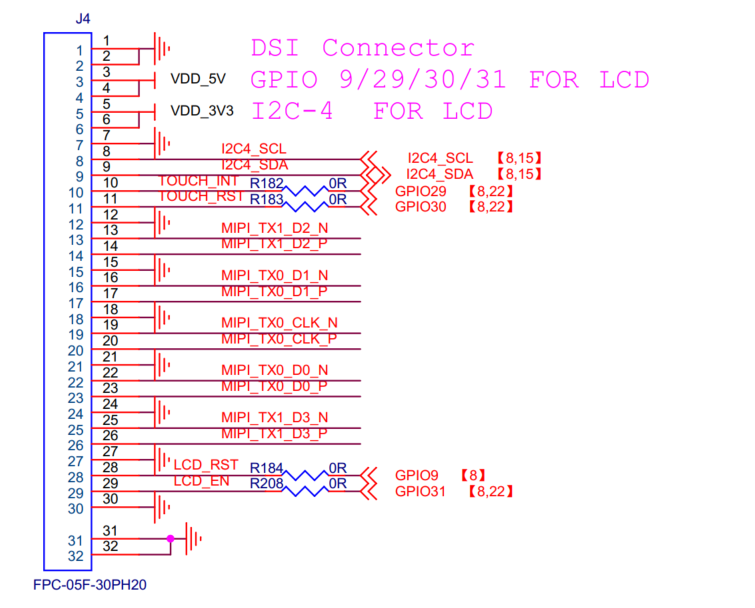
The screen touch I2C uses I2C4 (SCL: GPIO7, SDA: GPIO8)
Screen touch RST: GPIO29, INT: GPIO30
Screen RST: GPIO9, Backlight: GPIO31
The Mipi pins correspond one-to-one with the screen pins
Physical Diagram#
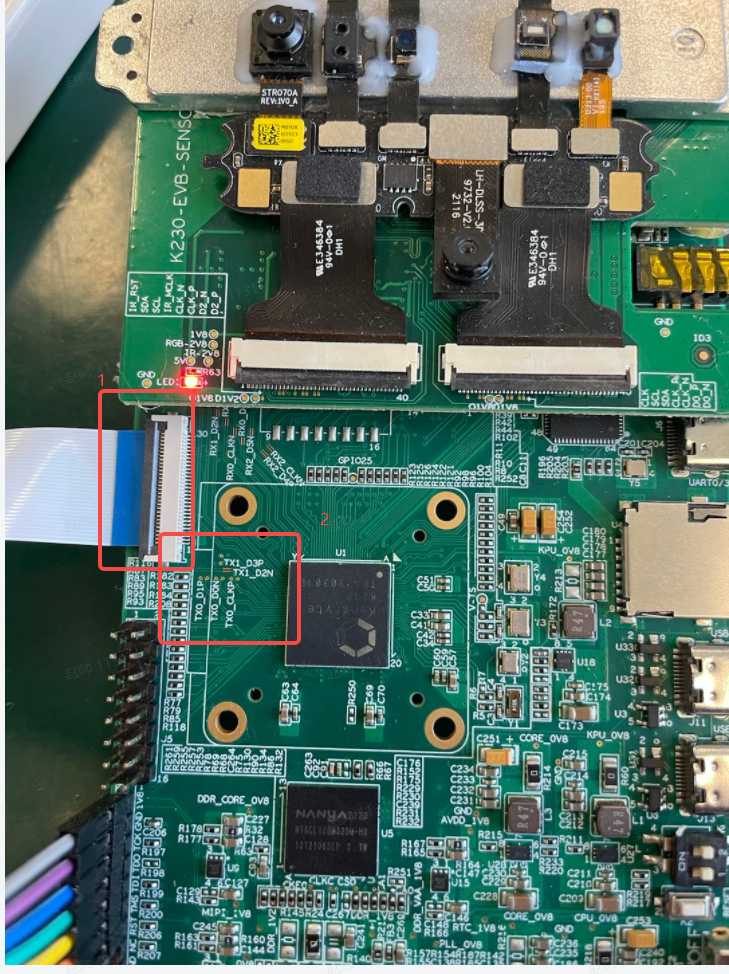
Item 1 in the figure is the Mipi interface, using a flexible flat cable
Item 2 in the figure is the Mipi signal test point, including four data lines and one CLK line
Software Description#
Video output software configuration is divided into 3 parts: phy configuration, dsi configuration, VO configuration,
PHY Configuration Process#
The phy frequency requires configuring three parameters: calculating PLL, configuring voc, and configuring freq. Based on these three parameters, the txphy frequency can be determined. The calculation of each parameter is as follows.
Calculating phy’s pll#
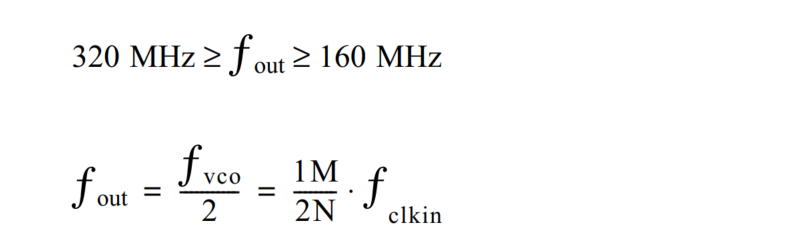
The data rate is given by twice the PLL output clock phase frequency: data rate (Gbps) = PLL Fout(GHz) * 2. The output frequency is a function of the input reference frequency and the multiplication/division ratio. Calculating the pll of phy is divided into 4 range calculations. Different frequencies correspond to different frequencies, which can be determined as follows:
M |
m+2 |
|---|---|
N |
n+1 |
Fclkin |
24M |
For:
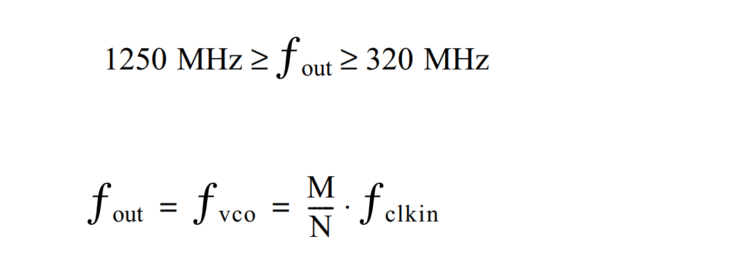
However, the following constraints need to be followed:
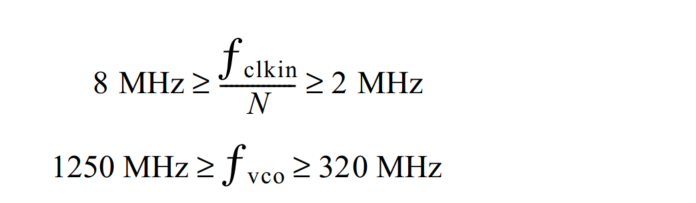
For:
For:


For:
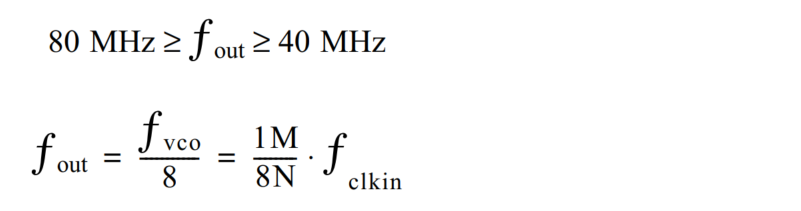
Each of the above for corresponds to a pll level. Different levels correspond to different calculation formulas and constraints. The calculation example is as follows:
Example:
The mipi rate is 445.5M: so the pll rate is 222.75M. The second formula should be selected. The calculation is as follows
222750000 = 1M / 2N = (m+2) / 2(n+1) * 24000000 , The finalized formula is as follows:
222.75n + 198.75 = 12m ,Calculated via excel as follows:
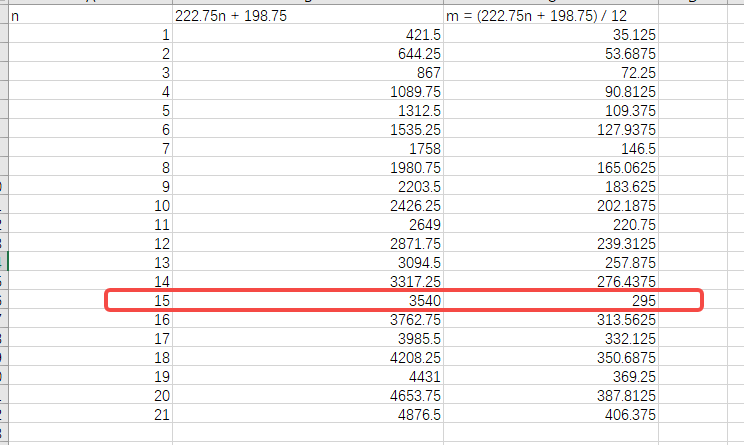
The result is m = 295 ,n = 15.
The m and n in the pll configuration are integer values. If all values are not integers, you need to add 1 and subtract 1 to the values of m and n, reverse-derive which frequency is closest to what you need, and then verify whether it is usable. If not, repeat the above operation.
Configuring phy’s voc#
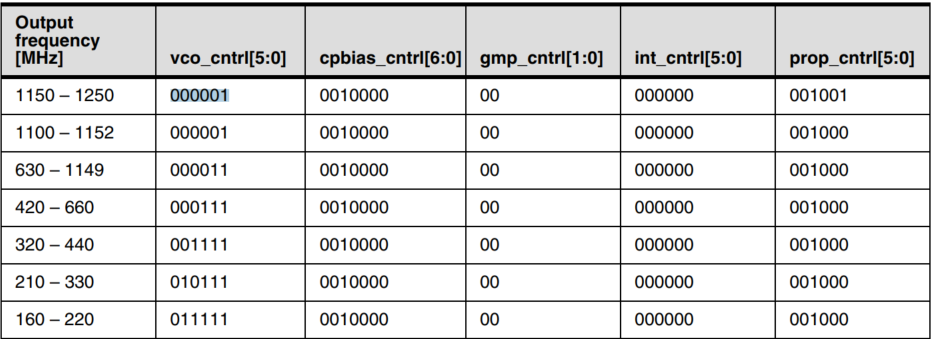
The voc for configuring phy can be found by querying the table:
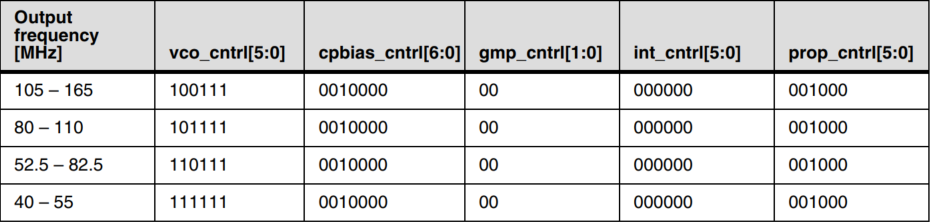
Example:
The mipi rate is 445.5M: so the pll rate is 222.75M, voc = 010111 = 0x17
Configuring freq#
The freq for configuring phy can be found by querying the table:
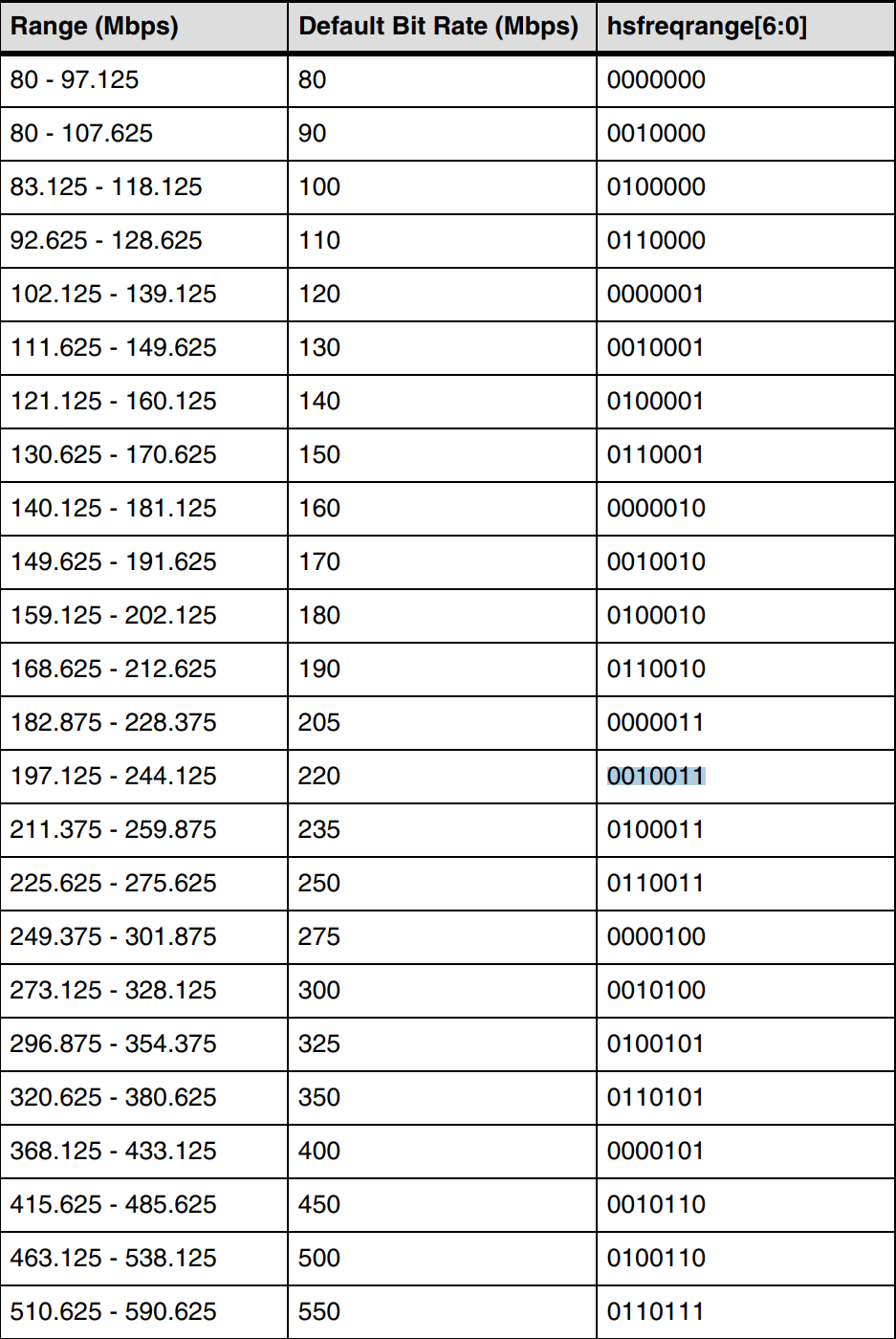
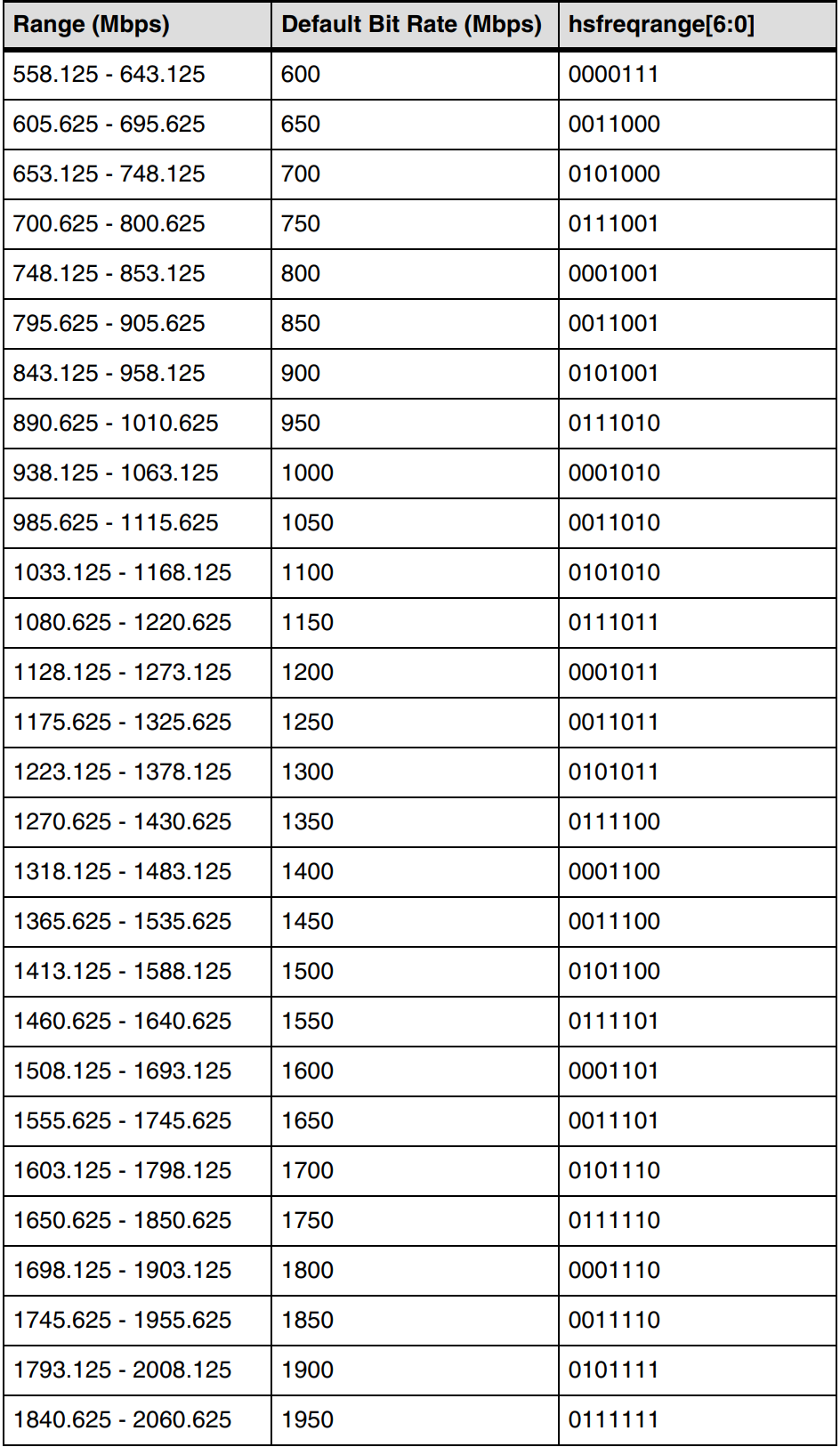
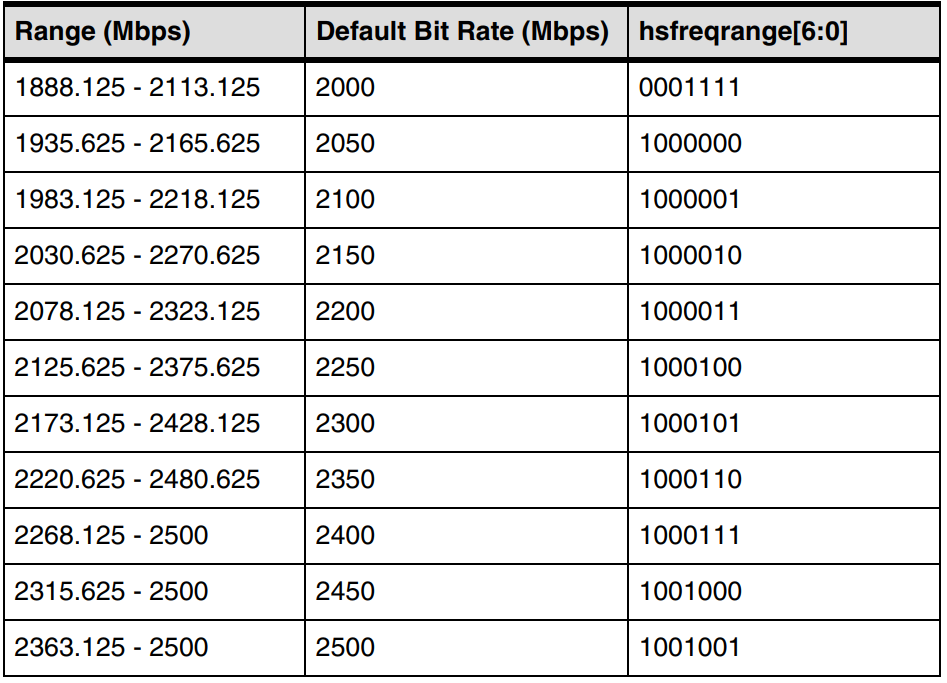
Example:
The mipi rate is 445.5M: the pll rate is 222.75M, freq selects 0100101, When configuring this, the highest bit bit[7] = 1 is required, so freq = 10100101= 0xa5
DSI Configuration#
DSI (Display Serial Interface) is part of a set of communication protocols defined by the MIPI Alliance. It is a digital controller that implements all protocol functions defined in the MIPI DSI specification, including a bidirectional PHY with two and four lanes.
DSI is primarily configured in software for screen display timing and command-sending functions.
Configuring Display Timing#
Each manufacturer’s screen has a set of timing parameters for screen control, primarily including frame control timing and line control timing, as shown in the following figures:
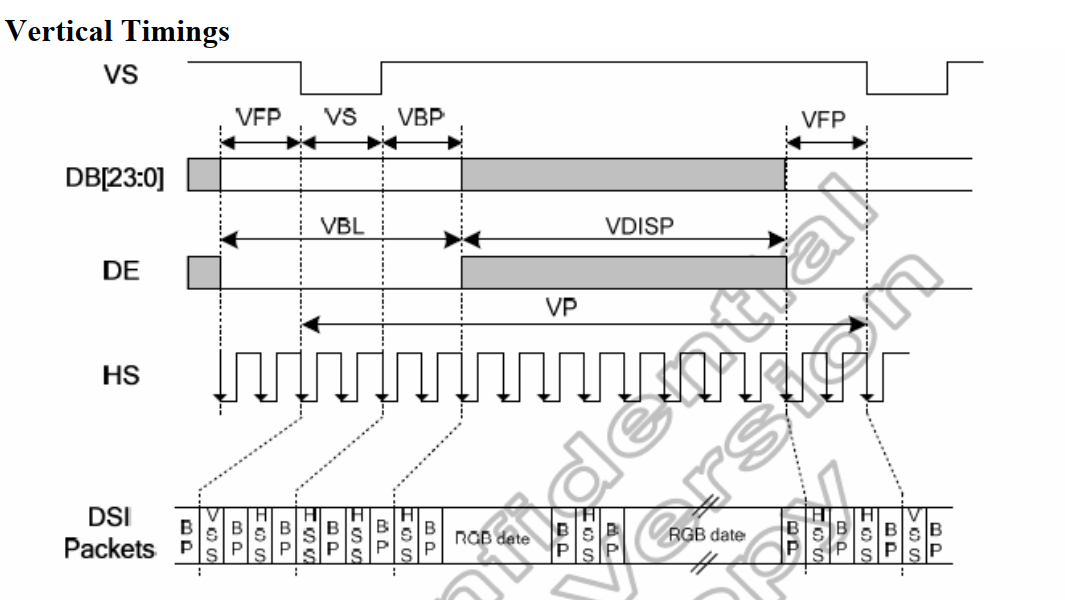
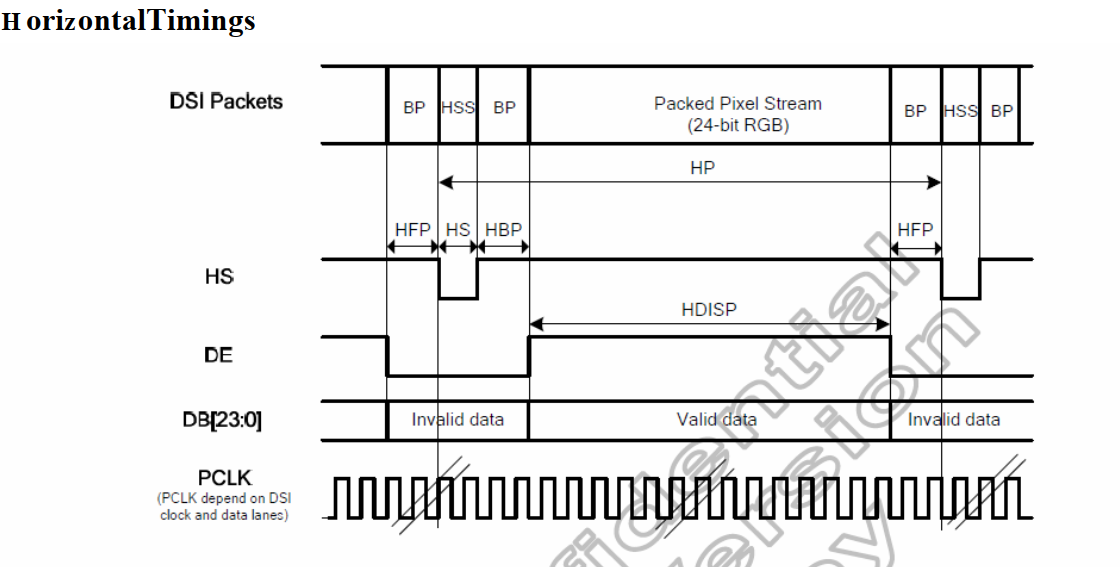
DSI also uses these parameters; the configured timing needs to be consistent with that of the screen.
DSI Command Sending#
The DSI needs to first enter LP mode, and then commands can be sent. The required APIs are as follows:
Data is sent in 8-bit units, and long or short packets will be automatically selected based on the quantity.
DSI Self-Test Mode#
The DSI self-test mode generates color bar data for transmission according to its own configured DSI timing, without depending on VO reading data from DDR. The test mode display is shown in the figure below:
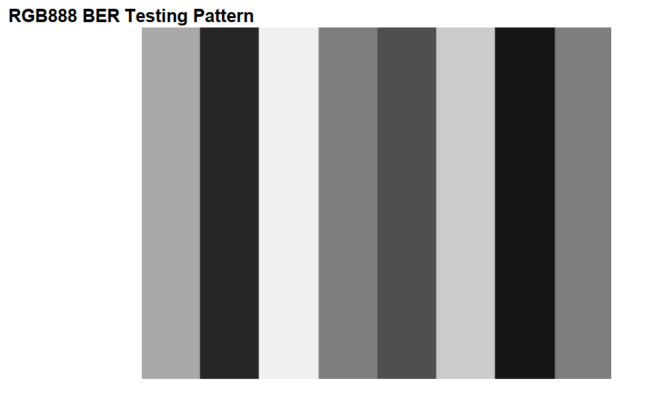
DSI and VO use a 24-bit interface, so the configured color bar produces the effect shown in the figure above. To use it, simply complete the DSI configuration and then enable the color bar. The API is as follows:
VO Configuration#
VO (video output) is mainly the VO (Video Output, video output) module that actively reads video and graphics data from the corresponding location in memory, and outputs video and graphics through the corresponding display device. The VO part contains two configurations, one is the timing configuration, and the other is the video layer configuration.
VO Timing Configuration#
The VO timing configuration and the dsi timing configuration use the same configuration parameters, with the same specific rows and columns. Please refer to the dsi timing introduction.
V1.2.3.2 O’s layer Configuration#
The VO layer currently supports 3 layer layers and 4 osd layers. The Layer layer can only display the yuv image format (the functions supported by layer0 and layer1 are in the diagram in Overview).
VO’s Write-back Function Configuration#
VO also supports the write-back function, which can verify whether the VO configuration is correct. After the VO configuration is completed, the data will be written back to ddr, making it convenient to verify whether the VO configuration is abnormal.
VO Module Debugging Methods#
Screen Testing Method#
You can use the LP command to configure the screen to enter self-test mode and check whether the generated image is normal
Use the LP command to read screen registers and check whether there is a return value
DSI Testing Method#
After configuring DSI, let the screen enter self-test mode, measure the signal to see whether it is normal, and you can also check whether the screen generates a color bar image
Check the err status register of phy to see whether there is an err status, which can be viewed through proc
VO Testing Method#
After VO configuration is completed, enable the writeback function and check whether it is consistent with the configuration requirements
Read the err status register of DSI to check whether underflow and overflow occur in data transmission between VO and DSI. If they occur, appropriately adjust the timing and try again
API Reference#
TXPHY#
This module provides the following APIs:
kd_mpi_set_mipi_phy_attr#
[Description]
Set the PHY frequency
[Syntax]
k_s32 kd_mpi_set_mipi_phy_attr(k_vo_mipi_phy_attr *attr)
[Parameters]
Parameter Name |
Description |
Input/Output |
|---|---|---|
attr |
PHY frequency structure description k_vo_mipi_phy_attr |
Input |
[Return Value]
Return Value |
Description |
|---|---|
0 |
Success. |
Non-0 |
Failure. See error codes. |
[Chip Differences]
None
[Requirements]
Header file: mpi_vo_api.h k_vo_comm.h
Library file: libvo.a
[Notes]
None
[Example]
None
[Related Topics]
None
DSI#
This function module provides the following APIs:
kd_mpi_dsi_set_attr#
【Description】
Configures dsi attribute parameters.
【Syntax】
k_s32 kd_mpi_dsi_set_attr(k_display_mode *attr)
Parameter |
Description |
Input/Output |
|---|---|---|
attr |
dsi attribute parameters |
Input |
【Return Value】
Return Value |
Description |
|---|---|
0 |
Success. |
Non-0 |
Failure, see error code. |
【Chip Differences】
None
【Requirements】
Header file: mpi_vo_api.h k_vo_comm.h
Library file: libvo.a
【Note】
None
【Example】
None
【Related Topics】
None
kd_mpi_dsi_enable#
【Description】
Enables dsi.
【Syntax】
k_s32 kd_mpi_dsi_enable(k_u32 enable)
【Parameters】
Parameter |
Description |
Input/Output |
|---|---|---|
enable |
dsi enable state (1: enable, 0: disable) |
Input |
【Return Value】
Return Value |
Description |
|---|---|
0 |
Success. |
Non-0 |
Failure, see error code. |
【Chip Differences】
None
【Requirements】
Header file: mpi_vo_api.h
Library file: libvo.a
【Note】
None
【Example】
None
【Related Topics】
None
kd_mpi_dsi_send_cmd#
【Description】
Dsi sends command.
【Syntax】
k_s32 kd_mpi_dsi_send_cmd(k_u8 *data, k_s32 cmd_len)
【Parameters】
Parameter |
Description |
Input/Output |
|---|---|---|
data |
Data to send |
Input |
cmd_len |
Data length |
Input |
【Return Value】
Return Value |
Description |
|---|---|
0 |
Success. |
Non-0 |
Failure, see error code. |
【Chip Differences】
None
【Requirements】
Header file: mpi_vo_api.h
Library file: libvo.a
【Note】
None
【Example】
None
【Related Topics】
None
kd_mpi_dsi_read_pkg#
【Description】
Dsi read command.
【Syntax】
k_s32 kd_mpi_dsi_read_pkg(k_u8 addr, k_u16 cmd_len, k_u32 *rv_data)
【Parameters】
Parameter |
Description |
Input/Output |
|---|---|---|
addr |
Received data |
Input |
cmd_len |
Data length |
Input |
rv_data |
Returned data |
Output |
【Return Value】
Return Value |
Description |
|---|---|
0 |
Success. |
Non-0 |
Failure, see error code. |
【Chip Differences】
None
【Requirements】
Header file: mpi_vo_api.h
Library file: libvo.a
【Note】
None
【Example】
None
【Related Topics】
None
kd_mpi_dsi_set_test_pattern#
【Description】
Configures dsi to enter self-test mode.
【Syntax】
k_s32 kd_mpi_dsi_set_test_pattern(void)
【Parameters】
None
【Return Value】
Return Value |
Description |
|---|---|
0 |
Success. |
Non-0 |
Failure, see error code. |
【Chip Differences】
None
【Requirements】
Header file: mpi_vo_api.h
Library file: libvo.a
【Note】
None
【Example】
None
【Related Topics】
None
VO#
kd_mpi_vo_draw_frame
kd_mpi_vo_init#
【Description】
Vo initializes default parameters.
【Syntax】
k_s32 kd_mpi_vo_init(void);
【Parameters】
None
【Return Value】
Return Value |
Description |
|---|---|
0 |
Success. |
Non-0 |
Failure, refer to error code. |
【Chip Differences】
None
【Requirements】
Header file: mpi_vo_api.h
Library file: libvo.a
【Note】
None
【Example】
None
【Related Topics】
None
kd_mpi_vo_set_dev_param#
【Description】
Dsi sends commands.
【Syntax】
k_s32 kd_mpi_vo_set_dev_param(k_vo_pub_attr *attr)
【Parameters】
Parameter Name |
Description |
Input/Output |
|---|---|---|
attr |
Pointer to the video output device public attribute structure. |
Input |
【Return Value】
Return Value |
Description |
|---|---|
0 |
Success. |
Non-0 |
Failure, refer to error code. |
【Chip Differences】
None
【Requirements】
Header file: mpi_vo_api.h k_vo_comm.h
Library file: libvo.a
【Note】
None
【Example】
None
【Related Topics】
None
kd_mpi_vo_enable_video_layer#
【Description】
Configures layer attribute parameters.
【Syntax】
k_s32 kd_mpi_vo_enable_video_layer([k_vo_layer](#k_vo_layer) layer)
【Parameters】
Parameter Name |
Description |
Input/Output |
|---|---|---|
layer |
Video output video layer number. Value range: [0 – K_MAX_VO_LAYER_NUM] |
Input |
【Return Value】
Return Value |
Description |
|---|---|
0 |
Success. |
Non-0 |
Failure, refer to error code. |
【Chip Differences】
None
【Requirements】
Header file: mpi_vo_api.h
Library file: libvo.a
【Note】
None
【Example】
None
【Related Topics】
None
kd_mpi_vo_disable_video_layer#
【Description】
Disables the video layer.
【Syntax】
k_s32 kd_mpi_vo_disable_video_layer([k_vo_layer](#k_vo_layer) layer)
【Parameters】
Parameter Name |
Description |
Input/Output |
|---|---|---|
layer |
Video output video layer number. Value range: [0 – K_MAX_VO_LAYER_NUM] |
Input |
【Return Value】
Return Value |
Description |
|---|---|
0 |
Success. |
Non-0 |
Failure, refer to error code. |
【Chip Differences】
None
【Requirements】
Header file:
Library file:
【Note】
None
【Example】
None
【Related Topics】
None
kd_mpi_vo_enable#
【Description】
Enables vo.
【Syntax】
k_u8 kd_mpi_vo_enable(void);
【Parameters】
None
【Return Value】
Return Value |
Description |
|---|---|
0 |
Success. |
Non-0 |
Failure, refer to error code. |
【Chip Differences】
None
【Requirements】
Header file:
Library file:
【Note】
None
【Example】
None
【Related Topics】
None
kd_mpi_vo_chn_insert_frame#
【Description】
Inserts a frame into the vo channel.
【Syntax】
k_s32 kd_mpi_vo_chn_insert_frame(k_u32 chn_num, [k_video_frame_info](#k_video_frame_info) *vf_info)
【Parameters】
Parameter Name |
Description |
Input/Output |
|---|---|---|
chn_num |
Channel number |
Input |
vf_info |
Pointer to the video frame structure. |
Input |
【Return Value】
Return Value |
Description |
|---|---|
0 |
Success. |
Non-0 |
Failure, refer to error code. |
【Chip Differences】
None
【Requirements】
Header file: mpi_vo_api.h k_video_comm.h
Library file: libvo.a
【Note】
None
【Example】
None
【Related Topics】
None
kd_mpi_vo_chn_dump_frame#
【Description】
Captures one frame of data from the vo channel.
【Syntax】
k_s32 kd_mpi_vo_chn_dump_frame(k_u32 chn_num, k_video_frame_info *vf_info, k_u32 timeout_ms);
【Parameters】
Parameter Name |
Description |
Input/Output |
|---|---|---|
chn_num |
Channel id |
Input |
vf_info |
Pointer to the video frame structure |
Input |
timeout_ms |
Timeout duration |
Input |
【Return Value】
Return Value |
Description |
|---|---|
0 |
Success. |
Non-0 |
Failure, refer to error code. |
【Chip Differences】
None
【Requirements】
Header file: mpi_vo_api.h k_video_comm.h
Library file: libvo.a
【Note】
None
【Example】
None
【Related Topics】
None
kd_mpi_vo_chn_dump_release#
【Description】
Releases the captured frame.
【Syntax】
k_s32 kd_mpi_vo_chn_dump_release(k_u32 chn_num, const k_video_frame_info *vf_info);
【Parameters】
Parameter Name |
Description |
Input/Output |
|---|---|---|
chn_num |
Channel id |
Input |
vf_info |
Pointer to the video frame structure |
Input |
【Return Value】
Return Value |
Description |
|---|---|
0 |
Success. |
Non-0 |
Failure, refer to error code. |
【Chip Differences】
None
【Requirements】
Header file: mpi_vo_api.h k_video_comm.h
Library file: libvo.a
【Note】
None
【Example】
None
【Related Topics】
None
kd_mpi_vo_osd_enable#
【Description】
Enables the osd layer.
【Syntax】
k_s32 kd_mpi_vo_osd_enable(k_vo_osd layer)
【Parameters】
Parameter Name |
Description |
Input/Output |
|---|---|---|
layer |
Video output video layer number. Value range: [0 – K_MAX_VO_OSD_NUM] |
Input |
【Return Value】
Return Value |
Description |
|---|---|
0 |
Success. |
Non-0 |
Failure, refer to error code. |
【Chip Differences】
None
【Requirements】
Header file: mpi_vo_api.h k_vo_comm.h
Library file: libvo.a
【Note】
None
【Example】
None
【Related Topics】
None
kd_mpi_vo_osd_disable#
【Description】
Disables the osd layer.
【Syntax】
k_s32 kd_mpi_vo_osd_disable(k_vo_osd layer)
【Parameters】
Parameter Name |
Description |
Input/Output |
|---|---|---|
layer |
Video output video layer number. Value range: [0 – K_MAX_VO_OSD_NUM] |
Input |
【Return Value】
Return Value |
Description |
|---|---|
0 |
Success. |
Non-0 |
Failure, refer to error code. |
【Chip Differences】
None
【Requirements】
Header file: mpi_vo_api.h k_vo_comm.h
Library file: libvo.a
【Note】
None
【Example】
None
【Related Topics】
None
kd_mpi_vo_set_video_osd_attr#
【Description】
Sets the osd layer attributes.
【Syntax】
k_s32 kd_mpi_vo_set_video_osd_attr(k_vo_osd layer, k_vo_video_osd_attr *attr)
【Parameters】
Parameter Name |
Description |
Input/Output |
|---|---|---|
layer |
Video output video layer number. Value range: [0 – K_MAX_VO_OSD_NUM] |
Input |
osd 层属性参数 |
osd layer attribute parameters |
Input |
【Return Value】
Return Value |
Description |
|---|---|
0 |
Success. |
Non-0 |
Failure, refer to error code. |
【Chip Differences】
None
【Requirements】
Header file: mpi_vo_api.h k_vo_comm.h
Library file: libvo.a
【Note】
None
【Example】
None
【Related Topics】
None
kd_mpi_vo_set_wbc_attr#
【Description】
Sets writeback attributes.
【Syntax】
k_s32 kd_mpi_vo_set_wbc_attr(k_vo_wbc_attr *attr)
【Parameters】
Parameter Name |
Description |
Input/Output |
|---|---|---|
attr |
writeback attribute parameters |
Input |
【Return Value】
Return Value |
Description |
|---|---|
0 |
Success. |
Non-0 |
Failure, refer to error code. |
【Chip Differences】
None
【Requirements】
Header file: mpi_vo_api.h k_vo_comm.h
Library file: libvo.a
【Note】
None
【Example】
None
【Related Topics】
None
kd_mpi_vo_enable_wbc#
【Description】
Enables writeback.
【Syntax】
k_s32 kd_mpi_vo_enable_wbc(void)
【Parameters】
None
【Return Value】
Return Value |
Description |
|---|---|
0 |
Success. |
Non-0 |
Failure, refer to error code. |
【Chip Differences】
None
【Requirements】
Header file: mpi_vo_api.h k_vo_comm.h
Library file: libvo.a
【Note】
None
【Example】
None
【Related Topics】
None
kd_mpi_vo_disable_wbc#
【Description】
Disables writeback.
【Syntax】
k_s32 kd_mpi_vo_disable_wbc(void)
【Parameters】
None
【Return Value】
Return Value |
Description |
|---|---|
0 |
Success. |
Non-0 |
Failure, refer to error code. |
【Chip Differences】
None
【Requirements】
Header file: mpi_vo_api.h k_vo_comm.h
Library file: libvo.a
【Note】
None
【Example】
None
【Related Topics】
None
kd_display_reset#
【Description】
Resets the video output subsystem.
【Syntax】
k_s32 kd_display_reset(void)
【Parameters】
None
【Return Value】
Return Value |
Description |
|---|---|
0 |
Success. |
Non-0 |
Failure, refer to error code. |
【Chip Differences】
None
【Requirements】
Header file: mpi_vo_api.h k_vo_comm.h
Library file: libvo.a
【Note】
None
【Example】
None
【Related Topics】
None
kd_display_set_backlight#
【Description】
Resets the screen and turns on the backlight.
【Syntax】
k_s32 kd_display_set_backlight(void)
【Parameters】
None
【Return Value】
Return Value |
Description |
|---|---|
0 |
Success. |
Non-0 |
Failure, refer to error code. |
【Chip Differences】
None
【Requirements】
Header file: mpi_vo_api.h k_vo_comm.h
Library file: libvo.a
【Note】
None
【Example】
None
【Related Topics】
None
kd_mpi_vo_set_user_sync_info#
【Description】
Sets user interface timing information, used to configure the clock source, clock size, and clock divider ratio.
【Syntax】
k_s32 kd_mpi_vo_set_user_sync_info(k_u32 pre_div,k_u32 clk_en)
【Parameters】
Parameter Name |
Description |
Input/Output |
|---|---|---|
pre_div |
User divider number |
Input |
clk_en |
Divider enable flag |
Input |
【Return Value】
Return Value |
Description |
|---|---|
0 |
Success. |
Non-0 |
Failure, refer to error code. |
【Chip Differences】
None
【Requirements】
Header file: mpi_vo_api.h k_vo_comm.h
Library file: libvo.a
【Note】
None
【Example】
None
【Related Topics】
None
kd_mpi_vo_draw_frame#
【Description】
Draws a frame.
【Syntax】
k_s32 kd_mpi_vo_draw_frame(k_vo_draw_frame *frame)
【Parameters】
Parameter Name |
Description |
Input/Output |
|---|---|---|
frame |
Frame attribute parameters |
Input |
【Return Value】
Return Value |
Description |
|---|---|
0 |
Success. |
Non-0 |
Failure, refer to error code. |
【Chip Differences】
None
【Requirements】
Header file: mpi_vo_api.h k_vo_comm.h
Library file: libvo.a
【Note】
None
【Example】
None
【Related Topics】
None
kd_mpi_get_connector_info#
【Description】
Gets the connector data structure by connection type.
【Syntax】
k_s32 kd_mpi_get_connector_info(k_connector_type connector_type, k_connector_info *connector_info)
【Parameters】
Parameter Name |
Description |
Input/Output |
|---|---|---|
connector_type |
Connector type |
Input |
connector_info |
Connector data structure |
Input |
【Return Value】
Return Value |
Description |
|---|---|
0 |
Success. |
Non-0 |
Failure, refer to error code. |
【Chip Differences】
None
【Requirements】
Header file: mpi_vo_api.h k_vo_comm.h k_connector_comm.h
Library file: libvo.a libconnector.a
【Note】
None
【Example】
None
【Related Topics】
None
kd_mpi_connector_open#
【Description】
Gets the connector data structure by connection type.
【Syntax】
k_s32 kd_mpi_connector_open(const char *connector_name)
【Parameters】
Parameter Name |
Description |
Input/Output |
|---|---|---|
connector_name |
Connector device node |
Input |
【Return Value】
Return Value |
Description |
|---|---|
fd |
Success, returns the id of the opened fd. |
Less than 0 |
Failure, refer to error code. |
【Chip Differences】
None
【Requirements】
Header file: mpi_vo_api.h k_vo_comm.h k_connector_comm.h
Library file: libvo.a libconnector.a
【Note】
None
【Example】
None
【Related Topics】
None
kd_mpi_connector_power_set#
【Description】
Turns on the connector power.
【Syntax】
k_s32 kd_mpi_connector_power_set(k_s32 fd, k_bool on)
【Parameters】
Parameter Name |
Description |
Input/Output |
|---|---|---|
fd |
Connector device node |
Input |
on |
Connector device switch |
Input |
【Return Value】
Return Value |
Description |
|---|---|
0 |
Success. |
Non-0 |
Failure, refer to error code. |
【Chip Differences】
None
【Requirements】
Header file: mpi_vo_api.h k_vo_comm.h k_connector_comm.h
Library file: libvo.a libconnector.a
【Note】
None
【Example】
None
【Related Topics】
None
kd_mpi_connector_init#
【Description】
Initializes vo connector.
【Syntax】
k_s32 kd_mpi_connector_init(k_s32 fd, k_connector_info info)
【Parameters】
Parameter Name |
Description |
Input/Output |
|---|---|---|
fd |
Connector device node |
Input |
info |
Connector initialization parameters |
Input |
【Return Value】
Return Value |
Description |
|---|---|
0 |
Success. |
Non-0 |
Failure, refer to error code. |
【Chip Differences】
None
【Requirements】
Header file: mpi_vo_api.h k_vo_comm.h k_connector_comm.h
Library file: libvo.a libconnector.a
【Note】
None
【Example】
None
【Related Topics】
None
kd_mpi_connector_get_negotiated_data#
【Description】
The Display driver automatically negotiates the resolution with the display, and saves the negotiated data to the negotiated_data variable after successful negotiation.
【Syntax】
k_s32 kd_mpi_connector_get_negotiated_data(k_s32 fd, k_connector_negotiated_data *negotiated_data);
【Parameters】
Parameter Name |
Description |
Input/Output |
|---|---|---|
fd |
File descriptor |
Input |
negotiated_data |
Data negotiated between the Display driver and the HDMI display |
Input |
【Return Value】
Return Value |
Description |
|---|---|
>= 1 |
Success, the number of resolutions supported by the Display driver after successful adaptation |
-1 |
Failure, refer to error code |
【Chip Differences】
None
【Requirements】
Header file: mpi_vo_api.h k_vo_comm.h k_connector_comm.h
Library file: libvo.a libconnector.a
【Note】
kd_mpi_connector_get_negotiated_data() only negotiates with the display, and will not set the optimal resolution to the VO, DSI, and HDMI modules after successful negotiation.
【Example】
None
【Related Topics】
None
kd_mpi_connector_adapt_resolution#
【Description】
The Display driver automatically negotiates the resolution with the display, and saves the negotiated data to the negotiated_data variable after successful negotiation. Meanwhile, it will set the optimal resolution to the VO, DSI, and HDMI modules.
【Syntax】
k_s32 kd_mpi_connector_adapt_resolution(k_connector_type type, k_connector_negotiated_data *negotiated_data)
【Parameters】
Parameter Name |
Description |
Input/Output |
|---|---|---|
type |
Connector device node; for HDMI interface, typically set to LT9611_MIPI_ADAPT_RESOLUTION |
Input |
negotiated_data |
Data negotiated between the Display driver and the HDMI display |
Input |
【Return Value】
Return Value |
Description |
|---|---|
0 |
Success |
-1 |
Failure, refer to error code |
【Chip Differences】
None
【Requirements】
Header file: mpi_vo_api.h k_vo_comm.h k_connector_comm.h
Library file: libvo.a libconnector.a
【Note】
1 kd_mpi_connector_adapt_resolution() internally negotiates with the display by calling kd_mpi_connector_get_negotiated_data().
2 After the application calls kd_mpi_connector_adapt_resolution() to complete the adaptive configuration, it can still call kd_mpi_get_connector_info(), kd_mpi_connector_open(), kd_mpi_connector_power_set(), kd_mpi_connector_init() to reconfigure the output resolution.
【Example】
None
【Related Topics】
None
kd_mpi_connector_set_mirror#
【Description】
Sets the screen mirror function.
【Syntax】
k_s32 kd_mpi_connector_set_mirror(k_s32 fd, k_connector_mirror mirror)
【Parameters】
Parameter Name |
Description |
Input/Output |
|---|---|---|
fd |
File descriptor |
Input |
mirror |
Screen mirror function |
Input |
【Return Value】
Return Value |
Description |
|---|---|
0 |
Success |
-1 |
Failure, refer to error code |
【Chip Differences】
None
【Requirements】
Header file: mpi_vo_api.h k_vo_comm.h k_connector_comm.h
Library file: libvo.a libconnector.a
【Note】
1 kd_mpi_connector_adapt_resolution() internally negotiates with the display by calling kd_mpi_connector_get_negotiated_data().
2 After the application calls kd_mpi_connector_adapt_resolution() to complete the adaptive configuration, it can still call kd_mpi_get_connector_info(), kd_mpi_connector_open(), kd_mpi_connector_power_set(), kd_mpi_connector_init() to reconfigure the output resolution.
【Example】
None
【Related Topics】
None
Data Types#
VO#
k_vo_intf_sync#
【Description】
Defines the resolution and frame rate in video.
【Definition】
typedef enum { K_VO_OUT_1080P30, K_VO_OUT_1080P60, } k_vo_intf_sync;
【Members】
Member Name |
Description |
|---|---|
K_VO_OUT_1080P30 |
1080 means 1920x1080 pixels. 30 means 30fps |
K_VO_OUT_1080P60 |
1080 means 1920x1080 pixels. 60 means 60fps |
K_VO_OUT_1080x1920P30 |
1080x1920 means 1080x1920 pixels. 30 means 30fps |
K_VO_OUT_11080x1920P60 |
1080x1920 means 1080x1920 pixels. 60 means 60fps |
【Notes】
None
【Related Data Types and Interfaces】
k_vo_intf_type#
【Description】
Defines the resolution and frame rate in video.
【Definition】
typedef enum { K_VO_INTF_MIPI = 0, } k_vo_intf_type;
【Members】
Member Name |
Description |
|---|---|
K_VO_INTF_MIPI |
Mipi interface |
【Notes】
None
【Related Data Types and Interfaces】
k_pixel_format#
【Description】
Data formats supported by the layer in display. The structures listed below only include the data formats supported by display, not all data formats.
【Definition】
typedef enum { PIXEL_FORMAT_RGB_444 = 0, PIXEL_FORMAT_RGB_555, PIXEL_FORMAT_RGB_565, PIXEL_FORMAT_RGB_888, PIXEL_FORMAT_BGR_444, PIXEL_FORMAT_BGR_555, PIXEL_FORMAT_BGR_565, PIXEL_FORMAT_BGR_888, PIXEL_FORMAT_ARGB_1555, PIXEL_FORMAT_ARGB_4444, PIXEL_FORMAT_ARGB_8565, PIXEL_FORMAT_ARGB_8888, PIXEL_FORMAT_ARGB_2BPP, PIXEL_FORMAT_ABGR_1555, PIXEL_FORMAT_ABGR_4444, PIXEL_FORMAT_ABGR_8565, PIXEL_FORMAT_ABGR_8888, PIXEL_FORMAT_BGRA_8888, PIXEL_FORMAT_RGB_MONOCHROME_8BPP, PIXEL_FORMAT_RGB_BAYER_8BPP, PIXEL_FORMAT_RGB_BAYER_10BPP, PIXEL_FORMAT_RGB_BAYER_12BPP, PIXEL_FORMAT_RGB_BAYER_14BPP, PIXEL_FORMAT_RGB_BAYER_16BPP, PIXEL_FORMAT_YVU_PLANAR_422, PIXEL_FORMAT_YVU_PLANAR_420, PIXEL_FORMAT_YVU_PLANAR_444, PIXEL_FORMAT_YVU_SEMIPLANAR_422, PIXEL_FORMAT_YVU_SEMIPLANAR_420, PIXEL_FORMAT_YVU_SEMIPLANAR_444, PIXEL_FORMAT_YUV_SEMIPLANAR_422, PIXEL_FORMAT_YUV_SEMIPLANAR_420, PIXEL_FORMAT_YUV_SEMIPLANAR_444, PIXEL_FORMAT_YUYV_PACKAGE_422, PIXEL_FORMAT_YVYU_PACKAGE_422, PIXEL_FORMAT_UYVY_PACKAGE_422, PIXEL_FORMAT_VYUY_PACKAGE_422, PIXEL_FORMAT_YYUV_PACKAGE_422, PIXEL_FORMAT_YYVU_PACKAGE_422, PIXEL_FORMAT_UVYY_PACKAGE_422, PIXEL_FORMAT_VUYY_PACKAGE_422, PIXEL_FORMAT_VY1UY0_PACKAGE_422, PIXEL_FORMAT_YUV_PACKAGE_444, PIXEL_FORMAT_YUV_400, PIXEL_FORMAT_UV_420, PIXEL_FORMAT_BGR_888_PLANAR, PIXEL_FORMAT_RGB_888_PLANAR, PIXEL_FORMAT_HSV_888_PACKAGE, PIXEL_FORMAT_HSV_888_PLANAR, PIXEL_FORMAT_LAB_888_PACKAGE, PIXEL_FORMAT_LAB_888_PLANAR, PIXEL_FORMAT_S8C1, PIXEL_FORMAT_S8C2_PACKAGE, PIXEL_FORMAT_S8C2_PLANAR, PIXEL_FORMAT_S8C3_PLANAR, PIXEL_FORMAT_S16C1, PIXEL_FORMAT_U8C1, PIXEL_FORMAT_U16C1, PIXEL_FORMAT_S32C1, PIXEL_FORMAT_U32C1, PIXEL_FORMAT_U64C1, PIXEL_FORMAT_S64C1, PIXEL_FORMAT_RGB_565_LE = 300, PIXEL_FORMAT_BGR_565_LE, PIXEL_FORMAT_BUTT } k_pixel_format;
【Members】
Member Name |
Description |
|---|---|
PIXEL_FORMAT_YVU_PLANAR_420 |
YUV420 NV12 |
PIXEL_FORMAT_YVU_PLANAR_422 |
YUV422 NV16 |
PIXEL_FORMAT_RGB_565 |
RGB565 |
PIXEL_FORMAT_RGB_888 |
RGB888 |
PIXEL_FORMAT_RGB_MONOCHROME_8BPP |
8 BIT RGB |
PIXEL_FORMAT_ARGB_8888 |
ARGB8888 |
PIXEL_FORMAT_ARGB_4444 |
ARGB4444 |
PIXEL_FORMAT_ARGB_1555 |
ARGB1444 |
【Notes】
None
【Related Data Types and Interfaces】
None
k_vo_osd#
【Description】
Number of OSDs and the index of each OSD.
【Definition】
typedef enum { K_VO_OSD0, K_VO_OSD1, K_VO_OSD2, K_VO_OSD3, K_MAX_VO_OSD_NUM, } k_vo_osd;
【Members】
Member Name |
Description |
|---|---|
K_VO_OSD0 |
OSD layer 0 |
K_VO_OSD1 |
OSD layer 1 |
K_VO_OSD2 |
OSD layer 2 |
K_VO_OSD3 |
OSD layer 3 |
K_MAX_VO_OSD_NUM |
Maximum number flag of OSD layers |
【Notes】
None
【Related Data Types and Interfaces】
None
k_vo_layer#
【Description】
Number of layers and the index of each layer.
【Definition】
typedef enum { K_VO_LYAER0 = 0, K_VO_LYAER1, K_VO_LYAER2, K_MAX_VO_LAYER_NUM, } k_vo_layer;
Members】
Member Name |
Description |
|---|---|
K_VO_LYAER0 |
Layer 0 |
K_VO_LYAER1 |
Layer 1 |
K_VO_LYAER2 |
Layer 2 |
K_VO_LYAER3 |
Layer 3 |
K_MAX_VO_LAYER_NUM |
Maximum number flag of layers |
【Notes】
None
【Related Data Types and Interfaces】
None
k_vo_rotation#
【Description】
Functions supported by Layer rotation.
【Definition】
typedef enum { K_ROTATION_0 = (0x01L << 0), K_ROTATION_90 = (0x01L << 1), K_ROTATION_180 = (0x01L << 2), K_ROTATION_270 = (0x01L << 3), } k_vo_rotation;
【Notes】
None
【Related Data Types and Interfaces】
None
k_vo_mirror_mode#
【Description】
Functions supported by Layer mirror.
【Definition】
typedef enum { K_VO_MIRROR_NONE = (0x01L << 4), K_VO_MIRROR_HOR = (0x01L << 5), K_VO_MIRROR_VER = (0x01L << 6), K_VO_MIRROR_BOTH = (0x01L << 7), } k_vo_mirror_mode;
【Members】
Member Name |
Description |
|---|---|
K_VO_MIRROR_NONE |
Layer does not perform mirror |
K_VO_MIRROR_HOR |
Layer performs only horizontal mirror |
K_VO_MIRROR_VER |
Layer performs only vertical mirror |
K_VO_MIRROR_BOTH |
Layer performs both vertical and horizontal mirror |
【Notes】
None
【Related Data Types and Interfaces】
None
k_vo_user_sync_info#
【Description】
User-defined clock division.
【Definition】
typedef struct { k_u32 pre_div; k_u32 clk_en;
} k_vo_user_sync_info;
【Members】
Member Name |
Description |
|---|---|
pre_div |
Clkext division |
clk_en |
Display clock enable |
【Notes】
None
【Related Data Types and Interfaces】
None
k_vo_point#
【Description】
Defines the coordinate information structure.
【Definition】
typedef struct { k_u32 x; k_u32 y; }k_vo_point;
【Members】
Member Name |
Description |
|---|---|
x |
X coordinate |
y |
Y coordinate |
【Notes】
None
【Related Data Types and Interfaces】
None
k_vo_size#
【Description】
Defines the size information structure.
【Definition】
typedef struct { k_u32 width; k_u32 height; } k_vo_size;
【Members】
Member Name |
Description |
|---|---|
width |
Width |
height |
Height |
【Notes】
None
【Related Data Types and Interfaces】
None
k_vo_video_layer_attr#
【Description】
Defines the display layer attributes.
【Definition】
typedef struct { k_vo_point display_rect; k_vo_size img_size; k_pixel_format pixel_format; k_u32 stride; k_u32 func; k_vo_scaler_attr scaler_attr;
} k_vo_video_layer_attr;
【Members】
Member Name |
Description |
|---|---|
display_rect; |
The start position of the OSD layer |
img_size |
The image resolution structure, i.e., the size of the composited image |
pixel_format |
Data formats supported by the video layer |
stride |
The image stride |
func |
Set the rotation angle (0, 90, 180, 270) |
scaler_attr |
Scaling settings |
【Notes】
alptha_tpye is only used for OSD layers.
【Related Data Types and Interfaces】
None
k_vo_wbc_attr#
【Description】
Defines the writeback attributes.
【Definition】
typedef struct { k_vo_size target_size; k_pixel_format pixel_format; k_u32 stride; k_u32 y_phy_addr; } k_vo_wbc_attr;
【Members】
Member Name |
Description |
|---|---|
target_size |
Target size of writeback |
pixel_format |
Data format of writeback |
stride; |
Stride of writeback |
y_addr |
Physical address for image writeback |
【Notes】
y_addr needs to allocate space.
【Related Data Types and Interfaces】
None
k_vo_pub_attr#
【Description】
Configures public attributes of the video output device.
【Definition】
typedef struct { k_u32 bg_color; k_vo_intf_type intf_type; k_vo_intf_sync intf_sync; k_vo_display_resolution *sync_info; }k_vo_pub_attr;
【Members】
Member Name |
Description |
bg_color |
Background color |
type |
Interface type, currently only supports MIPI |
intf_sync |
Resolution and frame rate in video |
sync_info |
Timing of image output |
【Notes】
None
【Related Data Types and Interfaces】
None
k_vo_scaler_attr#
【Description】
Defines scaler attributes.
【Definition】
typedef struct{ k_size out_size; k_u32 stride; }k_vo_scaler_attr;
【Members】
Member Name |
Description |
|---|---|
out_size |
Output size |
stride |
Input stride |
【Notes】
None
【Related Data Types and Interfaces】
None
k_vo_draw_frame#
【Description】
Defines the attributes of the drawing frame.
【Definition】
typedef struct { k_u32 draw_en; k_u32 line_x_start; k_u32 line_y_start; k_u32 line_x_end; k_u32 line_y_end; k_u32 frame_num; }k_vo_draw_frame;
【Members】
Member Name |
Description |
|---|---|
draw_en |
Frame drawing enable |
line_x_start |
Start in the X direction |
line_y_start |
Start in the Y direction |
line_x_end |
End in the X direction |
line_y_end |
End in the Y direction |
frame_num |
Number of the current frame 【0 - 16】 |
【Notes】
None
【Related Data Types and Interfaces】
None
k_vo_display_resolution#
【Description】
Display timing attributes.
【Definition】
typedef struct{ k_u32 pclk; k_u32 phyclk; k_u32 htotal; k_u32 hdisplay; k_u32 hsync_len; k_u32 hback_porch; k_u32 hfront_porch; k_u32 vtotal; k_u32 vdisplay; k_u32 vsync_len; k_u32 vback_porch; k_u32 vfront_porch; } k_vo_display_resolution;
【Members】
Member Name |
Description |
|---|---|
pclk |
Vo pix clk frequency |
phyclk |
d-phy frequency |
htotal |
Total pixels per line |
hdisplay |
Number of valid pixels per line |
hsync_len |
Number of pixels for line synchronization |
hback_porch |
Number of pixels for back porch |
hfront_porch |
Number of pixels for front porch |
vtotal |
Total number of lines |
vdisplay |
Number of valid lines per frame |
vsync_len |
Number of pixels for frame synchronization |
vback_porch |
Number of lines for back porch |
vfront_porch |
Number of lines for front porch |
【Notes】
None
【Related Data Types and Interfaces】
None
k_vo_mipi_phy_attr#
【Description】
Defines the structure of MIPI PHY frequency.
【Definition】
typedef struct { k_u32 n; k_u32 m; k_u32 voc; k_u32 phy_lan_num; k_u32 hs_freq; } k_vo_mipi_phy_attr;
【Members】
Member Name |
Description |
|---|---|
n |
Pll coefficient |
m |
Pll coefficient |
voc |
Pll coefficient |
phy_lan_num |
Number of Phy lanes |
hs_freq |
Frequency range of Phy |
【Notes】
None
【Related Data Types and Interfaces】
None
k_vo_video_osd_attr#
【Description】
Configures public attributes of the OSD layer.
【Definition】
typedef struct { k_vo_point display_rect; k_vo_size img_size; k_pixel_format pixel_format; k_u32 stride; k_u8 global_alptha; } k_vo_video_osd_attr;
【Members】
Member Name |
Description |
|---|---|
display_rect |
Position information |
img_size |
Valid size |
pixel_format |
Data format |
stride; |
Stride |
global_alptha |
Transparency |
【Notes】
None
【Related Data Types and Interfaces】
None
k_video_frame_info#
【Description】
Information of one frame.
【Definition】
typedef struct { k_video_frame v_frame; k_u32 pool_id; k_mod_id mod_id; } k_video_frame_info;
【Members】
Member Name |
Description |
|---|---|
v_frame |
Frame information |
pool_id |
VB pool ID |
mod_id |
Video frame id |
【Notes】
None
【Related Data Types and Interfaces】
None
k_connector_type#
【Description】
Type of connected screen (as supported screens will be added, please refer to the latest definition in the SDK).
【Definition】
typedef enum { HX8377_V2_MIPI_4LAN_1080X1920_30FPS; LT9611_MIPI_4LAN_1920X1080_60FPS; LT9611_MIPI_4LAN_1920X1080_30FPS; } k_connector_type;
【Members】
Member Name |
Description |
|---|---|
v_frame |
Frame information |
HX8377_V2_MIPI_4LAN_1080X1920_30FPS |
hx8377 screen initialization |
LT9611_MIPI_4LAN_1920X1080_60FPS |
hdmi 1080p60 initialization |
LT9611_MIPI_4LAN_1920X1080_30FPS |
hdmi 1080p30 initialization |
【Notes】
None
【Related Data Types and Interfaces】
None
k_dsi_lan_num#
【Description】
Number of DSI lanes.
【Definition】
typedef enum { K_DSI_1LAN = 0, K_DSI_2LAN = 1, K_DSI_4LAN = 3, } k_dsi_lan_num;
【Members】
Member Name |
Description |
|---|---|
K_DSI_1LAN |
1-lane mode |
K_DSI_2LAN |
2-lane mode |
K_DSI_4LAN |
4-lane mode |
【Notes】
None
【Related Data Types and Interfaces】
None
k_dsi_work_mode#
【Description】
DSI working mode.
【Definition】
typedef enum{ K_BURST_MODE = 0, K_NON_BURST_MODE_WITH_SYNC_EVENT = 1, K_NON_BURST_MODE_WITH_PULSES = 2, } k_dsi_work_mode;
【Members】
Member Name |
Description |
|---|---|
K_BURST_MODE |
DSI works in burst mode |
K_NON_BURST_MODE_WITH_SYNC_EVENT |
DSI works in non-burst event mode |
K_NON_BURST_MODE_WITH_PULSES |
DSI works in non-burst pulses mode |
【Notes】
None
【Related Data Types and Interfaces】
None
k_vo_dsi_cmd_mode#
【Description】
Mode for DSI sending commands.
【Definition】
typedef enum { K_VO_LP_MODE, K_VO_HS_MODE, } k_vo_dsi_cmd_mode;
【Members】
Member Name |
Description |
|---|---|
K_VO_LP_MODE |
Send commands in LP mode |
K_VO_HS_MODE |
Send commands in HS mode |
【Notes】
None
【Related Data Types and Interfaces】
None
k_connectori_phy_attr#
【Description】
PHY configuration information of the connector.
【Definition】
typedef struct { k_u32 n; k_u32 m; k_u32 voc; k_u32 hs_freq; } k_connectori_phy_attr;
【Members】
Member Name |
Description |
|---|---|
n |
Pll coefficient |
m |
Pll coefficient |
voc |
Pll coefficient |
hs_freq |
Frequency range of Phy |
【Notes】
None
【Related Data Types and Interfaces】
None
k_connector_info#
【Description】
Information of the connector.
【Definition】
typedef struct { const char *connector_name; k_u32 screen_test_mode; k_u32 dsi_test_mode; k_u32 bg_color; k_u32 intr_line; k_u32 pixclk_div; k_dsi_lan_num lan_num; k_dsi_work_mode work_mode; k_vo_dsi_cmd_mode cmd_mode; k_connectori_phy_attr phy_attr; k_vo_display_resolution resolution; k_connector_type type; } k_connector_info;
【Members】
Member Name |
Description |
|---|---|
connector_name |
Device node of the connector |
screen_test_mode |
Screen test mode |
dsi_test_mode |
DSI test mode |
bg_color |
Background color |
intr_line |
Screen lines |
pixclk_div |
Clock division number |
lan_num |
Lan mode setting: 1LAN, 2LAN, 4LAN |
work_mode |
Working mode |
cmd_mode |
Command mode |
phy_attr |
Physical address of display |
resolution |
Resolution |
k_connector_info |
Information of the current connector |
【Notes】
None
【Related Data Types and Interfaces】
None
k_connector_negotiated_data#
【Description】
Data negotiated between Display driver and HDMI display.
【Definition】
typedef struct { k_u32 connection_status; k_u32 negotiated_count; k_connector_type negotiated_types[256]; } k_connector_negotiated_data;
【Members】
Member Name |
Description |
|---|---|
connection_status |
HDMI interface connection status |
negotiated_count |
Number of resolutions supported by the Display driver after negotiation between the Display driver and HDMI display |
negotiated_types[256] |
List of resolutions supported by the Display driver after negotiation between the Display driver and HDMI display. negotiated_types[0] indicates the best resolution |
【Notes】
None
【Related Data Types and Interfaces】
None
k_connector_mirror#
【Description】
Mirror function of the Display driver.
【Definition】
typedef enum { K_CONNECTOR_MIRROR_HOR = 1, K_CONNECTOR_MIRROR_VER, K_CONNECTOR_MIRROR_BOTH, }k_connector_mirror;
【Members】
Member Name |
Description |
|---|---|
K_CONNECTOR_MIRROR_HOR |
Horizontal mirror |
K_CONNECTOR_MIRROR_VER |
Vertical mirror |
K_CONNECTOR_MIRROR_BOTH |
Both horizontal and vertical mirror |
【Notes】
None
【Related Data Types and Interfaces】
None
Error Codes#
Table 41 VO API Error Codes
Error Code |
Macro Definition |
Description |
|---|---|---|
0xa00b8006 |
K_ERR_VO_NULL_PTR |
Parameter null pointer error |
0xa00b8001 |
K_ERR_VO_INVALID_DEVID |
Invalid dev id |
0xa00b8002 |
K_ERR_VO_INVALID_CHNID |
Invalid chn id |
0xa00b8005 |
K_ERR_VO_UNEXIST |
Video buffer does not exist |
0xa00b8004 |
K_ERR_VO_EXIST |
Video buffer exists |
0xa00b8003 |
K_ERR_VO_ILLEGAL_PARAM |
Invalid parameter setting |
0xa00b8010 |
K_ERR_VO_NOTREADY |
vo not ready yet |
0xa00b8012 |
K_ERR_VO_BUSY |
System busy |
0xa00b8007 |
K_ERR_VO_NOT_CONFIG |
Configuration not allowed |
0xa00b8008 |
K_ERR_VO_NOT_SUPPORT |
Unsupported operation |
0xa00b8009 |
K_ERR_VO_NOT_PERM |
Operation not allowed |
0xa00b800c |
K_ERR_VO_NOMEM |
Failed to allocate memory |
0xa00b800d |
K_ERR_VO_NOBUF |
No buff |
0xa00b800e |
K_ERR_VO_BUF_EMPTY |
Buf is empty |
0xa00b800f |
K_ERR_VO_BUF_FULL |
Buf is full |
0xa00b8011 |
K_ERR_VO_BADADDR |
Incorrect address |
0xa00b8012 |
K_ERR_VO_BUSY |
System busy |