
K230 Integrated Demo - Single-Channel Smart IPC#
Function Overview#
The single-channel smart IPC system is an intelligent monitoring system that integrates network streaming, screen rendering, and face recognition functions. The system requires only one camera to achieve the following functions:
Real-time image display and face recognition: Real-time display of camera image through HDMI output or LCD screen, and detection and annotation of faces in the image.
Network video streaming: Stream the real-time image of the camera over the network. Clients can view the real-time video through the network stream URL. Note: The streamed image can include face recognition annotation information, or only transmit the original video.
Usage Instructions#
The project source code is located in the directory /src/rtsmart/examples/integrated_poc/smart_ipc.
You can enable compilation of this example through menuconfig:
Enter RT-Smart UserSpace Examples Configuration → Check Enable build integrated examples → Further enable Smart IPC examples.
After successful compilation, the generated executable file will be deployed to the following path on the target device:
/sdcard/app/examples/integrated_poc/smart_ipc/smart_ipc.elf
On the target device, the single-channel smart IPC system can be started with the following command:
/sdcard/app/examples/integrated_poc/smart_ipc/smart_ipc.elf [options]
Example:
Using HDMI output:
./smart_ipc.elf -C 0
Using LCD output:
./smart_ipc.elf -C 1
View help parameter information:
./smart_ipc.elf -H
The following is a detailed description of command line parameters:
Option |
Description |
Default |
|---|---|---|
|
Display help information |
- |
|
sensor type (default auto-detect sensor type) |
SENSOR_TYPE_MAX |
|
Whether to enable audio capture (enabled by default) |
1 |
|
Audio sample rate |
8000 |
|
Audio channel count |
1 |
|
Video codec type, h264/h265 |
h264 |
|
Video encoding width |
1280 |
|
Video encoding height |
720 |
|
Video encoding bitrate (kbps) |
2000 |
|
Encoding data source 0: Get original image encoding from sensor channel 1: Get composite image encoding from vo wbc |
0 |
|
Video output connector type (0:HDMI,1:LCD) |
HDMI |
|
AI analysis input width |
1280 |
|
AI analysis input height |
720 |
|
kmodel file path |
face_detection_320.kmodel |
|
Face detection threshold |
0.6 |
|
Face detection NMS threshold |
0.4 |
|
Whether to enable screen rendering function (0:disable, 1:enable) |
1 |
|
Whether to enable ai analysis function (0:disable, 1:enable) |
1 |
|
Whether to enable video encoding streaming function (0:disable, 1:enable) |
1 |
Key Code Analysis#
The project source code is located in the directory /src/rtsmart/examples/integrated_poc/smart_ipc. This directory contains the following key modules and files:
face_detection: Face detection module, implements face recognition function.media.cpp: Media processing implementation file, encapsulates all MPI interfaces, used for initialization and startup of basic modules such as camera, display, and audio/video codec.media.h: Media processing header file, declares media processing related interfaces and classes.smart_ipc.cpp: Smart IPC system main program, implements system initialization and startup logic.smart_ipc.h: Smart IPC system header file, definesMySmartIPCclass and related interfaces.
The MySmartIPC class encapsulates all functions of the smart camera system. In the main function, you only need to instantiate this class and call the init and start methods to start the system.
Inside the MySmartIPC class, by calling the MPI interface encapsulated in KdMedia, the initialization of the VB buffer and functions such as camera, display, and audio/video codec are completed. By initializing these underlying MPI interfaces, the following data callbacks can be obtained:
Video encoding data:
OnVEncDataAudio encoding data:
OnAEncDataVideo data input to the AI module:
OnAIFrameData
In addition, the MySmartIPC class also references the KdRtspServer and FaceDetection classes, which implement network streaming of audio/video and face recognition functions respectively. In the OnAIFrameData method, FaceDetection is called to implement face recognition, and the detection results are displayed on the OSD layer of VO; in the OnVEncData and OnAEncData callbacks, KdRtspServer is called to implement network streaming of audio/video data.
Data Pipeline#
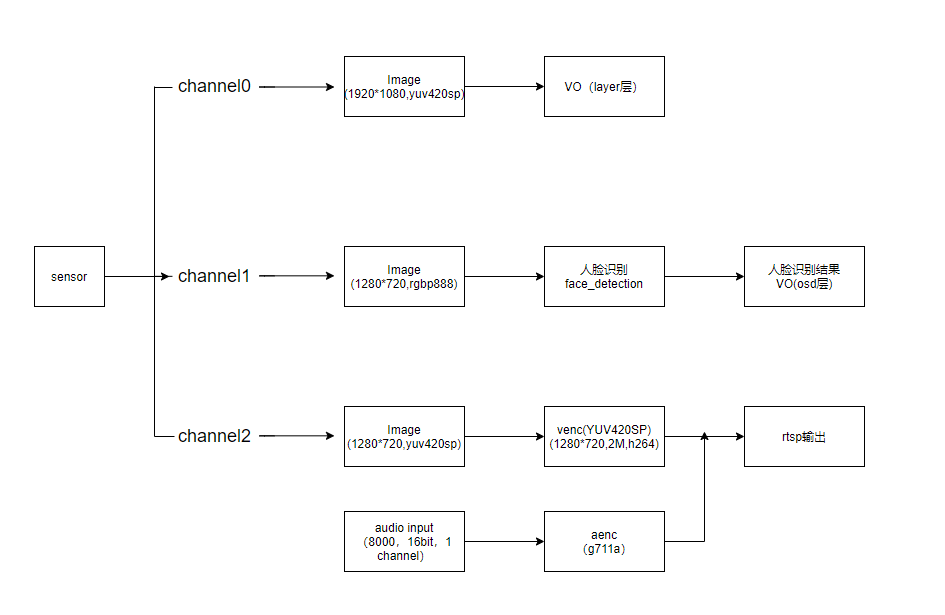
This data pipeline shows the workflow of the single-channel smart IPC system. The system enables three channels of the camera, which are used for HDMI/LCD screen output, face recognition data input, and encoding streaming respectively.
Camera input: The camera captures real-time video data, and the video data is divided into three channels for processing.
HDMI/LCD output: One channel of video data is displayed in real-time through the HDMI or LCD screen.
Face recognition: Another channel of video data is input to the AI module for face detection and recognition. The detected face information will be annotated on the video image and displayed on the HDMI/LCD screen.
Encoding streaming: 1) Transmit only original video: The last channel of video data is directly encoded and then streamed over the network. Note that the video data streamed under this scheme only contains the original image without any face recognition annotation information. 2) Transmit the composite image with AI analysis results: First obtain the composite image with AI analysis results overlaid from VO WBC (video output / composition module), then encode the composite image, and finally stream it over the network. Under this scheme, the streaming data will completely carry the face recognition and other related results produced by AI analysis.
This pipeline ensures that the video data captured by the camera can be simultaneously used for local display, face recognition, and network streaming, meeting various application requirements.
Operation Demo#
To obtain the real-time stream image of the camera through the network on the PC, please ensure that the development board is connected to the network and has obtained a valid IP address. You can check the network configuration by following these steps:
After starting the development board, enter
ifconfigin the serial port to check whether the current development board’s IP address is valid.Ensure that the development board and PC are network-interconnected. Enter
ping <PC_IP>on the development board to check the network connection.
If you need to output the image through HDMI, please connect the HDMI output port to a monitor. If you need to output the image through the LCD screen, please connect the LCD screen to the development board. After completing the above preparations, start the development board and execute the following commands:
cd /sdcard/app/examples/integrated_poc/smart_ipc
./smart_ipc.elf -C 0 -D 0 # HDMI output, rtsp transmits original image
./smart_ipc.elf -C 1 -D 1 # LCD output, rtsp transmits composite image with AI analysis results
At the same time, check the serial port output, there will be a prompt “Play this stream using the URL rtsp://<IP>:8554/test”. Open this URL using VLC player on the PC to receive the real-time image through the network.
