
USB Host NIC Configuration Guide#
Feature Overview#
K230 RT-Smart uses the CherryUSB Host driver for USB NICs and registers the detected interfaces with lwIP and RT-Thread netdev. The main device types currently supported are as follows:
Device |
USB Driver |
Typical Use |
|---|---|---|
RTL8152 and compatible NICs |
Dedicated RTL8152 driver |
USB wired NIC |
CH397 |
CDC ECM or CDC NCM |
USB wired NIC |
LTE modules |
CDC ECM or CDC NCM |
Data network ports on modules such as EC200 and ML307 |
USB NICs use the first available name in probe order, within the range of eth0 to eth9. Interface names are not bound to
the chip model; when using multiple network devices simultaneously, first use ifconfig to confirm the actual names.
Note
This document describes the network interface on the USB Host side. The SIM card, APN, network registration, and dialing parameters of LTE modules still need to be configured according to the module vendor’s documentation, and the module’s current USB composite mode must enumerate an ECM or NCM interface.
Common Configuration#
First load the target board configuration in the SDK root directory, and then enter the RT-Smart configuration interface:
make <board>_defconfig
make rtsmart-menuconfig
Navigate to the following path:
Components Configuration
    -> Enable CherryUSB
        -> Enable CherryUSB Host
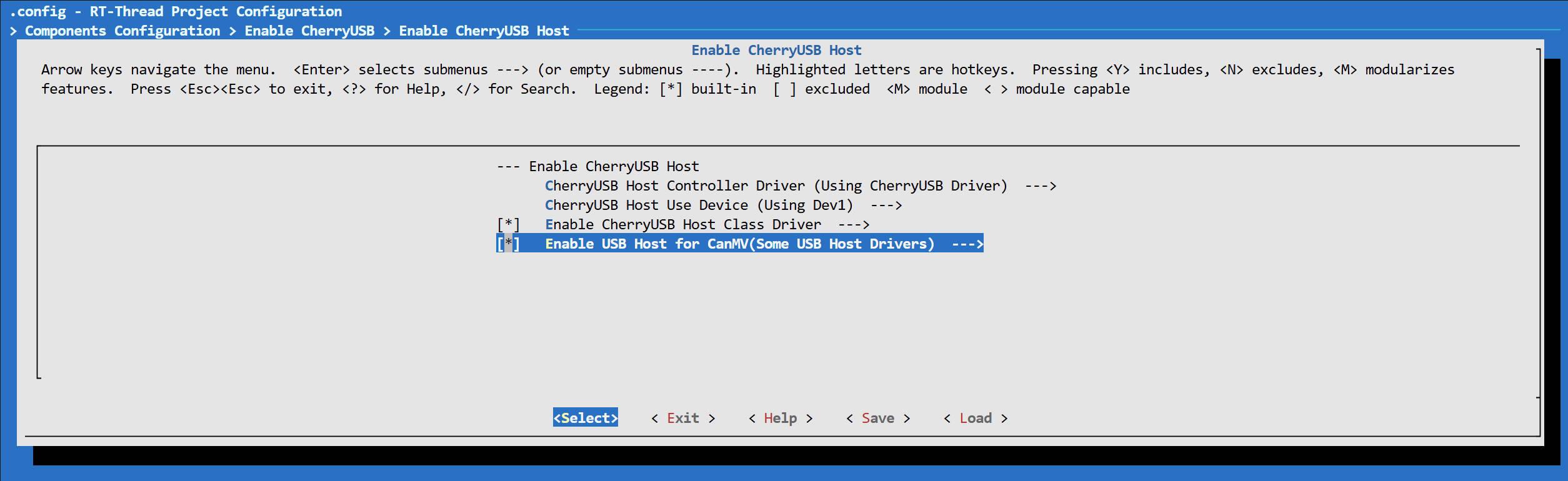
Complete the following common settings:
Enable
Enable CherryUSB Host.In
CherryUSB Host Use Device, select the USB controller to which the NIC is actually connected.Enable
Enable CherryUSB Host Class Driver.Enable
Enable USB Host for CanMV(Some USB Host Drivers).
The last option not only selects some CanMV USB drivers, but also causes app_canmv to initialize the Host controller,
so it cannot be omitted in non-OTG configurations. This option automatically selects the RTL8152 driver, so it is normal for the RTL8152 option to be enabled at the same time in the final configuration when using only
ECM/NCM devices.
If USB Device is also enabled in the firmware, Host and Device must select different controllers. The development board’s
USB ports, controller numbers, and VBUS enable GPIOs all depend on the hardware design. The existing CanMV USB Host Power Control GPIO setting in the target board’s
defconfig must be retained; GPIO values from other development boards cannot be applied directly.
Selecting the NIC Driver#
RTL8152#
Under Enable CherryUSB Host Class Driver, enable:
Enable net RTL8152
    -> Enable Link Down Check
Enable USB Host for CanMV(Some USB Host Drivers) automatically selects
Enable net RTL8152. It is recommended to also enable Enable Link Down Check so that the link state can be synchronized to netdev promptly after a network cable is plugged or unplugged.
The corresponding key configuration items are:
CONFIG_CHERRY_USB_HOST_ENABLE_CLASS_NET_RTL8152=y
CONFIG_CHERRY_USB_RTL8152_LINKCHECK=y
CH397#
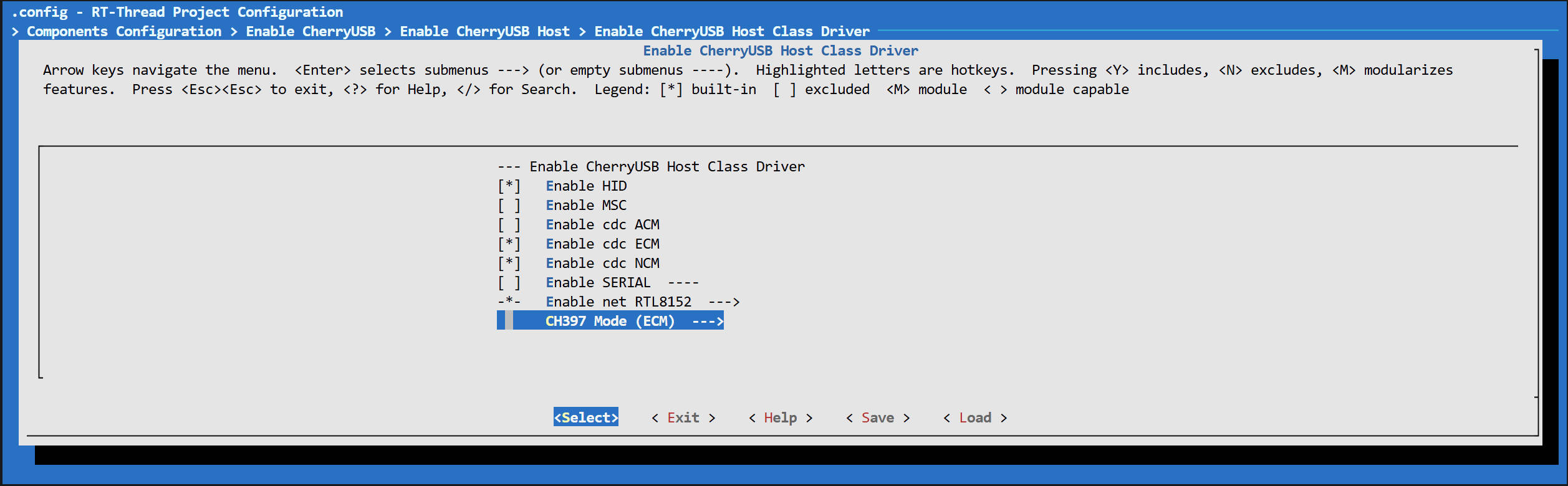
CH397 (USB VID/PID 1a86:5397) provides three USB configurations: Vendor, ECM, and NCM. The Host driver selects one of them according to CH397 Mode, so the selected mode must match
the CDC driver compiled into the firmware.
ECM is recommended:
Enable CherryUSB Host Class Driver
    -> Enable cdc ECM
    -> CH397 Mode
        -> ECM
The corresponding configuration is:
CONFIG_CHERRY_USB_HOST_ENABLE_CLASS_CDC_ECM=y
CONFIG_CHERRY_USB_HOST_CH397_MODE_ECM=y
If NCM is needed, enable Enable cdc NCM and select NCM in CH397 Mode:
CONFIG_CHERRY_USB_HOST_ENABLE_CLASS_CDC_NCM=y
CONFIG_CHERRY_USB_HOST_CH397_MODE_NCM=y
You cannot switch only CH397 Mode without enabling the corresponding CDC ECM/NCM driver. The ECM and NCM drivers can be
compiled simultaneously, but CH397 can select only one of these modes for each enumeration.
LTE Modules#
First confirm the type of network interface provided by the module’s current USB composite mode, and then enable the corresponding driver:
Module Enumerated Interface |
Option to Enable |
Configuration Item |
|---|---|---|
CDC ECM |
|
|
CDC NCM |
|
|
Common configurations for modules such as EC200 and ML307 use ECM, but the configuration may differ among firmware versions or USB composite modes within the same series.
The actual USB descriptors and vendor manual should be used as the authoritative reference. CH397 Mode applies only to CH397 devices with VID/PID
1a86:5397 and does not change the mode of LTE modules.
If you also need to set the APN, query the network registration status, or switch the USB composite mode through the AT port, you can additionally enable:
Enable CherryUSB Host Class Driver
    -> Enable SERIAL
        -> Enable serial EC200M/A7680C or Other Compatible
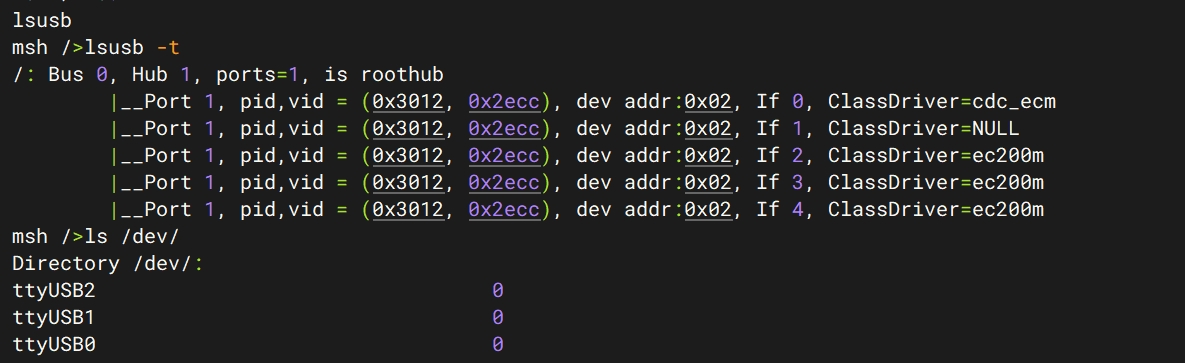
A compatible Vendor Serial port is usually registered as /dev/ttyUSBx. If the module provides a standard CDC ACM
port, you also need to enable Enable cdc ACM; the device is usually registered as /dev/ttyACMx. The serial driver and
ECM/NCM network driver are independent of each other; enabling the serial driver itself does not establish a cellular data connection.
Network Stack Configuration#
USB network adapters depend on lwIP and netdev. Confirm that the following options are enabled in the configuration:
CONFIG_RT_USING_LWIP=y
CONFIG_RT_LWIP_DHCP=y
CONFIG_RT_USING_NETDEV=y
CONFIG_NETDEV_USING_IFCONFIG=y
RT_USING_NETDEV is usually selected automatically by SAL, while DHCP and ifconfig are enabled by default. When manually
checking, you can search for the above configuration options in menuconfig.
After saving the configuration, rebuild and flash the firmware. To make the changes persistent in the target board defconfig, follow the SDK’s
board-level configuration maintenance process to run make savedefconfig.
Runtime Verification#
After inserting the device, first check the USB enumeration logs. Upon successful binding, registration information for the RTL8152, CDC ECM, or CDC NCM class driver will appear, followed by a log similar to:
registered LAN interface as eth0
Run the following command to view the link, address, gateway, and DNS:
ifconfig
After enabling RT_LWIP_DHCP, DHCP starts when the interface is registered. If no address is obtained after the link is established, you can retrigger DHCP using
the actual interface name displayed by ifconfig:
ifconfig eth0 dhcp
You can also temporarily configure a static IPv4 address:
ifconfig eth0 <ip-address> <gateway-address> <netmask>
Finally, verify the gateway and external address:
ping <gateway-address>
ping <external-ip-address>
In a multi-NIC environment, the interface marked as Default by ifconfig serves as the default route. Do not assume that a USB
network adapter is always eth0 or the default interface; applications can query the LAN
interface through NetMgmt’s RT_NET_DEV_LAN.
Troubleshooting#
The USB device does not enumerate at all: Confirm that the Host controller actually connected is selected, and check the VBUS power supply, cable, and board-level
CANMV_USB_PWR_PINconfiguration.The USB VID/PID is present, but there is no
ethN: Confirm that the RTL8152, CDC ECM, or CDC NCM driver matching the device descriptor is enabled, as well asEnable USB Host for CanMV.CH397 enumerates but does not bind to a network driver: Check whether
CH397 Modematches the enabled ECM/NCM driver.The device selects config 1in the enumeration log indicates ECM, whileconfig 2indicates NCM.The LTE module only exposes a serial port and no network adapter: The module’s current USB composite mode does not provide ECM/NCM, or the cellular data session has not yet been established. First verify the USB mode, SIM, APN, and network registration status through the AT port.
The interface has a link but no IPv4 address: Confirm that DHCP is enabled, run
ifconfig ethN dhcp, and check whether the upstream router or LTE module provides a DHCP service.The status does not update after unplugging or reconnecting the Ethernet cable: Enable
Enable Link Down Checkfor RTL8152; ECM/NCM devices must also be confirmed to report the network connection status correctly through USB notifications.
Source Locations#
USB Host configuration:
src/rtsmart/rtsmart/kernel/bsp/maix3/components/KconfigRT-Smart network adapter adaptation:
src/rtsmart/rtsmart/kernel/bsp/maix3/components/canmv_usb/CherryUSB class drivers:
src/rtsmart/rtsmart/kernel/bsp/maix3/components/CherryUSB/class/