
Sensor Module API Manual#
Attention
This module has undergone significant changes since firmware version V0.7. If you are using firmware prior to V0.7, please refer to the older version documentation.
Overview#
The sensor module of the CanMV K230 platform is responsible for image acquisition and data processing. This module provides a set of high-level APIs that allow developers to easily obtain images of different formats and sizes without needing to understand the underlying hardware implementation. Its architecture is shown in the figure below:
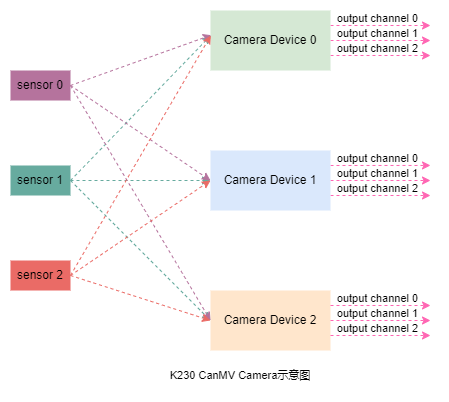
In the figure, sensor 0, sensor 1, and sensor 2 represent three image input sensor devices; Camera Device 0, Camera Device 1, and Camera Device 2 correspond to the respective image processing units; output channel 0, output channel 1, and output channel 2 indicate that each image processing unit supports up to three output channels. Through software configuration, different sensor devices can be flexibly mapped to the corresponding image processing units.
The sensor module of CanMV K230 supports up to three image sensors connected simultaneously, each of which can independently perform image data acquisition, capture, and processing. In addition, each video channel can output three streams of image data in parallel for further processing by backend modules. In practical applications, the specific number of supported sensors, input resolution, and number of output channels will be limited by the hardware configuration and memory size of the development board, so a comprehensive evaluation based on project requirements is necessary.
API Introduction#
Constructor#
Description
Construct a Sensor object via csi id and image sensor type.
In image processing applications, users typically need to first create a Sensor object. The CanMV K230 software can automatically detect built-in image sensors without requiring users to manually specify a specific model; users only need to set the sensor’s maximum output resolution and frame rate. For information on supported image sensors, please refer to the Image Sensor Support List. If the set resolution or frame rate does not match the current sensor’s default configuration, the system will automatically adjust to the optimal configuration. The final configuration can be viewed in the log, for example, use sensor 23, output 640x480@90.
When the same resolution/frame rate has both 2LANE and 4LANE modes available, lane_pref can be used to specify the detection preference; the default prioritizes matching 2LANE.
Syntax
sensor = Sensor(id=None, width=1920, height=1080, fps=60, lane_pref=VICAP_MIPI_2LANE, ...)
Parameters
Parameter Name |
Description |
Input/Output |
Notes |
|---|---|---|---|
id |
|
Input |
Optional, default value varies by development board model |
width |
Maximum output image width of the |
Input |
Optional, default |
height |
Maximum output image height of the |
Input |
Optional, default |
fps |
Maximum output image frame rate of the |
Input |
Optional, default |
lane_pref |
MIPI lane preference during auto-detection |
Input |
Optional, default |
type |
Fixed sensor type enumeration; skip auto-detection when specified |
Input |
Optional |
Note
lane_pref only accepts VICAP_MIPI_ANY / VICAP_MIPI_2LANE / VICAP_MIPI_4LANE (0/1/2); invalid values will raise ValueError.
Return Value
Return Value |
Description |
|---|---|
Sensor Object |
Sensor object |
Example
from media.sensor import *
from mpp.vicap import VICAP_MIPI_2LANE, VICAP_MIPI_4LANE

sensor = Sensor(id=0)
sensor = Sensor(id=0, width=1280, height=720, fps=60)
sensor = Sensor(id=0, width=640, height=480)
# Force 2LANE at the same resolution (default behavior, can be omitted)
sensor = Sensor(id=0, width=2592, height=1944, fps=30, lane_pref=VICAP_MIPI_2LANE)
# Force 4LANE at the same resolution
sensor = Sensor(id=0, width=2592, height=1944, fps=30, lane_pref=VICAP_MIPI_4LANE)
sensor.reset#
Description
Reset the sensor object. After constructing a Sensor object, this function must be called before performing other operations.
Syntax
sensor.reset()
Parameters
Parameter Name |
Description |
Input/Output |
|---|---|---|
None |
Return Value
Return Value |
Description |
|---|---|
None |
Example
# Initialize sensor device 0 and sensor OV5647
sensor.reset()
sensor.set_framesize#
Description
Set the output image size for the specified channel. Users can configure the output image size via the framesize parameter or by directly specifying width and height. The width is automatically aligned to 16 pixels wide.
Syntax
sensor.set_framesize(framesize=FRAME_SIZE_INVALID, chn=CAM_CHN_ID_0, alignment=0, crop = None, **kwargs)
Parameters
Parameter Name |
Description |
Input/Output |
|---|---|---|
framesize |
sensor output image size |
Input |
chn |
sensor output channel number |
Input |
width |
output image width, kw_arg |
Input |
height |
output image height, kw_arg |
Input |
crop |
output image crop region; |
Input |
Return Value
Return Value |
Description |
|---|---|
None |
Notes
The output image size must not exceed the actual output capability of the image sensor.
The maximum output image size of each channel is limited by hardware.
Example
# Configure sensor device 0, output channel 0, output image size 640x480
sensor.set_framesize(chn=CAM_CHN_ID_0, width=640, height=480)

# Configure sensor device 0, output channel 1, output image size 320x240
sensor.set_framesize(chn=CAM_CHN_ID_1, width=320, height=240)
sensor.set_pixformat#
Description
Configure the image format output by the image sensor for the specified channel.
Syntax
sensor.set_pixformat(pix_format, chn=CAM_CHN_ID_0)
Parameters
Parameter Name |
Description |
Input/Output |
|---|---|---|
pix_format |
Output image format |
Input |
chn |
sensor output channel number |
Input |
Return Value
Return Value |
Description |
|---|---|
None |
Example
# Configure sensor device 0, output channel 0, output NV12 format
sensor.set_pixformat(sensor.YUV420SP, chn=CAM_CHN_ID_0)

# Configure sensor device 0, output channel 1, output RGB888 format
sensor.set_pixformat(sensor.RGB888, chn=CAM_CHN_ID_1)
sensor.set_hmirror#
Description
Configure whether the image sensor performs horizontal mirroring.
Syntax
sensor.set_hmirror(enable)
Parameters
Parameter Name |
Description |
Input/Output |
|---|---|---|
enable |
|
Input |
Return Value
Return Value |
Description |
|---|---|
None |
Example
sensor.set_hmirror(True)
sensor.set_vflip#
Description
Configure whether the image sensor performs vertical flipping.
Syntax
sensor.set_vflip(enable)
Parameters
Parameter Name |
Description |
Input/Output |
|---|---|---|
enable |
|
Input |
Return Value
Return Value |
Description |
|---|---|
None |
Example
sensor.set_vflip(True)
sensor.run#
Description
Start the output of the image sensor. This operation must be performed after calling MediaManager.init().
Syntax
sensor.run()
Return Value
Return Value |
Description |
|---|---|
None |
Notes
When using multiple sensors simultaneously (up to 3), only one of them needs to call
run.
Example
# Start the data stream output of the sensor device
sensor.run()
sensor.stop#
Description
Stop the output of the image sensor. This method must be called before MediaManager.deinit().
Syntax
sensor.stop()
Return Value
Return Value |
Description |
|---|---|
None |
Notes
If multiple image sensors are used simultaneously (up to 3), each sensor must call
stopseparately.
Example
# Stop the data stream output of sensor device 0
sensor.stop()
sensor.snapshot#
Description
Capture one frame of image data from the specified output channel.
Syntax
sensor.snapshot(chn=CAM_CHN_ID_0, timeout = 1000, dump_frame = False)
Parameters
Parameter Name |
Description |
Input/Output |
|---|---|---|
chn |
sensor output channel number |
Input |
timeout |
sensor timeout for capturing one frame, default 1000 ms |
Input |
dump_frame |
If True returns py_video_frame_info, otherwise returns Image |
Input |
Return Value
Return Value |
Description |
|---|---|
image object or py_video_frame_info |
Captured image data |
Other |
Capture failed |
Example
# Capture one frame of image data from channel 0 of sensor device 0
sensor.snapshot()
sensor.bind_info#
Description
Get the binding information of the sensor channel for binding with other modules (such as the display module).
Syntax
sensor.bind_info(x=0, y=0, chn=CAM_CHN_ID_0)
Parameters
Parameter Name |
Description |
Input/Output |
|---|---|---|
x |
Horizontal start coordinate of the binding area |
Input |
y |
Vertical start coordinate of the binding area |
Input |
chn |
Sensor output channel number |
Input |
Return Value
Return Value |
Description |
|---|---|
dict object |
Contains the channel’s source information, area size, and pixel format |
Example
# Get the binding information of sensor channel 0
info = sensor.bind_info(chn=CAM_CHN_ID_0)
print(info)  # Output e.g., {'src': (0, 0, 0), 'rect': (0, 0, 640, 480), 'pix_format': 2}
sensor.get_hmirror#
Description
Get the current enable status of the horizontal mirroring function.
Syntax
sensor.get_hmirror()
Return Value
Return Value |
Description |
|---|---|
bool |
|
Example
hmirror_enabled = sensor.get_hmirror()
print("Horizontal mirroring enabled:", hmirror_enabled)
sensor.get_vflip#
Description
Get the current enable status of the vertical flip function.
Syntax
sensor.get_vflip()
Return Value
Return Value |
Description |
|---|---|
bool |
|
Example
vflip_enabled = sensor.get_vflip()
print("Vertical flip enabled:", vflip_enabled)
sensor.width#
Description
Get the current output image width of the specified channel.
Syntax
sensor.width(chn=CAM_CHN_ID_0)
Parameters
Parameter Name |
Description |
Input/Output |
|---|---|---|
chn |
Sensor output channel number |
Input |
Return Value
Return Value |
Description |
|---|---|
int |
Image width (pixels) |
Example
current_width = sensor.width(chn=CAM_CHN_ID_0)
print("Current width:", current_width)
sensor.height#
Description
Get the current output image height of the specified channel.
Syntax
sensor.height(chn=CAM_CHN_ID_0)
Parameters
Parameter Name |
Description |
Input/Output |
|---|---|---|
chn |
Sensor output channel number |
Input |
Return Value
Return Value |
Description |
|---|---|
int |
Image height (pixels) |
Example
current_height = sensor.height(chn=CAM_CHN_ID_0)
print("Current height:", current_height)
sensor.get_pixformat#
Description
Get the current pixel format of the specified channel.
Syntax
sensor.get_pixformat(chn=CAM_CHN_ID_0)
Parameters
Parameter Name |
Description |
Input/Output |
|---|---|---|
chn |
Sensor output channel number |
Input |
Return Value
Return Value |
Description |
|---|---|
int |
Pixel format enumeration value (e.g., |
Example
current_format = sensor.get_pixformat(chn=CAM_CHN_ID_0)
print("Current pixel format:", current_format)
sensor.get_type#
Description Get the type identifier of the current sensor.
Syntax
sensor.get_type()
Return Value
Return Value |
Description |
|---|---|
int |
Sensor type enumeration value |
Example
sensor_type = sensor.get_type()
print("Sensor type:", sensor_type)
sensor.again#
Description
Get or set the analog gain value of the sensor.
Syntax
# Get gain
gain = sensor.again()

# Set gain (pass a float value directly)
sensor.again(desired_gain)
Parameters
Parameter Name |
Description |
Input/Output |
|---|---|---|
desired_gain |
Target gain value (used when setting), passed directly as a float |
Input |
Return Value
Return Value |
Description |
|---|---|
k_sensor_gain |
Current gain object (returned when getting), access gain value via |
bool |
Returns |
Notes
Only supported by certain sensors, such as
sc132gsEnsure the sensor is initialized and running when setting gain
It is recommended to call
get_again_range()first to get the gain range
Example
# Get current gain
current_gain = sensor.again()
print("Current gain:", current_gain.gain[0])

# Set gain to 4.0
sensor.again(4.0)
sensor.auto_focus#
Description
Get or set the enable status of the auto-focus function.
Syntax
Sensor.auto_focus(enable = None)
Parameters
Parameter Name |
Description |
Input/Output |
|---|---|---|
enable |
Enable status of the auto-focus function (used when setting) |
Input |
Return Value
Return Value |
Description |
|---|---|
bool |
When getting: returns the current status: |
Example
# Get auto-focus status
auto_focus_get = sensor.auto_focus()
print("sensor.auto_focus():", auto_focus_get)

# Set auto-focus
sensor.auto_focus(True)
Notes
Only supported by certain sensors.
The auto-focus function must be set before running.
sensor.focus_caps#
Description
Get the auto-focus function and its range of the sensor.
Syntax
focus_caps_tuple = Sensor.focus_caps()
Parameters
None
Return Value
Return Value |
Description |
|---|---|
focus_caps_tuple |
A tuple containing the auto-focus function and its range: |
Example
# Get auto-focus function and its range
focus_caps_tuple = sensor.focus_caps()
print("focus_caps_tuple:", focus_caps_tuple)
sensor.focus_pos#
Description
Get or set the current focus position of the sensor.
Syntax
focus_pos = sensor.focus_pos(pos = None)
Parameters
Parameter Name |
Description |
Input/Output |
|---|---|---|
pos |
Focus position (used when setting) |
Input |
Return Value
Return Value |
Description |
|---|---|
focus_pos |
When getting: returns the current focus position; |
Example
# Get current focus position
current_focus_pos = sensor.focus_pos()
print("Current focus position:", current_focus_pos)

# Set focus position
sensor.focus_pos(300)
sensor.get_exposure_time_range#
Description
Get the exposure time range supported by the sensor.
Syntax
sensor.get_exposure_time_range()
Parameters
None
Return Value
Return Value |
Description |
|---|---|
|
|
|
If retrieval fails |
Example
from media.sensor import Sensor

sensor = Sensor()
sensor.reset()

# Get exposure range
range = sensor.get_exposure_time_range()
if range:
    max_exp, min_exp = range
    print(f"Exposure range: {min_exp:.2f} us - {max_exp:.2f} us")
    print(f"               ({min_exp/1000:.2f} ms - {max_exp/1000:.2f} ms)")
Notes
The return value unit is microseconds (us)
Different sensors support different exposure ranges
It is recommended to get the range before setting exposure
Must be called after
sensor.run()
sensor.auto_exposure#
Description
Turn on/off auto exposure or get the current auto exposure status.
Syntax
# Get current status
status = sensor.auto_exposure()

# Set status
sensor.auto_exposure(enable)
Parameters
Parameter Name |
Description |
Input/Output |
|---|---|---|
enable |
|
Input |
Return Value
Return Value |
Description |
|---|---|
|
Current auto exposure status (returns |
Exception
RuntimeError: If the sensor is not initialized
Example
from media.sensor import Sensor

sensor = Sensor()
sensor.reset()

# Get current auto exposure status
status = sensor.auto_exposure()
print(f"Auto exposure: {'Enabled' if status else 'Disabled'}")

# Disable auto exposure (manual mode) - must be before run()!
sensor.auto_exposure(False)

# Set manual exposure time
sensor.exposure(10000)  # 10ms

# Start sensor
sensor.run()
Notes
Must be called before
sensor.run()Auto exposure must be disabled before manually setting the exposure time
Currently, dynamic enabling/disabling of auto exposure after
sensor.run()is not supported
sensor.exposure#
Description
Get or set the sensor exposure time.
Syntax
# Get current exposure time
current = sensor.exposure()

# Set exposure time
sensor.exposure(exposure_us)
Parameters
Parameter Name |
Description |
Input/Output |
|---|---|---|
exposure_us |
Exposure time, in microseconds (us) |
Input |
Return Value
Return Value |
Description |
|---|---|
|
Current exposure time (microseconds) |
|
If failed |
Exception
RuntimeError: If sensor fd is invalid
Example
from media.sensor import Sensor

sensor = Sensor()
sensor.reset()

# Disable auto exposure (must be before run)
sensor.auto_exposure(False)

# Start sensor
sensor.run()

# Get current exposure time
current = sensor.exposure()
print(f"Current exposure: {current:.2f} us")

# Set exposure time to 10ms
sensor.exposure(10000)

# Combine with exposure range
range = sensor.get_exposure_time_range()
if range:
    max_exp, min_exp = range
    # Set to middle value
    mid_exp = (max_exp + min_exp) / 2
    sensor.exposure(mid_exp)
    print(f"Set exposure: {mid_exp:.2f} us")
Notes
Must be called after
sensor.run()The unit is uniformly microseconds (us)
The underlying layer automatically performs second↔microsecond conversion
It is recommended to disable auto exposure first before manual setting
The set value should be within the range returned by
get_exposure_time_range()
Complete Example#
from media.sensor import Sensor

# Initialize sensor
sensor = Sensor()
sensor.reset()
sensor.set_pixformat(sensor.RGB565)
sensor.set_framesize(sensor.FHD)

# Get exposure range (cannot be called before run)
# range = sensor.get_exposure_time_range()  # Error!

# Disable auto exposure (must be before run)
sensor.auto_exposure(False)

# Start sensor
sensor.run()

# Now you can call get_exposure_time_range and exposure
range = sensor.get_exposure_time_range()
if range:
    max_exp, min_exp = range
    print(f"Exposure range: {min_exp:.2f} us - {max_exp:.2f} us")

    # Set to middle exposure value
    mid_exp = (max_exp + min_exp) / 2
    sensor.exposure(mid_exp)
    print(f"Set exposure: {mid_exp:.2f} us")

# Adjust exposure during runtime
frame_count = 0
while True:
    img = sensor.snapshot()

    # Adjust exposure every 100 frames
    if frame_count % 100 == 0:
        current = sensor.exposure()
        print(f"Current exposure: {current:.2f} us")

    frame_count += 1
Data Structure Description#
frame_size#
Image Frame Size |
Resolution |
|---|---|
QQCIF |
88x72 |
QCIF |
176x144 |
CIF |
352x288 |
QSIF |
176x120 |
SIF |
352x240 |
QQVGA |
160x120 |
QVGA |
320x240 |
VGA |
640x480 |
HQQVGA |
120x80 |
HQVGA |
240x160 |
HVGA |
480x320 |
B64X64 |
64x64 |
B128X64 |
128x64 |
B128X128 |
128x128 |
B160X160 |
160x160 |
B320X320 |
320x320 |
QQVGA2 |
128x160 |
WVGA |
720x480 |
WVGA2 |
752x480 |
SVGA |
800x600 |
XGA |
1024x768 |
WXGA |
1280x768 |
SXGA |
1280x1024 |
SXGAM |
1280x960 |
UXGA |
1600x1200 |
HD |
1280x720 |
FHD |
1920x1080 |
QHD |
2560x1440 |
QXGA |
2048x1536 |
WQXGA |
2560x1600 |
WQXGA2 |
2592x1944 |
pixel_format#
Pixel Format |
Description |
|---|---|
RGB565 |
16-bit RGB format |
RGB888 |
24-bit RGB format |
RGBP888 |
Separated 24-bit RGB |
YUV420SP |
Semi-planar YUV |
GRAYSCALE |
Grayscale |
lane_pref#
MIPI lane preference during auto-detection, defined in mpp.vicap. The underlying C API passes it explicitly through kd_mpi_sensor_adapt_get_ex(config, info, lane_pref); k_vicap_probe_config no longer contains the lane_pref field:
Constant |
Value |
Description |
|---|---|---|
|
0 |
Do not filter by lane; when same resolution, determined by firmware ordering |
|
1 |
Match non-4LANE mode (default) |
|
2 |
Match only 4LANE mode |
Note
lane_pref value can only be VICAP_MIPI_ANY / VICAP_MIPI_2LANE / VICAP_MIPI_4LANE (0/1/2); values out of range will raise ValueError.
channel#
Channel Number |
Description |
|---|---|
CAM_CHN_ID_0 |
Channel 0 |
CAM_CHN_ID_1 |
Channel 1 |
CAM_CHN_ID_2 |
Channel 2 |
CAM_CHN_ID_MAX |
Invalid channel |
Image Sensor Support List#
Image Sensor Model |
Resolution |
Frame Rate |
|---|---|---|
OV5647 |
2592x1944 |
15 FPS |
1920x1080 |
30 FPS |
|
1280x960 |
45 FPS |
|
1280x720 |
60 FPS |
|
640x480 |
90 FPS |
|
GC2093 |
1920x1080 |
30 FPS |
1920x1080 |
60 FPS |
|
1280x960 |
90 FPS |
|
1280x720 |
90 FPS |
|
IMX335 |
1920x1080 |
30 FPS |
2592x1944 |
30 FPS |
|
SC132GS |
1080x1280 |
120 FPS |
640x480 |
240 FPS |
|
BF3238 |
1920x1080 |
30 FPS |
1280x960 |
30 FPS |
sensor.get_again_range#
Description
Get the configurable range of the sensor’s analog gain (Again).
Syntax
sensor.get_again_range()
Parameters
None
Return Value
Return Value |
Description |
|---|---|
|
A dictionary containing gain range information: |
|
If retrieval fails |
Notes
Only supported by some sensors
Must be called after
sensor.run()It is recommended to get the range before setting the gain
Example
from media.sensor import Sensor

sensor = Sensor()
sensor.reset()
sensor.run()

# Get gain range
gain_range = sensor.get_again_range()
if gain_range:
    min_gain = gain_range['min']
    max_gain = gain_range['max']
    step = gain_range['step']
    print(f"Gain range: {min_gain:.2f} - {max_gain:.2f}")
    print(f"Step value: {step:.6f}")

    # Set gain to the middle value
    mid_gain = (min_gain + max_gain) / 2
    sensor.again(mid_gain)
Sensor.list_mode#
Description
List all resolution and FPS combinations supported by the specified sensor. This is a static method and can be called without initializing the sensor.
Syntax
Sensor.list_mode(id=None, lane_pref=VICAP_MIPI_2LANE)
Parameters
Parameter Name |
Description |
Input/Output |
|---|---|---|
id |
CSI bus number (0-2), defaults to the board’s default sensor |
Input |
lane_pref |
MIPI lane detection preference, same as the constructor, defaults to |
Input |
Return Value
Return Value |
Description |
|---|---|
|
|
Notes
Static method, use
Sensor.list_mode()to call, notsensor.list_mode()No need to initialize the sensor, can be called before
Sensor()Different sensors support different modes
When there is ambiguity with the same resolution in 2LANE/4LANE, the
lane_prefpassed in should be consistent with the subsequentSensor(...)
Example
from media.sensor import Sensor
from mpp.vicap import VICAP_MIPI_2LANE, VICAP_MIPI_4LANE

# Call before sensor initialization (default 2LANE preference for detection)
sensor_name, modes = Sensor.list_mode(id=2)
print(f"Sensor: {sensor_name}")

# Detect with 4LANE preference before initialization
sensor_name, modes = Sensor.list_mode(id=0, lane_pref=VICAP_MIPI_4LANE)

if modes:
    print(f"A total of {len(modes)} modes are supported:")
    for i, mode in enumerate(modes):
        print(f"{i}: {mode['width']}x{mode['height']}@{mode['fps']}fps")

# Select a suitable resolution based on the mode list
if modes:
    # Select 1080P30 mode
    for mode in modes:
        if mode['width'] == 1920 and mode['height'] == 1080 and mode['fps'] == 30:
            print("Found 1080P30 mode")
            break

# Then initialize the sensor (lane_pref consistent with list_mode)
sensor = Sensor(id=2, lane_pref=VICAP_MIPI_2LANE)
sensor.reset()
sensor.set_framesize(width=1920, height=1080)
Output Example
Sensor Mode List (CSI 2, gc2093_csi2):
---------------------------------------------
Index  Resolution      FPS
---------------------------------------------
0      1920x1080       30
1      1920x1080       60
2      1280x960        90
3      1280x720        90
---------------------------------------------
Total: 4 modes
Sensor: gc2093_csi2
A total of 4 modes are supported:
0: 1920x1080@30fps
1: 1920x1080@60fps
2: 1280x960@90fps
3: 1280x720@90fps