SPI_LCD Module API Manual#
Overview#
The SPI_LCD module provides interfaces for interacting with LCD displays via the SPI bus, including screen initialization, drawing, text display, and other operations.
API Introduction#
Constructor#
SPI_LCD(spi: SPI, dc: Pin, cs: Pin = None, rst: Pin = None, bl: Pin = None, type: int = SPI_LCD.ST7789)
Initialize a SPI_LCD object, creating a connection with the specified SPI bus and pins.
Parameters:
spi: SPI object, used to communicate with the LCD.dc: Data/Command control pin.cs: (Optional) Chip select pin. It is strongly recommended to use softwareCS.rst: (Optional) Reset pin.bl: (Optional) Backlight pin.type: LCD type (e.g.,SPI_LCD.ST7789).
Returns:
SPI_LCDobject.
configure Method#
lcd.configure(width, height, hmirror=False, vflip=False, bgr=False)
Configure the basic parameters of the LCD display.
Parameters:
width: Screen width.height: Screen height.hmirror: (Optional) Whether to enable horizontal mirroring, default isFalse.vflip: (Optional) Whether to enable vertical flipping, default isFalse.bgr: (Optional) Whether to enable BGR color format. WhenTrue, the screen is set toBGR565; whenFalse, the screen is set toRGB565. Default isFalse.
Returns:
No return value.
Note
Module parameters must be configured before init.
init Method#
lcd.init(custom_command=False)
Initialize the LCD screen.
Parameters:
custom_command: (Optional) Default isFalse, which automatically sends commands to initialize the screen (HD24019C18). IfTrue, the user needs to usecommandto initialize the screen.
Returns:
img:
Imageobject, which the user can use as a buffer for image drawing operations.
command Method#
lcd.command(cmd, data)
Send a command to the LCD.
Parameters:
cmd: The command to send.data: The data to transmit.
Returns:
No return value.
deinit Method#
lcd.deinit()
Shut down and release the LCD display.
Returns:
No return value.
Display Size Retrieval Methods#
lcd.width()
Get the width of the LCD.
Returns:
The width value.
lcd.height()
Get the height of the LCD.
Returns:
The height value.
Display Direction and Properties#
lcd.hmirror()
lcd.vflip()
lcd.bgr()
These methods return whether horizontal mirroring, vertical flipping, and BGR color format are enabled, respectively.
Pass True or False as a parameter to set the property; if no parameter is passed, the current configuration is returned.
get_direction Method#
lcd.get_direction()
Get the current configured direction register value, usually 0x36.
Returns:
The value of the direction register.
Backlight Control#
lcd.light(value)
Sets the LCD backlight brightness.
Parameters:
value: Brightness value (0-100).
Returns:
No return value.
Pixel Operations#
lcd.get(x,y)
Gets the pixel value at the specified position.
lcd.set(x, y, color)
lcd.pixel(x, y, color)
Draws a pixel at the specified position.
get, set, and pixel all operate on the Image returned by init, and show must be called to display it on the screen.
Parameters:
x,y: Coordinates of the pixel.color: Color of the pixel.
Returns:
No return value.
Screen Fill#
lcd.fill(color)
Fills the entire screen with the specified color.
fill operates on the Image returned by init, and show must be called to display it on the screen.
Parameters:
color: Fill color.
Returns:
No return value.
Image Display#
lcd.show(img=None, x = 0, y = 0)
lcd.show_image(img=None, x = 0, y = 0)
Displays an image on the LCD.
If img is not passed, the internal image buffer will be displayed.
Parameters:
img: (Optional) The image object to be displayed.x: (Optional) The starting coordinate for displaying the image.y: (Optional) The starting coordinate for displaying the image.
Returns:
No return value.
Screen Type#
SPI_LCD.ST7789: ST7789 controller, 4-wire SPI interface
Example Code#
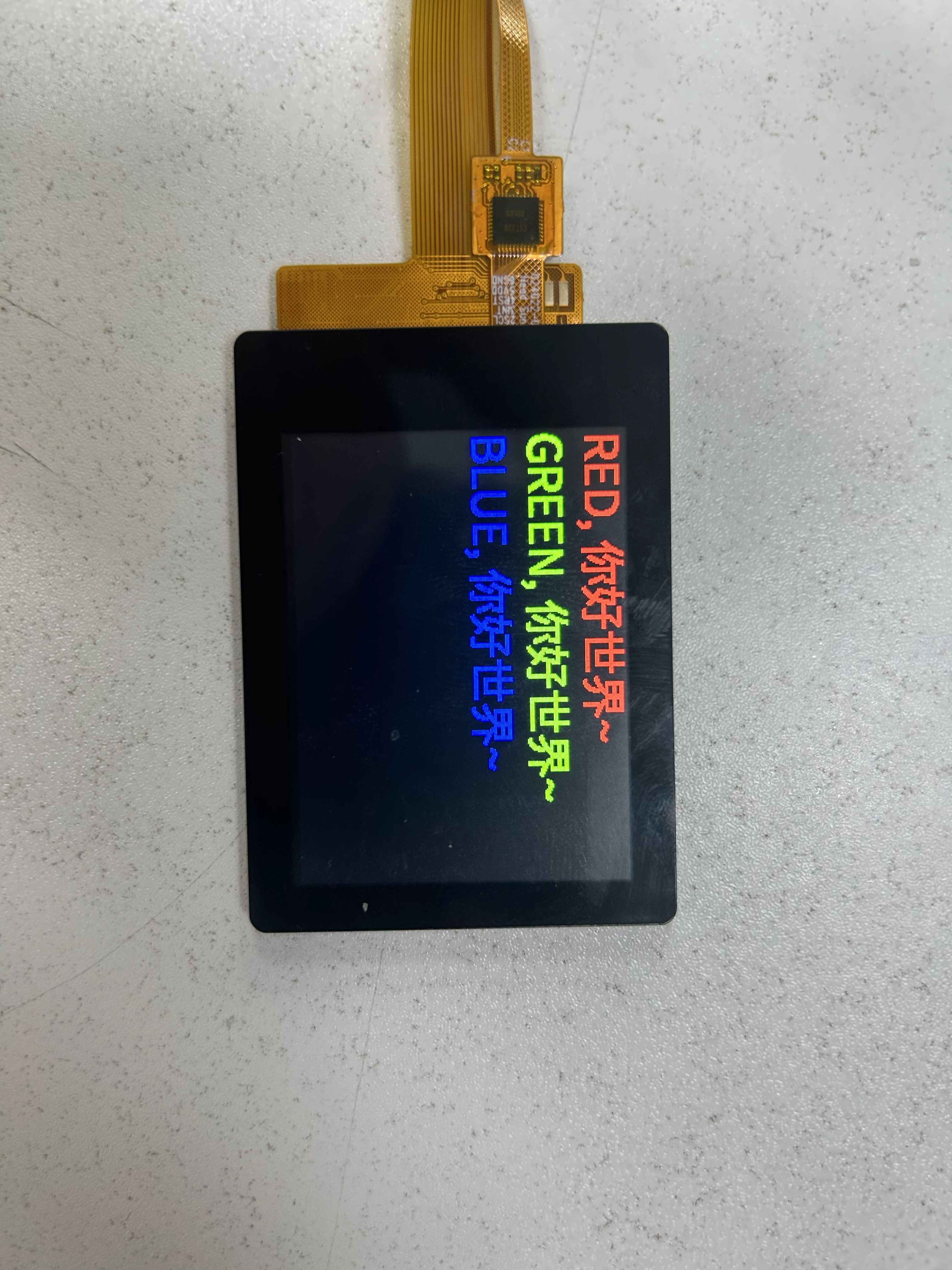
Display characters on the screen#
import time, image
from machine import FPIOA, Pin, SPI, SPI_LCD

fpioa = FPIOA()

# Use gpio 19 to connect to the screen cs pin
fpioa.set_function(19, FPIOA.GPIO19)
pin_cs = Pin(19, Pin.OUT, pull=Pin.PULL_NONE, drive=15)
pin_cs.value(1)

# Use gpio 20 to connect to the screen dc pin
fpioa.set_function(20, FPIOA.GPIO20)
pin_dc = Pin(20, Pin.OUT, pull=Pin.PULL_NONE, drive=15)
pin_dc.value(1)

# Use gpio 44 to connect to the screen reset pin
fpioa.set_function(44, FPIOA.GPIO44, pu = 1)
pin_rst = Pin(44, Pin.OUT, pull=Pin.PULL_UP, drive=15)

# spi
fpioa.set_function(15, fpioa.QSPI0_CLK) # scl
fpioa.set_function(16, fpioa.QSPI0_D0) # mosi

spi1 = SPI(1,baudrate=1000*1000*50, polarity=1, phase=1, bits=8)

lcd = SPI_LCD(spi1, pin_dc, pin_cs, pin_rst)

lcd.configure(320, 240, hmirror = False, vflip = True, bgr = False)

print(lcd)

img = lcd.init()
print(img)

img.clear()
img.draw_string_advanced(0,0,32, "RED, 你好世界~", color = (255, 0, 0))
img.draw_string_advanced(0,40,32, "GREEN, 你好世界~", color = (0, 255, 0))
img.draw_string_advanced(0,80,32, "BLUE, 你好世界~", color = (0, 0, 255))

lcd.show()
This example will display the 你好世界~ string in red, green, and blue colors on the screen