
I2C_Slave Module API Manual#
Overview#
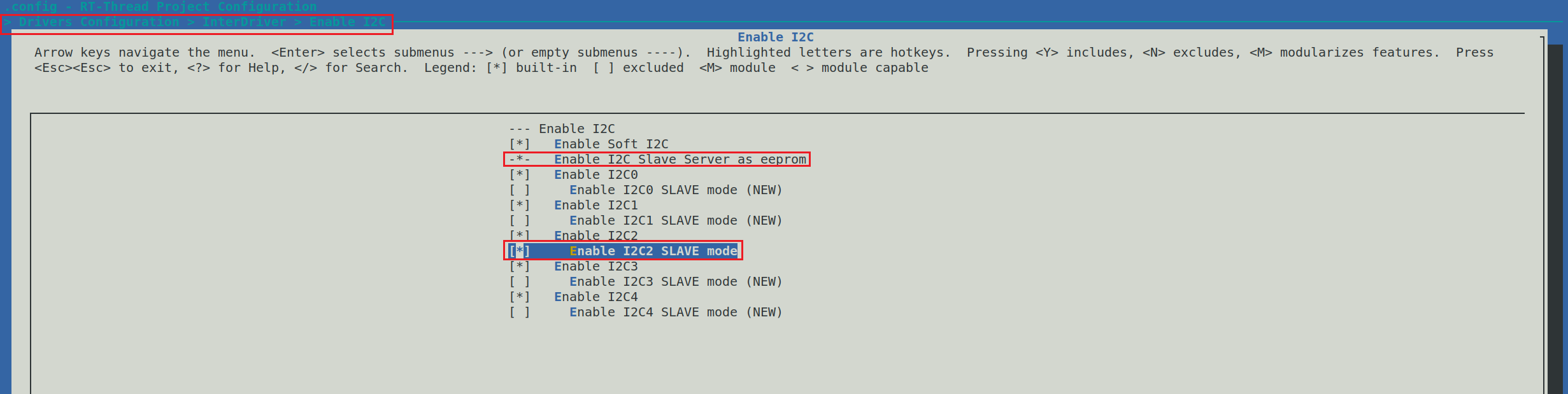
The K230 I2C controller works in master mode by default, but it can also be switched to slave mode by customized firmware. To enable slave mode, please use make rtsmart-menuconfig when compiling the firmware to enable the Enable I2Cx SLAVE mode option (path: Drivers Configuration > InterDriver > Enable I2C > Enable I2Cx SLAVE mode), and then recompile the firmware.
Slave Device API Introduction#
The I2C_Slave class is located in the machine module.
Example Code#
In the following example application, we use one K230 as the master device and another K230 as the slave device to demonstrate how the master and slave communicate via the I2C bus. Among them, the slave’s IO14 is used to notify the master device to read data when the data changes.
Slave Code:
from machine import Pin, FPIOA, I2C_Slave
import time
import os

# 实例化 FPIOA
fpioa = FPIOA()
# 设置 Pin14 为 GPIO输出模式,用于通知主机有数据更新,初始化为输出高电平
fpioa.set_function(14, FPIOA.GPIO14)
pin = Pin(14, Pin.OUT, pull=Pin.PULL_UP, drive=7)
pin.value(1)

# 设置I2C2的iomux,gpio11为SCL,gpio12为SDA
fpioa.set_function(11, FPIOA.IIC2_SCL, pu = 1)
fpioa.set_function(12, FPIOA.IIC2_SDA, pu = 1)


# I2C 从设备 ID 列表
device_id = I2C_Slave.list()
print("Find I2C slave device:", device_id)

# 构造 I2C 从设备,设备地址为 0x10,模拟 EEPROM 映射的内存大小为 20 字节
i2c_slave = I2C_Slave(device_id[0], addr=0x10, mem_size=20)

# 等待主设备发送数据,并读取映射内存中的值
last_dat = i2c_slave.readfrom_mem(0, 20)
dat = last_dat
while dat == last_dat:
    dat = i2c_slave.readfrom_mem(0, 20)
    time.sleep_ms(1)
    os.exitpoint()

# 等待总线数据传输完毕
time.sleep_ms(100)

print(dat.hex())

i2c_slave.writeto_mem(0, dat)
# 通知主机数据已经写入成功
pin.value(0)
time.sleep_ms(1000)
Master Code:
from machine import Pin, FPIOA, I2C

fpioa = FPIOA()

fpioa.set_function(14, FPIOA.GPIO14)

pin = Pin(14, Pin.IN, pull=Pin.PULL_UP, drive=7)

i2c = I2C(2, scl=11, sda=12, freq=100000)

buf = b"01234567890123456789"
i2c.writeto_mem(0x10, 0, buf)

while pin.value() == 1:
    pass

buf = i2c.readfrom_mem(0x10, 0, 20)
print(buf.hex())
list Method#
Obtains the list of all available I2C slave device IDs in the current system. This list is essential for specifying the correct device ID when initializing the I2C_Slave object.
Parameters
This method does not accept any parameters.
Return Value
Returns a list containing all available I2C slave device IDs in the system. These IDs are integers or similar identifiers, used to specify the specific slave device when creating an I2C_Slave object.
Notes
The ID values and the devices they represent depend on the hardware platform and system configuration.
When no slave devices are available, the returned list may be empty.
Constructor#
i2c = I2C_Slave(id, addr=0x01, mem_size=10)
This constructor is used to create an I2C slave object, enabling the device to operate in slave mode and simulate an EEPROM with the specified memory size.
Parameters
id: The ID of the I2C slave device, a unique identifier. The list of available slave device IDs can be obtained by calling theI2C_Slave.list()method.addr: The I2C address in slave mode, used by the master device to identify and communicate with it.mem_size: The size of the memory mapped by the simulated EEPROM, in bytes.
Return Value
Returns the created I2C slave device object.
readfrom_mem Method#
i2c.readfrom_mem(addr, n)
Reads data from the mapped memory address (data written by the master device through EEPROM timing).
Parameters
addr: The starting memory address from which to begin reading data.n: The number of bytes to read.
Return Value
Returns a byte array (bytearray) containing the n bytes of data read from the specified address.
writeto_mem Method#
i2c.writeto_mem(addr, data)
Writes data to the mapped memory address (data read by the master device through EEPROM timing).
Parameters
addr: The starting memory address from which to begin writing data.data: A byte array (bytearray) containing the data to be written.
Return Value
None