

K230 AI in Action - HHB Neural Network Model Deployment Tool#

Copyright 2023 Canaan Inc. ©
Disclaimer#
The products, services or features you purchase should be subject to Canaan Inc. (“Company”, hereinafter referred to as “Company”) and its affiliates are bound by the commercial contracts and terms and conditions of all or part of the products, services or features described in this document may not be covered by your purchase or use. Unless otherwise agreed in the contract, the Company does not provide any express or implied representations or warranties as to the correctness, reliability, completeness, merchantability, fitness for a particular purpose and non-infringement of any statements, information, or content in this document. Unless otherwise agreed, this document is intended as a guide for use only.
Due to product version upgrades or other reasons, the content of this document may be updated or modified from time to time without any notice.
Trademark Notice#
 , “Canaan” and other Canaan trademarks are trademarks of Canaan Inc. and its affiliates. All other trademarks or registered trademarks that may be mentioned in this document are owned by their respective owners.
Copyright 2023 Canaan Inc.. © All Rights Reserved. Without the written permission of the company, no unit or individual may extract or copy part or all of the content of this document without authorization, and shall not disseminate it in any form.
Directory#
[TOC]
preface#
Briefly#
This document is the instruction document for the use of HHB on the k230 hardware platform, which guides users on how to compile the model on HHB to generate c code, and how to use the k230 cross-compilation toolchain to compile the program and run on the board.
Reader object#
This document (this guide) is intended primarily for:
Software Development Engineer
Definition of acronyms#
abbreviation |
description |
|---|---|
HHB |
Heterogeneous Honey Badger |
SHL |
Structure of Heterogeneous Library |
Revision history#
Document version number |
Modify the description |
Author |
date |
|---|---|---|---|
V1.0 |
First version of the document |
Yang Zhang |
2023/6/25 |
1. Overview#
To deploy and run the HHB program on k230 RTT, the following steps are required
Based on the HHB development environment, compile the model to generate C code
Compile C code using the K230 RTT cross-compilation toolchain
Run the executable program on the board
1.1 HHB#
HHB (Heterogeneous Honey Badger) is a set of neural network model deployment toolsets provided by T-Head for the Xuan Tie chip platform. It includes a series of tools required for deployment, such as compilation optimization, performance analysis, process debugging, and result simulation.
Functions and features of HHB:
Supports models in the corresponding formats of Caffe, TensorFlow, ONNX and TFLite
Data types such as 8/16-bit fixed-point and 16/32-bit floating-point are supported
Supports symmetric and asymmetric fixed-point quantization, and supports channel quantization
You can optimize the network structure of the model before deployment
Compile and generate binaries that can be executed on Wujian SoC platforms
Supports behavior simulation on the host
The multi-component toolset facilitates secondary development
Both the traditional Unix command line and Python interfaces are provided
HHB already supports many different business algorithms for speech and vision, and can import models from different training frameworks such as PyTorch and TensorFlow.
Based on the open-source project TVM, HHB adds rich command line options to provide command mode; presets multi-class quantization algorithms to adapt to the data types supported by different platforms; outputs C code that calls SHL according to the characteristics of different platforms, or directly outputs executable binaries.
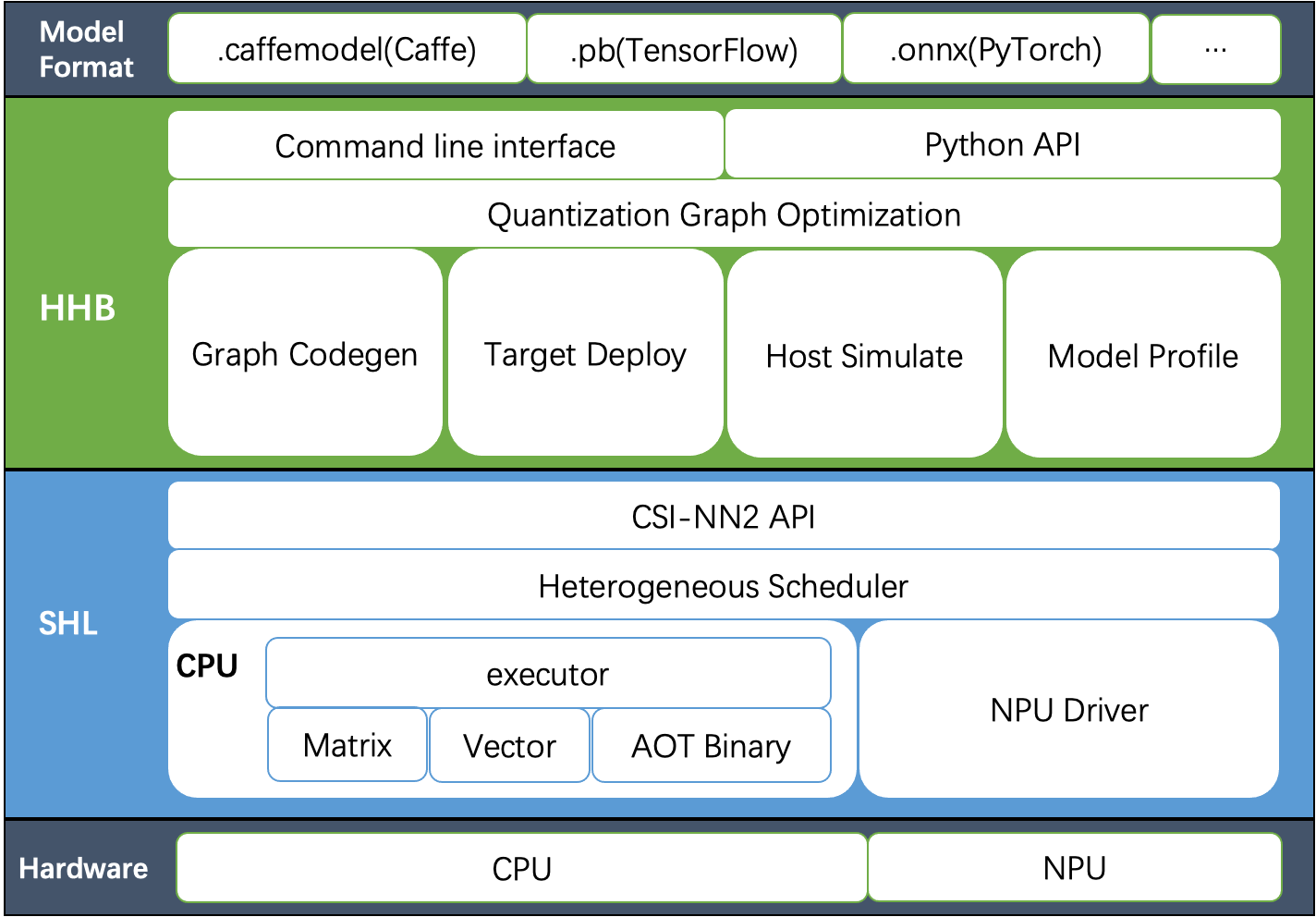
For detailed instructions, please refer to HHB User Manual
1.2 SHL#
SHL is a set of neural network library APIs provided by T-HEAD for the Xuantie CPU platform. It abstracts interfaces to various common network layers and provides a series of optimized binary libraries.
Features of SHL:
Reference implementation for C code versions.
Provides an assembly optimization implementation of Xuantie series CPUs.
Supports symmetric and asymmetric quantization.
Supports data types such as 8-bit fixed point, 16-bit fixed point and 16-bit floating point.
Compatible with NCHW and NHWC formats.
Use HHB to implement automatic code invocation.
Cover different architectures such as CPU, NPU, etc.
Additional heterogeneous reference implementations.
SHL provides a completed interface declaration and a reference implementation of the interface, according to which each device provider can complete the optimization work of each interface.
For detailed instructions, please refer to SHL User Manual
2. HHB compilation model#
2.1 Environment Setup#
Precondition: The local PC has docker installed
Go to HHBand download the hhb-2.2.35 docker image
Unzip, load and then start docker image
tar xzf hhb-2.2.35.docker.tar.gz
cd hhb-2.2.35.docker/
docker load < hhb.2.2.35.img.tar
./start_hhb.sh
2.2 Compiling the model#
At present, this version of Docker Image does not integrate C908 model compilation, here we can copy C906 and modify the relevant configuration.
root@02297217e66d:~# cd /home/example/
root@02297217e66d:/home/example# cp -a c906 c908
root@02297217e66d:/home/example# cd c908/onnx_mobilenetv2/
run.sh relevant modifications
Modify the value of the
--boardparameter (fromc906toc908)Add calibration set parameter (
-cd)Add quantization parameter(
--quantization-scheme)
The final content of run.sh is as follows
#!/bin/bash -x

hhb -S --model-file mobilenetv2-12.onnx  --data-scale 0.017 --data-mean "124 117 104" --board c908 --input-name "input" --output-name "output" --input-shape "1 3 224 224" --postprocess save_and_top5 --simulate-data persian_cat.jpg -cd persian_cat.jpg   --quantization-scheme "int8_asym_w_sym" --fuse-conv-relu
Note: Different models may have different compilation parameters, which will cause performance data differences. Users need to understand the meaning of each parameter of HHB (hhb -h) based on their own model or consult T-Head.
Execute run.sh to start compiling
root@02297217e66d:/home/example/c908/onnx_mobilenetv2# ./run.sh
+ hhb -S --model-file mobilenetv2-12.onnx --data-scale 0.017 --data-mean '124 117 104' --board c908 --input-name input --output-name output --input-shape '1 3 224 224' --postprocess save_and_top5 --simulate-data persian_cat.jpg -cd persian_cat.jpg --quantization-scheme int8_asym_w_sym --fuse-conv-relu
[2023-06-21 09:02:53] (HHB LOG): Start import model.
[2023-06-21 09:02:55] (HHB LOG): Model import completed!
[2023-06-21 09:02:55] (HHB LOG): Start quantization.
[2023-06-21 09:02:55] (HHB LOG): get calibrate dataset from persian_cat.jpg
[2023-06-21 09:02:55] (HHB LOG): Start optimization.
[2023-06-21 09:02:55] (HHB LOG): Optimization completed!
Calibrating: 100%|###############################################################################################################################################################################################################################| 153/153 [00:14<00:00, 10.66it/s]
[2023-06-21 09:03:10] (HHB LOG): Start conversion to csinn.
[2023-06-21 09:03:10] (HHB LOG): Conversion completed!
[2023-06-21 09:03:10] (HHB LOG): Start operator fusion.
[2023-06-21 09:03:10] (HHB LOG): Operator fusion completed!
[2023-06-21 09:03:10] (HHB LOG): Start operator split.
[2023-06-21 09:03:10] (HHB LOG): Operator split completed!
[2023-06-21 09:03:10] (HHB LOG): Start layout convert.
[2023-06-21 09:03:10] (HHB LOG): Layout convert completed!
[2023-06-21 09:03:10] (HHB LOG): Quantization completed!
[2023-06-21 09:03:14] (HHB LOG): cd hhb_out; qemu-riscv64 -cpu c908v hhb_runtime ./hhb.bm persian_cat.jpg.0.bin
Run graph execution time: 1675.78113ms, FPS=0.60

=== tensor info ===
shape: 1 3 224 224
data pointer: 0x2e0b40

=== tensor info ===
shape: 1 1000
data pointer: 0x325530
The max_value of output: 16.053827
The min_value of output: -8.026914
The mean_value of output: 0.002078
The std_value of output: 11.213154
 ============ top5: ===========
283: 16.053827
281: 14.920615
282: 12.559759
285: 12.182022
287: 11.520982
Finally, a hhb_out directory is generated, as follows
root@02297217e66d:/home/example/c908/onnx_mobilenetv2# ll hhb_out
total 17940
drwxr-xr-x 2 root root    4096 Jun 21 09:03 ./
drwxr-xr-x 5 root root    4096 Jun 21 09:02 ../
-rw-r--r-- 1 root root 3554304 Jun 21 09:03 hhb.bm
-rwxr-xr-x 1 root root 6140744 Jun 21 09:03 hhb_runtime*
-rw-r--r-- 1 root root  602112 Jun 21 09:03 input.0.bin
-rw-r--r-- 1 root root 2860548 Jun 21 09:03 input.0.tensor
-rw-r--r-- 1 root root    4946 Jun 21 09:03 io.c
-rw-r--r-- 1 root root    1539 Jun 21 09:03 io.h
-rw-r--r-- 1 root root    7410 Jun 21 09:03 main.c
-rw-r--r-- 1 root root   81352 Jun 21 09:03 main.o
-rw-r--r-- 1 root root  112618 Jun 21 09:03 model.c
-rw-r--r-- 1 root root  791576 Jun 21 09:03 model.o
-rw-r--r-- 1 root root 3546112 Jun 21 09:03 model.params
-rw-r--r-- 1 root root  602112 Jun 21 09:03 persian_cat.jpg.0.bin
-rw-r--r-- 1 root root    9534 Jun 21 09:03 persian_cat.jpg.0.bin_output0_1_1000.txt
-rw-r--r-- 1 root root   20086 Jun 21 09:03 process.c
-rw-r--r-- 1 root root    2040 Jun 21 09:03 process.h
Copy the hhb_out directory to /mnt, export to your PC host, which will be re-compiled by the k230 rtt toolchain in the future.
root@02297217e66d:/home/example/c908/onnx_mobilenetv2# cp -a hhb_out/ /mnt/
3. Demo#
3.1 Environment Setup#
Precondition: The user has compiled the docker image according to the k230_sdk documentation
start k230 docker image
cd /path/to/k230_sdk
docker run -u root -it -v $(pwd):$(pwd) -v $(pwd)/toolchain:/opt/toolchain -w $(pwd) k230_docker /bin/bash
3.2 Compile demo#
We provide a demo of HHB in the k230_sdk, and users only need to copy the C code compiled by HHB to compile the executable program running on the board.
Description of the relevant catalog
directory |
remark |
|---|---|
/path/to/k230_sdk/src/big/utils/examples/hhb |
Users can modify CMakeLists .txt to add new demos |
/path/to/k230_sdk/src/big/utils/lib/csi-nn2 and /path/to/k230_sdk/src/big/utils/lib/hhb-prebuilt-decode |
Precompiled libraries that C code depends on (CSI-NN2/JPEG/PNG/Zlib, etc., compiled using the MUSL cross-compilation toolchain) |
Prepare the use case
The mbv2_onnx_int8 directory is the c code generated by HHB earlier, and after the user modifies the model compilation parameters, it needs to be updated synchronously.
Users can also add demos and modify CMakeLists .txt according to their own model.
Start compiling
root@9d2a450436a7:/home/zhangyang/workspace/k230_sdk# cd src/big/utils/examples/hhb/
root@9d2a450436a7:/home/zhangyang/workspace/k230_sdk/src/big/utils/examples/hhb# ./build_app.sh
The final executable program generated is out/bin/mbv2_onnx_int8.elf
root@9d2a450436a7:/home/zhangyang/workspace/k230_sdk/src/big/utils/examples/hhb# ll out/bin/mbv2_onnx_int8.elf
-rwxr-xr-x 1 root root 1172680 Jun 25 14:37 out/bin/mbv2_onnx_int8.elf*
Transfer the files related to mbv2_onnx_int8 to the /sharefs directory of the little core linux
[root@canaan /sharefs/k230/mbv2_onnx_int8 ]#ls -l
total 5560
-rw-r--r--    1 sshd     sshd       3554304 Jun 25  2023 hhb.bm
-rwxr-xr-x    1 sshd     sshd       1172680 Jun 25  2023 mbv2_onnx_int8.elf
-rw-r--r--    1 sshd     sshd        359355 Jun 25  2023 persian_cat.jpg
-rw-r--r--    1 sshd     sshd        602112 Jun 25  2023 persian_cat.jpg.0.bin
3.3 Run demo#
Power on K230, execute the following command at serial port of the big core RTT
msh />cd /sharefs/k230/mbv2_onnx_int8/

msh /sharefs/k230/mbv2_onnx_int8>./mbv2_onnx_int8.elf hhb.bm persian_cat.jpg.0.bin
Run graph execution time: 64.71648ms, FPS=15.45

=== tensor info ===
shape: 1 3 224 224
data pointer: 0x300170060

=== tensor info ===
shape: 1 1000
data pointer: 0x300194c80
The max_value of output: 15.581656
The min_value of output: -8.026914
The mean_value of output: 0.008405
The std_value of output: 11.703238
 ============ top5: ===========
283: 15.581656
281: 14.731747
282: 12.559759
285: 11.709850
287: 11.143245

msh /sharefs/k230/mbv2_onnx_int8>./mbv2_onnx_int8.elf hhb.bm persian_cat.jpg
Run graph execution time: 64.67589ms, FPS=15.46

=== tensor info ===
shape: 1 3 224 224
data pointer: 0x300170060

=== tensor info ===
shape: 1 1000
data pointer: 0x300194c80
The max_value of output: 16.053827
The min_value of output: -8.026914
The mean_value of output: 0.009821
The std_value of output: 12.815542
 ============ top5: ===========
283: 16.053827
281: 15.109484
282: 13.220798
287: 12.087587
285: 11.804284