
K230 SDK Dewarp User Guide#
Directory#
[TOC]
Introduction to Dewarp calibration#
The Dewarp calibration process generates a YAML file containing the camera matrix and distortion coefficient, and the K230 SDK will generate a remap file through this YAML file at build time, and put it in the directory of the large kernel root file system/bin, and set the structure to 1 when configuring VICAP k_vicap_dev_attr to enable Dewarp, and VICAP will look for it in the current path dw_enable <sensor_name>-<width>x<height>.bin (for example, IMX335 full resolution, that is) imx335-2592x1944.bin file is distorted as a Dewarp configuration file.
Grab images#
Rotate the checkerboard on the same plane and take at least 20 pictures
Choose to save at least 10 photos covering all angles to a fixed directory, it is recommended to choose pictures with large differences
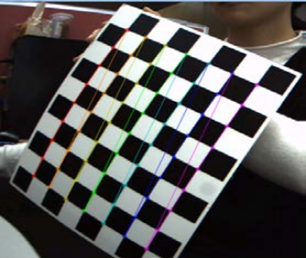
You can use the sample_vicap.elf program to grab and convert the saved YUV file to an image format that is easy to read by OpenCV such as png/bmp through ffmpeg, refer to the following command
ffmpeg -f rawvideo -pixel_format nv12 -video_size 2592x1944 -i dev_00_chn_00_2592x1944_0000.yuv420sp 0.png
Import to the Dewarp pattern#
Dewarp has a variety of modes, and two are described here, lens correction and split screen.
Lens correction#
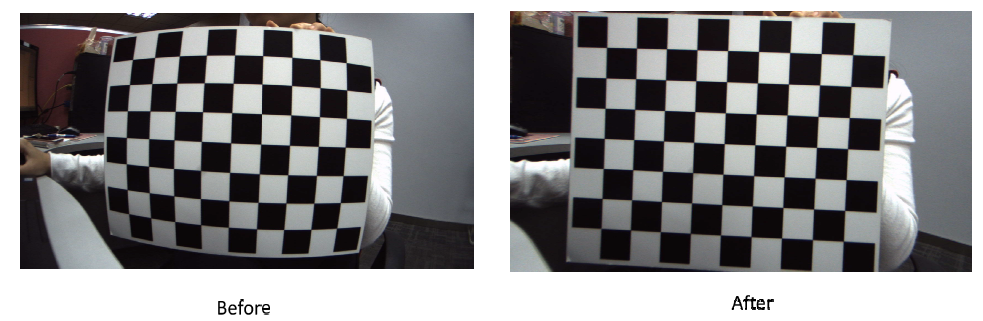
Lens correction is actually using the Brown-Conrady distortion model. The input parameters include u0, v0, fx, and fy in the camera’s internal matrix, k1, k2, p1, p2, k3, k4, k5, and k6 in the distortion factor, as well as fovRatio, which can be calibrated by the table in the previous step, and the correction effect is as follows
Split screen#
Split-screen mode does not require the camera to be calibrated.
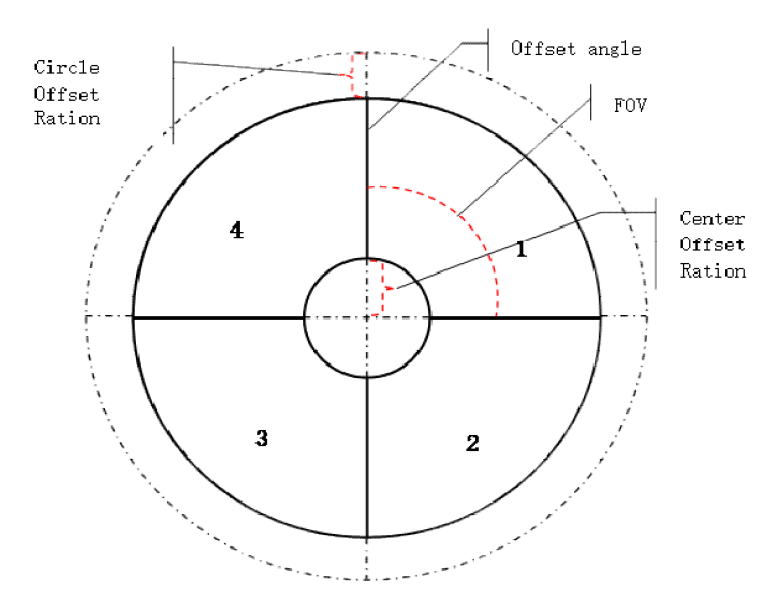
Each sliced image in the image below is corrected to a small rectangular split-screen image. Each mini-split-screen image is calculated similarly. After calculating each small image, the corresponding coordinate array of each small image needs to be spliced into a coordinate array of the large image. For example, the coordinate calculation process for one of the small images is shown below. Input parameters include CenterOffsetRatio, CircleOffsetRatio, maxRadius, image width, and image height, which are the dimensions of each small output image, and centerX and centerY, the center points of the input image. The outputX and outputY of the output are the coordinates relative to the output small image.
Perform calibration procedures#
Create an XML file containing the image path, for example, imx335-2592x1944-0.xml fill in the image path saved in the previous step, like
<?xml version="1.0"?>
<opencv_storage>
<images>
images/imx335-2592x1944-0/0.png
...
</images>
</opencv_storage>
Edit , change the last parameter to the path to the run.batXML file you just created, change the -o parameter to the path to the YAML file where the output is saved, and execute run.bat
Dewarp works with the VICAP module#
VICAP controls distortion correction by loading the Dewarp configuration file, the Dewarp configuration file generated after the K230 SDK compilation is placed under , the <K230 SDK> src/big/mpp/userapps/src/sensor/config suffix .bin is the dewarp configuration file, the first 8 bytes of its content are split-screen parameters, and then all the content is a mapping table, VICAP will match the current sensor according to the file name to load.
Lens correction mode#
Note: Opening Dewarp requires an additional vb pool, and changing the buf_size of the device property to the sensor output buffer size, you can refer sample_vicap.c to the practice of the function in sample_vicap_vb_init to initialize the vb pool.
The YAML file generated in the previous step needs to be placed in <K230 SDK>/src/big/mpp/userapps/src/sensor/dewarp the directory to compile the K230 SDK.
If you have compiled the K230 SDK before, you can run it directly after placing the YAML file without recompiling it completely, make mpp-apps or if you need to make an image make build-image.
Split screen mode#
In the K230 SDK built-in a program for generating a split screen mode configuration file, the source code is placed in , K230 SDK will <K230 SDK>/src/big/mpp/userapps/src/sensor/dewarp/k230dwmapgen/exe/split_screen.c generate a program in the directory <K230 SDK>/src/big/mpp/userapps/src/sensor/build after complete compilation, after running, the configuration file will be printed through the standard output, if you need to keep it can be redirected to the file, this program defaults to 1280x720 camera configuration split screen, k230dwmapgen-splitscreen if you need to modify the parameters can modify its source code CreateUpdateWarpPolarMap The parameters of the function, recompile and run.